
liilgcgopgifgbhnemhlpodmjajiilnb
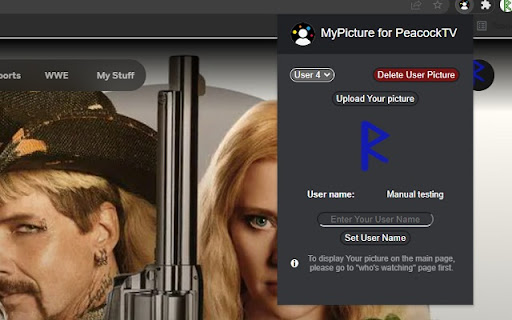

Extension to make a custom Peacock TV profile picture. Personalize your user account and choose your own profile icon. Nowadays you can customize almost everything, so why not Peacock TV profile picture? If you’re bored with the limited options available on PeacockTV this extension is for you! Make your avatar stand out by uploading a picture of your choice. Whether it’s your selfie, cute photo of your pet, or your favorite band’s logo, now you can individualize your profile even more. Add some personal touch to your watching experience. How does it work? 1. Add the Peacock TV MyPicture extension to your browser 2. Set the username you want to change 3. Choose a picture to use as your avatar. Use a square one for the best result. Make your profile more distinctive and 100% personalized. It's as simple as that! Please note: the extension will only modify the profile picture on the device it is installed on. This means your new picture won't be visible on smart TVs or smartphones. Disclaimer : Peacock TV is a trademark of NBCUniversal Television and Streaming. This website & extension hold no association or affiliation with Peacock TV or any third-party companies.

Apple TV Skipper: skip intros & recaps
Automatically skip intros, recaps, and click next episode button on AppleTV Extension to skip all intros and recaps when watching AppleTV+. Save your time, muscles and keyboard buttons! One click to play all series episodes in a row without a single move from the couch. Add Apple TV + Skipper to your browser to automatically: ⏭️ Skip intros ⏭️ Skip recaps ⏭️ Go to the next episode One extension to play all episodes of your favorite series in a row smoothly. All you need to do is to add the extension to your browser, switch on skipping options using toggles and log into your AppleTV+ account. Now you are ready to binge series all night. It is as simple as that! How does it work? Skipper automatically clicks ""skip"" buttons which appear while watching. Please note that this extension was developed and tested for the English version only. It may not work for other languages or if the "skip" button is not available by default. Disclaimer : AppleTV+ is a trademark of Apple Inc. This website & extension hold no association or affiliation with AppleTV+ or any third-party companies.

Peek for YNAB
Check on your YNAB category and account balances, and quickly add transactions. The Peek for YNAB extension gives you a snapshot of your current YNAB category and account balances. You can pin your favorite categories and accounts, view recent transactions, and add transactions right from the extension. Split transactions and transfers are fully supported. You can also setup customizable notifications and alerts for each budget. Peek for YNAB is a third-party extension, and is not maintained or supported by YNAB (the company). Please do not reach out to YNAB's official support channels for help or issues related to this extension. Instead, please refer to the extension's help page: https://peekforynab.com/help

PeacockTV SubStyler : customize subtitles
Extension to customize captions and subtitles on Peacock TV. Change text size, font, color and add background. Wake up your inner artist and express your creativity by customizing Peacock TV subtitle style. Even though you usually don’t use movie captions, you may consider starting after checking out all the settings this extension has to offer. Now you’re able to: - Choose custom text color, - Adjust text size, - Add text outline and choose its color, - Add text background, choose its color and adjust the opacity - Choose font family Feeling artistic? Here’s another bonus: all the colors can be chosen either from a built-in color picker or by entering RGB value, creating almost endless style possibilities. Take the subtitle customization to the next level with PeacockTV SubStyler and let your imagination run wild!! Too many options? Worry not! Check out some basic settings, such as text size and background. All you need to do is add PeacockTV SubStyler extension to your browser, manage available options in the control panel and adjust subtitles to your own preferences. It’s as simple as that! Disclaimer : Peacock TV is a trademark of NBCUniversal Television and Streaming. This website & extension hold no association or affiliation with Peacock TV or any third-party companies.

MyPicture for HBOMax: custom profile picture
Extension to make a custom HBO Max profile picture. Personalize your user account and choose your own profile icon. Nowadays you can customize almost everything, so why not HBOMax profile picture? If you’re bored with the limited options available on HBO this extension is for you! Make your avatar stand out by uploading a picture of your choice. Whether it’s your selfie, cute photo of your pet, or your favorite band’s logo, now you can individualize your profile even more. Add some personal touch to your watching experience. How does it work? 1. Add the MyPicture for HBOMax extension to your browser 2. Set the username you want to change 3. Choose a picture to use as your avatar. Use a square one for the best result. Make your profile more distinctive and 100% personalized. It's as simple as that! Please note: the extension will only modify the profile picture on the device it is installed on. This means your new picture won't be visible on smart TVs or smartphones. Disclaimer : HBO is a trademark of Home Box Office, Inc.. This website & extension hold no association or affiliation with HBO Max or any third-party companies.
