
lhobaanbhgmjnodmdhafighbomcgpacj
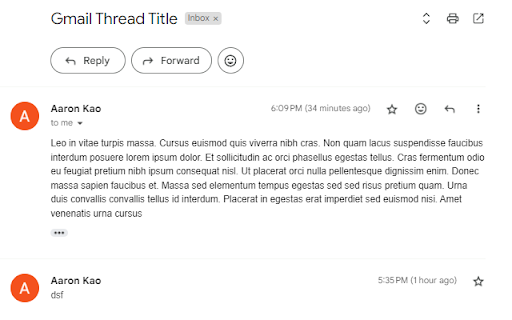
Reply to and show latest emails on top of Gmail. By showing Gmail threads latest to oldest, this extension allows you to read the latest messages and reply to threads more efficiently. Simply install the plugin, refresh Gmail, and you are good to go! For any updates for requested features, please leave a comment. Note: This extension does not modify the original emails or their content. It simply reorganizes the display order within Gmail threads for easier access and navigation.

Gmail Reverse Convert By Sajeewa Dissanayake
Gmail Reverse Convertor By Sajeewa Dissanayake. This addon will reverse the mail view on conversation view. Just like outlook.

Gmail Show Time
Shows full date/time in email listing and detail headers. Support custom date/time format. Gmail shows the date of an email in the last column of your email overview. Depending on how old the email is, the display format changes. In all cases, I wanted to see the time of the emails. This extension does exactly that. The latest major version 3 now supports custom date/time formatting options. By installing and using Gmail Show Time, you agree to the Privacy Policy at https://cleverinsert.com/privacy_policy_cws.txt Version 3.7.1 2022-07-19 Removed Bing until further notice Seems you lose all control over search engines Version 3.7.0 2022-07-19 Added Bing as default search engine to help support the project The change is optional and can be reversed if needed Version 3.5.2 2021-03-30 Redirect to options on install - now the proper way Version 3.4.0 2021-01-14 Stripped the store Version 3.3.12 2020-08-17 Fixed parser for Japanese Version 3.3.10 2019-05-17 Another layout fix for preview pane Version 3.3.8 2018-09-10 Added support for week numbers Version 3.3.6 2018-08-06 Date parse fix for AM/PM Version 3.3.4 2018-07-11 Preloading i18l branch Reintroduction of enabled/disabled icon state Possible fix for annoying update notification Icon-style synchronised with Groups Show Time Version 3.2.4 2018-05-18 Added support for month names %b, %B

Gmail Conversation Reversal
Reverse the display of emails in Gmail threads, show the latest email at top. By default, email threads in Gmail conversations shows the oldest email first, this extension simply reverses that. Inspired by extension of 'Gmail reverse conversation', we just fixed some issues and make it more reliable.

Gmail - Reply at the TOP
Move the reply/compose box to the top of conversation thread. Allows you to refer the latest response as you compose the reply. If you are frustrated of scrolling up and down while composing your email replies in Gmail, THIS IS THE EXTENSION YOU NEED! This will move the reply/compose box from the bottom of the page to the top of the page. You can now see the latest email in the thread as you type, without have to scroll up and down. This is especially loved by Outlook users who are used to the reverse chronological view. I developed this after I could not find any solution. After using it for a while, I have noticed a significant boost in email productivity ... no more scrolling for those long conversation threads! NOTE: Refresh/reopen the Gmail tab for the extension to start working.
