
lgopopmbcfmojhfmnlbhjhgepclocphh

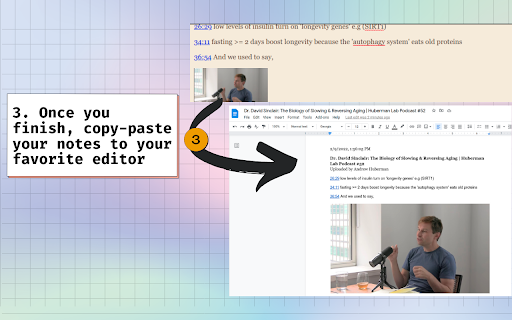
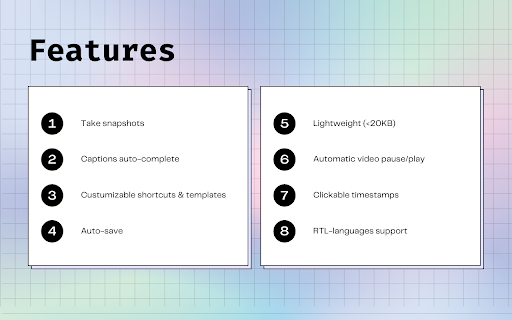

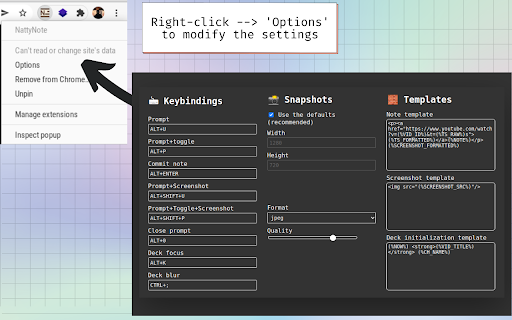
With this extension you can take time-stamped notes while watching YouTube videos. Press Alt+P, the video will stop playing, a prompt will show up, write your note and press Alt+Enter. Your timestamped notes will appear at the bottom of the video. Hit the Shift key with the previous commands to take a snapshot! You can find more shortcuts and customize them.

LunaNotes - Take notes on YouTube
The Simplest Way to Take Notes on YouTube Videos! 🌟 Take smarter notes on YouTube with AI. Summarize videos, generate flashcards diagrams & podcasts instantly. LunaNotes is the AI-powered learning companion trusted by 12,000+ students, teachers, and professionals. Take notes directly on YouTube, chat with AI about any video, and turn content into study materials, all without leaving the page. 🎥 Built for YouTube Learning * Open a sidebar directly on any YouTube video page * Take timestamped notes, click any timestamp to jump back to that moment * Browse and search the full video transcript * Auto-pause video when you start typing * See your note markers on the video timeline * Rich text with headings, lists, code blocks, tables & formatting * Auto-save, never lose your work * Organize with tags, favorites, and search * Use templates for lectures, meetings, and study sessions * Export notes to PDF or Excel 🤖 AI That Understands Your Videos * Chat with AI about the video you're watching * Select text in your notes and let AI improve, simplify, or fix it * Generate flashcards from any video for active recall study * Create visual diagrams to map out complex topics * Turn videos into AI-generated podcast discussions * AI-generated flashcards with multiple choice & fill-in-the-blank * Interactive quiz mode to test your knowledge * Diagrams to visualize relationships and processes * Podcasts in multiple tones: educational, casual, debate & more * All generated from your videos, notes, or uploaded files 🚀 Perfect For * Students , Organize lectures, create exam materials, ace your studies * Teachers , Plan lessons, build resources, share with your team * Professionals , Document training, capture meeting insights, upskill faster * Content Creators , Research topics, outline scripts, organize ideas 💡 Everything You Need ✓ Unlimited notes with rich formatting ✓ Full video transcript with search ✓ AI chat for instant explanations ✓ AI text editing inside your notes ✓ Flashcard & diagram generation ✓ AI podcast creation from any content ✓ Tags, favorites, templates & search ✓ Team sharing & collaboration ✓ Cloud sync across devices ✓ Export to PDF & Excel ✓ Works on any YouTube video Start taking smarter notes today, install LunaNotes and transform how you learn from YouTube. For app updates and changes, visit our blog. DISCLAIMER This extension is NOT made by Google or YouTube, it is created by Fernando de la Rosa, @jfdelarosa on X. LunaNotes is not owned, licensed and is not an affiliate of YouTube or Google Inc.

VideoMark - Take notes on YouTube, Coursera
VideoMark is a simple tool that can help you take notes on YouTube, Coursera, Udemy. 🌟 Now Supporting ChatGPT-Assisted Video Summary Generation! 🌟 🌟 Now Supporting Udemy and Coursera Video Notes! 🌟 📝 Export Your Notes to Google Docs Instantly! 📝 VideoMark is your go-to solution for annotating videos across platforms. With a user-friendly interface and intuitive drawing tools, you can easily take notes directly on YouTube videos and highlight key frames. - Capture and Save: Effortlessly save subtitles and screenshots, making it an ideal tool for educational purposes and capturing essential video content. - Your Data, Your Rules: Unlike other note-taking tools, we respect your privacy. We neither own your notes nor your videos, and we promise never to display ads or sell your information. 🪄 Features - 🖍 Draw annotations on online videos - 📝 Take notes on YouTube, Coursera, and Udemy - 📸 Save screenshots and subtitles directly from videos - ⏩ Convenient speed control and A-B loop features - ☁️ Autosave to Google Drive - 🏷 Use hashtags to categorize your notes - 📤 Export options include PDF, TXT, and Word 🌝 Who Can Benefit? 🎓 Learners Whether you're acquiring new skills in tech, design, or music through platforms like YouTube, Coursera, or Udemy, VideoMark consolidates your video notes in one place. Focus on gaining insights and inspiration to transform your life through education. 🎥 YouTubers Struggling to manage a plethora of video clips and screenshots? VideoMark allows you to quickly browse, tag, and organize your content effortlessly. 🛠 Coming Soon - 🔄 Enhanced autosave options, including Dropbox, Evernote, and Notion - 🔍 Full-Text Search Capability 📨 Support For additional help and information, visit VideoMark.app

Annotate.tv
Create video annotations on YouTube and Vimeo videos Create a video in Annotate.tv just by clicking the logo while watching a video in YouTube

YiNote
Description: YiNote can help you easily save your ideas with online videos, and provide smooth note taking experience! In-page notes taking and reviewing for videos - Save time-stamped notes while watching online video - Quick access to interested video time by clicking note - Notes are always stay with video in page for easy review Manage all video notes in one place - Bookmark your noted videos - Search notes and videos by keywords - Always keep new note on top of list
