
jogmoeadejjblbhmaelnammnebhpbcaa


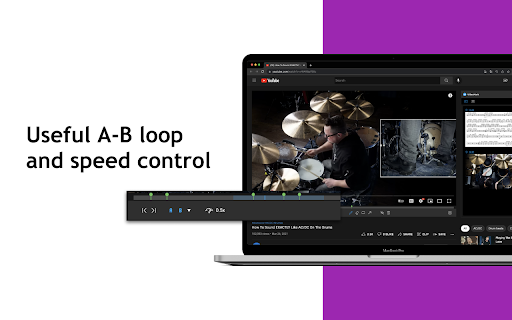

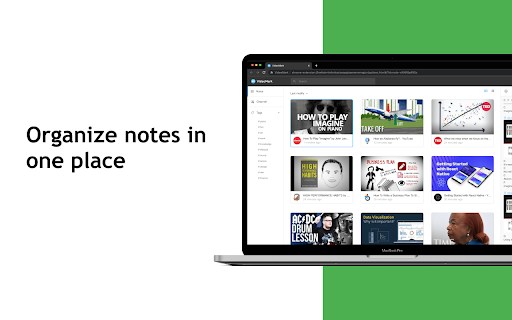
VideoMark is a simple tool that can help you take notes on YouTube, Coursera, Udemy. 🌟 Now Supporting ChatGPT-Assisted Video Summary Generation! 🌟 🌟 Now Supporting Udemy and Coursera Video Notes! 🌟 📝 Export Your Notes to Google Docs Instantly! 📝 VideoMark is your go-to solution for annotating videos across platforms. With a user-friendly interface and intuitive drawing tools, you can easily take notes directly on YouTube videos and highlight key frames. - Capture and Save: Effortlessly save subtitles and screenshots, making it an ideal tool for educational purposes and capturing essential video content. - Your Data, Your Rules: Unlike other note-taking tools, we respect your privacy. We neither own your notes nor your videos, and we promise never to display ads or sell your information. 🪄 Features - 🖍 Draw annotations on online videos - 📝 Take notes on YouTube, Coursera, and Udemy - 📸 Save screenshots and subtitles directly from videos - ⏩ Convenient speed control and A-B loop features - ☁️ Autosave to Google Drive - 🏷 Use hashtags to categorize your notes - 📤 Export options include PDF, TXT, and Word 🌝 Who Can Benefit? 🎓 Learners Whether you're acquiring new skills in tech, design, or music through platforms like YouTube, Coursera, or Udemy, VideoMark consolidates your video notes in one place. Focus on gaining insights and inspiration to transform your life through education. 🎥 YouTubers Struggling to manage a plethora of video clips and screenshots? VideoMark allows you to quickly browse, tag, and organize your content effortlessly. 🛠 Coming Soon - 🔄 Enhanced autosave options, including Dropbox, Evernote, and Notion - 🔍 Full-Text Search Capability 📨 Support For additional help and information, visit VideoMark.app

YouTube Time Labels
A Chrome Extension for saving labelled timestamps of YouTube videos Take notes on YouTube easily with YouTube Time Labels. Add labels to different times of a video, and skip a video to that time by simply clicking the recorded timestamp on the extension. Very helpful for long videos where you want to save particular sections (e.g. lecture material, a song from a compilation), or to simply keep track of your favorite videos. For easy access to the extension, make sure to pin the extension. Major Features: - Add and remove videos to the extension, and give videos a custom name. - Record and delete video timestamps to the extension - Add custom labels / notes to timestamps. - Open a video at a particular timestamp from the extension. - Filter videos by title or timestamp label - Export / Import data of your saved videos and timestamps. This is a personal project I made for fun and learning. If you are interested in the source code, please visit the GitHub page: https://github.com/brianlinUM/youtube-timestamps All YouTube browsing data (e.g. saved videos and timestamps) are handled by this extension solely for the functioning of this extension - it can not save notes about timestamps without saving the timestamp after all. This data is only stored locally on your device, and never transmitted elsewhere; I do not collect your data.

Beastnotes ▪ Take notes for online courses
Take notes and learn effectively while watching course videos on MOOC platforms, YouTube etc. Beastnotes is a notebook for online courses, enabling you to learn and study effectively across the web. The extension and website work together seamlessly to help you take notes while watching MOOC lecture videos and studying thereafter. As a result, you can: Learn effectively Take in-context notes while focusing on MOOC lecture videos. No more tabbing through apps or scribbling frantically on paper. The extension is widely supported on learning websites such as Coursera, Udemy, edX, Zoom, and Youtube, live streaming sites, reference and news sites, blogs, and beyond, offering features such as Video Timestamps. In addition, you can use a Pomodoro timer, set goals, and understand how you spend your time learning. Stay organized Use a familiar textbook hierarchy to structure notes according to your online course. The notes taken via the extension will be organized on the website where you can study them. Study for exams Notes are linked to the course webpage you typed them on. Review these notes in context, when rewatching video lectures on, whether on Udemy, Coursera, or other learning sites. The website is designed to help you study content effectively and has features to help exam preparation. Collaborate with classmates You can share notes directly from the extension. As importantly, you can also easily capture meeting notes when you are in a video conferences with your classmates. Beast notes works with Google Hangouts / Meet and other web-based video conference tools. By installing the extension, you agree to our Terms of Service present in this link: https://www.beastnotes.com/#!/terms-of-service. And here is a link to our Privacy Policy - https://www.beastnotes.com/#!/privacy-policy - if you would like to learn more about it. 1. Install the extension 2. Sign up on www.beastnotes.com 3. Sign in 4. Select or create a notebook 5. Take notes! Please provide your thoughts, ideas and feedback in the links in the extension and website. We would be delighted to hear from you!

Annotate.tv
Create video annotations on YouTube and Vimeo videos Create a video in Annotate.tv just by clicking the logo while watching a video in YouTube

YiNote
Description: YiNote can help you easily save your ideas with online videos, and provide smooth note taking experience! In-page notes taking and reviewing for videos - Save time-stamped notes while watching online video - Quick access to interested video time by clicking note - Notes are always stay with video in page for easy review Manage all video notes in one place - Bookmark your noted videos - Search notes and videos by keywords - Always keep new note on top of list
