
lgkgbieeckeaajhaccofeligghghdela

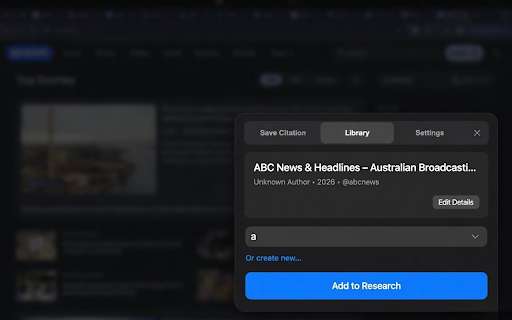

Quick Cite lets you instantly save and organize webpages for future citations and assignments. Instantly save and cite webpages with Quick Cite – One-Click Referencing, the privacy-first citation tool for Chrome. With one click, capture any page’s title, URL, and access date — organize into research projects or assignments, then copy ready-to-paste citations in APA, MLA, or Harvard formats. Build your bibliography without leaving your tab. Key Features: • One-Click Capture: Save sources instantly from any webpage • Organized Library: Group citations by project, assignment, or topic • Draft Citations: Auto-format in APA, MLA, Harvard (with easy placeholders like [YEAR] and [Author] for manual tweaks) • 100% Private & Local: All data stays on your device — no accounts, no tracking, no cloud sync • Clean UI: Distraction-free popup with dark mode support • Lightweight & Fast: Designed for students, researchers, and academic writers Perfect for essays, theses, reports, or any research needing secure, ad-free source management. Generate draft references in seconds — edit as needed for accuracy.

CopyTab URLs
Effortlessly copy and organize the URLs of your open tabs in one click. CopyTab URLs is a powerful Chrome extension that allows you to effortlessly save and organize the links of all your open tabs in the current window. With just a click of a button, CopyTab URLs copies the URLs to your clipboard. 📌 What’s New in This Update: ➤ You can now copy links from just the current tab group 📌 Why Choose CopyTab URLs? Take control of your tabs with ease! Every time you hit "Copy," your links are not only copied but also displayed in an editable text box—so you can tweak them before sharing. ✔ Need page titles with your links? We've got you covered. ✔ Want to keep tab groups intact? Just check "Include group names." (Group names appear as [GroupName]. Don't worry, the old #GroupName format is still supported for opening links.) ✔ Have a list of links to open all at once? Paste them into the text box and hit "Open"—they’ll load in the same order. ✔ Switching computers? Copy all tabs in one click, paste them in the extension, and hit "Open"—your setup is instantly restored, groups and all! Access all your tabs just the way you saved them anywhere, anytime. Stay organized and save time with CopyTab URLs—perfect for researchers, content creators, and anyone who manages multiple URLs. Download now and streamline your tab management workflow! Note: The extension doesn't store any of your data.

QuoteBox – Save Text & Images from Web Pages Instantly
QuoteBox helps you save meaningful text and images from web pages instantly — without interrupting your reading. QuoteBox is a Chrome extension designed to help users save and manage selected content while browsing the web. The extension allows users to select text or images on a webpage and save them locally through a right-click action. Saved content can be accessed from QuoteBox’s home page, where users can view, edit, categorize, and search their saved items. QuoteBox stores all data locally in the user’s browser using IndexedDB. The extension does not collect browsing history, page content, or personal information, and does not transmit saved data to any external servers. QuoteBox is suitable for users who want a simple tool to collect and organize information encountered during everyday web browsing.

AutoCommentAI
AutoCommentAI auto generate natural, on-topic comments with promo links in one click—save your time and boost link-build efficiency. AutoCommentAI is a semi-automated Chrome extension designed to streamline link-building and content engagement. It intelligently extracts the main content of any webpage, then uses AI to generate natural, relevant, and engaging comments (with optional embedded promotional links). Finally, it auto-fills the comment into the form—all with just a few clicks. This saves you time, boosts productivity, and lets you focus on what truly matters. Key Features: 🔍 Smart Content Extraction Automatically detects and extracts the core content from blog or forum posts, filtering out ads, pop-ups, and clutter to ensure every comment stays on topic. 🤖 Natural, On-Point, and Interactive Comment Generation Generate comments that sound natural, relevant, and engaging in just one click. Quickly customize the persona, tone, style, and interaction level. 🔗 Seamless Link Embedding Effortlessly embed promotional or reference links in your comments so they feel natural and unobtrusive—maximizing your promotional impact. 📦 Bulk Comment Generation Generate multiple personalized comments at once, each with a different link—perfect for link-building and content marketing at scale. ⚡ Auto-Detect & Fill Comment Forms Automatically detects form fields (name, email, website, comment) and fills them in—no more manual copy-pasting. 🔐 Local Privacy First & Pay-As-You-Go All your data (links, settings, preferences) is stored locally in your browser. We never collect any personal information. You only pay for what you use—no subscriptions required. 📖 For a detailed user guide, please visit: https://autocommentai.cc/docs/user-guide 💬 Feedback & Support We’d love to hear from you! If you run into any issues, have suggestions, or just want to say hi, feel free to reach out: 📧 zhugetd@gmail.com Thank you for choosing AutoCommentAI ——Let’s make the internet more interactive, one thoughtful comment at a time! 🌐✨

ToLinks - Smart Shortcuts & Link Organizer
Save long URLs as memorable to/ shortcuts, organize bookmarks with tags, and open links instantly for faster browsing. ToLinks turns long URLs into memorable to/ shortcuts so you can open pages instantly, organize with tags, and launch focused tab groups faster. Stop digging through bookmarks and start navigating by intent. ToLinks helps you create memorable shortcuts like to/docs, to/billing, and to/dashboard so your most important links are always one quick command away. What you can do with ToLinks: - Create custom to/ aliases for any page - Open links instantly from the address bar - Use omnibox suggestions while typing - Organize links with tags, pinning, and smart sorting - Search by alias, title, URL, or tags - Switch between compact and detailed views - Open filtered links together in one tab group - Generate QR codes for quick sharing - Import Chrome bookmarks to get started quickly - Export and upload your link library as HTML backups Why teams and power users love it: - Faster daily workflows with fewer clicks - Cleaner browser organization without bookmark clutter - No account required - Local-first data storage in your browser Built for Chromium browsers: Works on Google Chrome, Microsoft Edge, Brave, and other Chromium-based browsers with Manifest V3 support.
