
lgjinjcobiflbbnhenlfkcjpeeacklfl
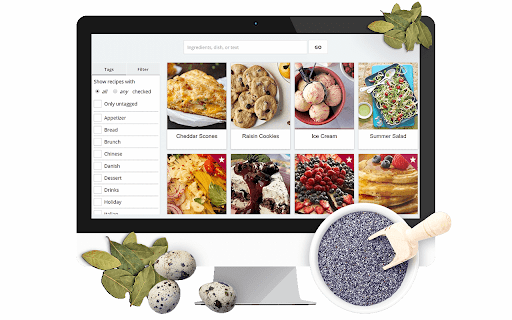


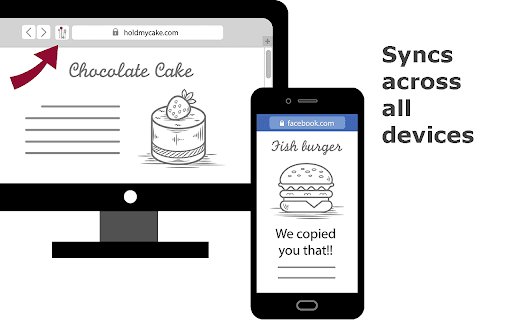

Copy any recipe from any website with just one click. Recipe manager, shopping list, and meal planner. Manage all your recipes in… Copy any recipe from any website with just one click. Recipe manager, shopping list, and meal planner. Manage all your recipes in one location. Edit copied recipes or add your own. Organize with collections. Add recipes to your shopping list and cross items off when you're in the supermarket. Plan meals with the meal planner. Share your recipes and get inspired by others.

CookBook Manager - Recipe Importer
Import recipes to your CookBook Manager App account from Chrome! CookBook Recipe Clipper for Chrome Save any recipe you find online straight to your CookBook library with one click. The CookBook extension turns your browser into the fastest recipe collector so you never lose a dish again. KEY FEATURES • One‑click capture: grabs ingredients, instructions, images and nutrition data while you browse. • Import from anywhere: clip recipes from Instagram, TikTok, Facebook, Pinterest, your cookbooks and more! • AI smart import: cleans up formatting and links ingredient amounts • AI Chef: generate new recipe ideas, variations and ingredient swaps in seconds. • Sync everywhere: recipes appear instantly in your CookBook iPhone, iPad, Android and web apps. • Meal planning and grocery lists: send saved recipes to your meal planner and create a smart shopping list that syncs across devices. • Macros and nutrition tracking: view calories, protein, carbs and fats for each recipe, then track daily totals in the planner. • Organise your way: tag by cuisine, course or diet, create custom tag collections and mark family favourites. HOW TO USE 1. Click “Add to Chrome” and pin the CookBook icon to your toolbar. 2. Log in with your CookBook account or start a free 7‑day trial. 3. When you are on a recipe page, click the CookBook icon. 4. Either click Save or Edit. FAQ Q: Is it free? A: We offer limited use for free. Unlimited clipping needs an active CookBook subscription. Q: Does my subscription work on mobile and web? A: Yes. Sign in with the same CookBook account on any device. SUPPORT Questions or feedback? Email team@cookbookmanager.com and we will help.

Eat This Much Recipe Clipper
This extension allows you to quickly import recipes to use in your Eat This Much meal plans. UPDATED: Now works with the new Eat This Much web interface. Import your favorite recipes into your Eat This Much account with a few clicks. Find the recipe you want to import, click the clipper icon, and then verify and save the recipe. It's a huge time saver over entering your recipes manually. Once you have your recipes added, Eat This Much will automatically start using them in your meal plans! With a free account, the generator will incorporate the recipes into your meal plans that hit all of your daily nutrition targets, and with a premium account, we'll automatically build weekly meal plans for you complete with leftovers and grocery lists. Eating smart has never been this easy.

Umami
Shows just the recipe and skips the rest. Save and customize the recipes you like. Click the Umami button on any recipe website to see just the recipe and nothing else. The recipe is shown in a beautifully simple sheet with ingredients and directions side-by-side. Click ingredients to check them off as you go and click steps in the instructions to mark your spot. Your progress is saved as you cook. Even if you close the cooking sheet or refresh the page, you can still pick up right where you left off. To save a recipe, click the "Import" button and select the recipe book you want to add it to. Once saved to Umami, you can edit and customize the recipe to your taste.

Recipe Cart | View & Save Recipes
View simplified recipes, save or print them, and order ingredients directly from Instacart. RecipeCart gives you cleanly formatted recipes the top of any recipe site. Save recipes from any site and organize them into folders. Print in black and white on one page. Avoid paywalls! Join over 3000 users in downloading the No. 1 recipe extension. + VIEW RECIPES AT TOP OF THE PAGE Immediately get the recipe at the top of the page. Once click to share a copy or print a pdf! + SAVE RECIPES TO YOUR BROWSER OR DESKTOP + ORDER INGREDIENTS FAST VIA INSTACART Select ingredients for same-day delivery via Instacart + SAVE TIME Immediately print, save, or share the recipe. Get to cooking faster! + REDUCE WASTE Order only what you need for cooking on the day you need it. + STICK TO YOUR DIET Search for recipes matching your diet type- Keto, Vegan, FODMAP, Weight Watchers, Noom and more at www.GetRecipeCart.com/Search + WORKS WITH ALL RECIPE SITES Recipecart is compatible with NYT Cooking, Allrecipes, Food Network and more! HOW TO INSTALL: 1. Click 'Add to Chrome' 2. Login to enable "Save" functionality 3. You're all set! RC automatically shows on any recipe page. SUPPORT If you have any problems or requests for new features, email us at support@getrecipecart.com .
