
lgjdpadgainjhokjahdjoapcdekdioge
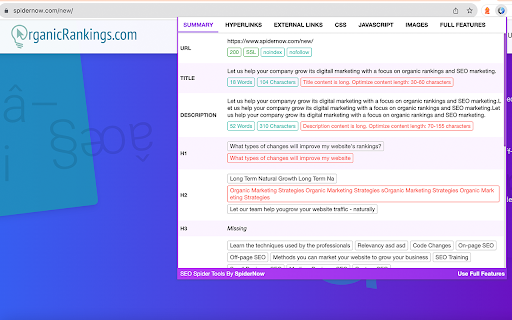
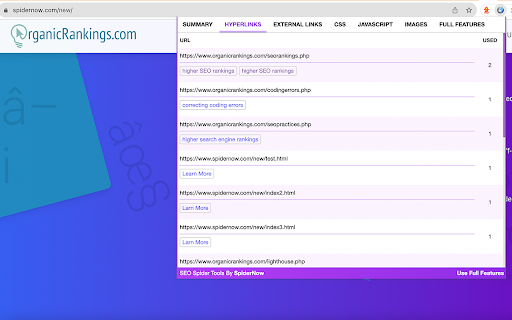


SpiderNow's Technical SEO and Web Audit tools are designed to help website owners discover and improve On-Page SEO issues. Our SEO tools are a free extension for Google Chrome browser. It will help you discover SEO issues, fix errors, and improve your search engine rankings. This free extension is like having an SEO sidekick right in your browser. It will help you analyze all of your pages for SEO and help you discover ways to boost your rankings in the search engines. It quickly captures every element of your website in real-time and then highlights issues and errors that need attention. This can range from meta, link, css, scripts tags, poor optimization, page speed, performance and other unknown factors within seconds. Now daily SEO tasks can be easier to manage so install our free extension today! USE OUR TOOLS TO CHECK FOR: Meta Robots & Directives: - Discover blocked URLs blocked by robot.txt protocol, noindex, follow, nofollow, noarchive, nosnippet - Show blocked resources in rendering mode Inlinks & Outlinks: - Display all pages that the URL links to - Display all of the pages linking to a URL - Scans for anchor text and if the link is a follow or a nofollow Page Status: - Displays if page is broken such as a 404 - Displays Server Default Port - Displays Server Type - Shows if page is secure with SSL or non-SSL - Displays URL Response Time and Code - Server Errors such as no responses, 4XX client & 5XX server errors - Display issues with on ASCII characters, underscores, uppercase characters, parameters, or long URLs - Show file size of URLs and Images - Display Page Speed and Load Time HTML Elements: - Displays the number of each html elements occurring on the page Images: - Scans for Alt tags under 100 Characters - Scans Current Page & Site for duplicates Images - Displays Broken Images - Discover Missing Alt Tags - Scans Current Page & Site for duplicates Alt Tags - Shows issues with Multiple Alt Tags CSS: - Scans for Broken CSS Links - Scans for Current Page & Site Duplicates CSS - Displays External CSS Javascript: - Scans for Broken Javascript Links - Scans for Current Page & Site Duplicates Javascript - Displays External Javascript Hreflang: - Scans for Duplicate Hreflang - Displays Broken links - Discover Redirect 301, 302, etc. - Scans for Broken hreflang tag attribute - Displays missing hreflang links - Displays incorrect languages codes Hyperlinks: - Displays hyperlinks on the scanned page and connected pages that are broken - Scans for Current Page & Site Duplicates - Display redirect chains and loops - Discover Redirect 301, 302, etc. such as permanent, temporary, JavaScript redirects and meta refreshes - Displays External Links, status codes and source pages - Display links from other pages that point to the scanned page - Shows what Hypertext are used for the Hyperlinks for internal and external links Canonical Tags: - Scans for Missing Canonical Tag - Scans to see if Canonical Tag does or does not match the page’s URL - Scans for Current Page & Site Duplicates of Canonical Tag PageSpeed Insights: - Scans for scores for Core Web Vitals metrics of mobile and desktop devices Download Htaccess: - Generates custom file for high-level configuration of your website - 301 Redirect File or Directory - Rewrite to www - Caching Javascript, CSS, and Images - Prevent Hotlinking - Custom Error Pages (400, 404, 500, etc) - Change default directory page Crawl Depth: - Displays the crawl depth for each page Content: - Scans for the Word Count that are less than

Website SEO Checker
Get free on-page SEO report by 100+ parameters with the best website SEO checker ☑️ Overview – quickly check essential SEO data: URL structure, metadata, indexation, and canonical settings. ☑️ Content – analyze headings, keyword density, text length, and text-to-code ratio for better structure. ☑️ Links – identify external, internal, and subdomain links, plus dofollow/nofollow status and anchor text. ☑️ Hreflangs – instantly verify hreflang setup and language targeting for international SEO. ☑️ Images – detect missing alt/title tags, broken images, and check sizes with on-page highlighting. ☑️ Structured Data – instantly identify and validate Schema.org markup for better SEO performance. ☑️ PageSpeed – measure mobile and desktop performance with actionable optimization insights. ☑️ GSC+GA4 Insights – assess search performance & indexing plus user behavior and conversion metrics. ☑️ Issues & Monitoring – detect SEO issues, track technical changes, and monitor page updates over time. Deep dive into Sitechecker Chrome Extension’s capabilities to unlock the full potential of your SEO workflow. 1️⃣ Get a quick technical overview of any page to ensure it meets SEO best practices. • Inspect URL structure, status code, and page size. • Review meta title, description, and H1 heading. • Analyze indexation settings, including robots meta tags, X-Robots-Tag directives, and robots.txt rules. • Validate canonical tag settings to prevent duplicate content issues. 2️⃣ Analyze content structure to improve keyword relevance and readability. • Review heading hierarchy (H1–H6) and highlight them on the page. • Copy the entire heading structure in one click for easy documentation. • Measure text length in words and characters. • Calculate text-to-code ratio to optimize content efficiency. • Get keyword density insights for single, two, and three-word phrases. 3️⃣ Audit all links on a page to improve internal linking and track external references. • Detect external, internal, and subdomain links. • Check dofollow/nofollow status and analyze HTTP response codes. • Review anchor text usage and link destinations. • Search for specific links and highlight them directly on the page. • Copy all detected links in one click for easy analysis and outreach. 4️⃣ Ensure proper hreflang implementation for international SEO. • Detect missing or incorrect hreflang attributes. • Validate language targeting and regional settings. • Check backward links to confirm proper hreflang setup. 5️⃣ Optimize images to improve SEO and user experience. • Identify missing alt and title attributes. • Detect broken images and oversized files. • Highlight image details directly on the page for easy fixes. 6️⃣ Validate structured data for better search visibility. • Detect Schema.org markup and review structured data implementation. • Identify missing or incorrect structured data elements. • Ensure key rich snippet attributes are correctly applied. 7️⃣ Measure page speed and get actionable insights for optimization. • Check page loading speed for desktop and mobile. • Identify slow-loading elements affecting performance. • Get recommendations to improve Core Web Vitals. 8️⃣ Unlock real-time GSC + GA4 insights to track performance, user behavior, and conversions. • View clicks, impressions, CTR, and average position over 7/30/60/90 days. • Analyze top search queries and how they drive traffic. • Inspect URL crawling, indexing status, and mobile usability issues. • Measure user behavior with engagement metrics like bounce rate and average session duration. • Track conversions with key events and key event rate. • Break down performance by traffic source (Google Organic, Direct, Social, Bing, etc.). 9️⃣ Monitor SEO issues and track page changes over time. • Detect technical errors, broken links, and missing metadata. • Track content updates and structural modifications. • Get alerts for critical SEO changes.

SEO Pro Extension
Are you ready to save at least 5 hours/week on daily SEO checks? If your answer is yes, then SEO Pro is exactly what you need.… Are you ready to save at least 5 hours/week on daily SEO checks? If your answer is yes, then SEO Pro is exactly what you need. SEO Pro helps you get all the necessary information about a website page at a glance. Here are 11 examples of what you can do with this free extension in under 3 seconds: 1️⃣ See all main page information at a glance, including: ✅ Title tag ✅ Meta description ✅ Canonical URL ✅ Meta robots ✅ Core Web Vitals (Field data) ✅ Word count on the page 2️⃣Export all page copy in just 1 click 3️⃣ Instantly check Core Web Vitals metrics for a page The SEO Pro extension shows the Core Web Vitals: The SEO Pro extension will show you hints when the page you’re looking at: • Has meta-robots set to ‘noindex’ • Has the canonical tag pointing to a different page 5️⃣ Easily analyze the headings hierarchy of any page It’s handy when you want to see how many H1s the page is using. Or when you want to spot any heading opportunities your competitors are using. 💡 You can also export all the headings found on a page in a CSV with just 1 click! 6️⃣ See status codes and redirect chains at a glance 💪 Pro tip: You can also check if the most common duplicates – like http/https and www/non-www – are handled properly on the website you’re analyzing. 7️⃣Get the number of links on a page, their type and anchor text - Internal links - External links - Anchor text for each of these links 💪 Pro tip: Export the links and their anchor text for further analysis 8️⃣ Highlight nofollow links on a page You can easily see nofollow links on any page with the SEO Pro extension. On the Images tab of the SEO Pro extension, you can easily see the alt tags of the images on a page. It will help you quickly spot the images that are missing alt tags. 💪 Pro tip: Export all images along with their dimensions in a CSV in 1 click for further analysis. 🔟 See what a page preview will look like when shared on social media No need to look for Open graph tags in the source code anymore! The SEO pro extension will show you the preview image, website, title and description of any page so that you can make sure it looks great when you share it online. SEO Pro extension makes it easy for you to check all types of Schema markup so that you don’t need to open the Rich Snippets tool and wait minutes for it to show the results. Just check out the Schema tab.

Broken Link Checker
A SEO tool to find broken (404) and redirected (301, 307, 308) links in all frames A simple tool to find broken (404 code) and redirected (301, 307, 308 codes) links in the current page. This tool examines all links in the current page (top frame and all sub-frames) and returns the status code and its meaning for each link. You can optionally ask the extension to check links inside about:blank frame elements are well. All broken links are placed in a separated category for easier detection. Beside each link, there is an inspect button which focuses the link to the center of the page to help to find the links faster. Note that to increase link validation speed, the extension evaluates 5 links simultaneously. Note that you can open the validation UI in a new popup window or as an embedded frame inside the page. Note that this extension also notifies you about the links that are skipped like none HTTP links or mailto links Features: 1. Deep search: search deep inside a website. If this mode is enabled, the extension parses all links of the same domain and extract links from them. 2. Filter: Ignore URLs that match with the user-specified keywords. This way you can increase the searching speed by ignoring particular URLs. 3. Filters to show and hide links with 2XX, 3XX, 4XX, and 5XX status codes

SEO Buddy - On-Page SEO Analyser
A complete On-Page SEO tool to help you analyse your webpage and optimize it for better ranking SEO Buddy is a complete On-Page SEO tool to help you analyse your webpage and guide you to optimise it for better ranking. ✅ Analyse On-Page SEO: This extension analyse the existing On-Page SEO following good practices and get a performance score ✅ Reliable Benchmark: Most essential On-Page SEO conventions are used to calculate the score of your current On-Page SEO score. ✅ Checklist for Improvement: It suggests checklist containing best practices to improve the SEO ranking. ✅ Detail overview of each factors: All the best On-Page SEO practices are presented in a detail manner like External/Internal/ Broken Links, Images missing alt, useful integrations etc. ✅ Technologies Detection: It has technology detection feature like Built-With and Wappalyzer to detect which technologies are being used on the webpage. ✅ Super fast and efficient: On-Page SEO analysis are done very efficiently within seconds ensuring reliable results. ✅ Clean and User friendly UI/UX: Ensuring a great experience is important to us. In every aspects we tried to guide the user through as less cluttered informations as possible. Besides all the above mentioned features, we are actively working bringing newer features. If you have questions, concerns or feature request, please send an email to rahulbaruri1@gmail.com. We will to reply you as early as possible.
