
lgiajpmojmpdhapbigeckoomdngblmdd
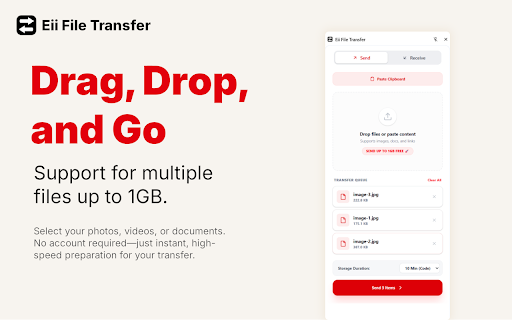


Fast, secure, and simple file transfer between your devices with a 6-digit code. Eii File Transfer: The Privacy-First Way to Send 1GB+ No Cloud Bloat. No Accounts. Just Fast Transfers. Stop emailing yourself files or clogging up your personal Drive. Eii File Transfer is a lightweight, high-speed bridge between your devices. Whether you need an instant 6-digit code for a quick move or a secure link for a colleague, we’ve got you covered. 👉 Instant Transfer: Generate a 6-digit code that expires in 10 minutes. Perfect for moving a photo or document from your PC to your phone (or vice versa) in seconds. 👉 Extended Link: Need more time? Generate a secure URL with a custom expiry of 1 to 30 days. Perfect for sharing with friends or coworkers via Slack, WhatsApp, or Email. ⚡ Huge Capacity: Send multiple files at once with a total limit of up to 1GB. ⚡ Zero-Waste Storage: Files are automatically wiped from the cloud the moment they expire. No digital footprint, no manual cleanup. ⚡ True Privacy: We use a "Metadata-Only" architecture. Your files go directly from your browser to secure cloud storage via encrypted HTTPS—they never even touch our servers. ⚡ Zero Friction: No sign-ups, no passwords to remember, and no account setup. Just drag, drop, and done. 🔒 Built for Security 🎯 Direct-to-Cloud: Files are stored in secure, temporary Cloudflare storage with signed URLs. 🎯 Auto-Destruct: Once your timer hits zero, the file is gone forever. No backups, no traces. 🎯 Safe-Filtering: We automatically block unsafe file types to keep your devices protected. 🏆 Best For: 🏃 The Multi-Tasker: Moving work between your laptop and desktop. 📱 The Mobile User: Scanning a QR code to grab a PDF on your phone instantly. 🤝 The Collaborator: Sending a large project to a client without needing their email address or a shared folder. Eii Tech Solutions: Fast, Secure, and Stress-Free. 🎉 What's New 🌟🌟1GB limit and 30-day links🌟🌟

Markleaf: Bookmark Manager
Simple and practical bookmark manager. • List and grid layout • Create: Folder and bookmark/current page • Add active tabs • Edit: URL and name • Draggable sorting for folders and bookmarks • Dynamic search across all bookmarks with keyboard navigation • Dark/light/system theme • Root folder selection (Bookmarks Bar / Other Bookmarks). • Remember last visited folder • Supports 17 languages • Trash: deleted items are recoverable, with configurable auto-expiry • Multi-select with bulk open, move, and delete • Folder style: classic icon or favicon collage preview • Import and export all bookmarks and settings as JSON • Scroll-to-top button • Up and down: Navigate through the list. • Enter: Open selected item or enter folder. • Left / Tab: Go to parent folder. • Left click: open in current tab. • Right click: open context menu. • Middle click: open in new tab. • Ctrl + click: open in new tab. • Shift + click: open in new window. 1.2.1: Important Space • Main folder selection added (Bookmarks Bar / Other Bookmarks). • Context menu can now be opened by clicking on empty space. • Breadcrumb navigation added (toggle in settings). • New context action: add active tabs to a selected location or folder. • Search bar now includes a clear "x" button when input is present. • Bug fix: missing favicons (unvisited sites) now load instantly without requiring extension reopen. 1.2.0: New paths • Multi-select mode with bulk actions. • Trash system with restore and auto-delete. • Import / Export (full backup & restore). • Improved search performance and responsiveness. • Theme control and UI customization options. 1.1.1: Fresh Start • Markleaf is now open source! • You can now navigate search results using the arrow keys. Pressing the up and down arrows moves through the list; pressing right or Enter opens the selected item; pressing left or Tab goes up a folder. Moving the mouse cancels the keyboard selection. 1.1.0: Silent Refactor • Content loads at least 30% faster. Folder item counts and favicon previews are now calculated from already-loaded data instead of making separate requests for each item. • A three-column grid layout has been implemented. • Right-clicking on an empty area no longer opens the browser's native menu the custom menu closes instead. • The context menu now plays a closing animation, just like it does when opening. • Moving a folder into itself or one of its own subfolders is no longer possible. • Scrolling back to the top is now smoother. It now uses the browser's built-in scroll engine instead of a custom animation, resulting in a more natural and consistent feel. 1.0.5: First Orion • Context menu animations have been improved. • Browsers that do not support the browser's default favicon feature (such as Opera) automatically use Google's favicon service. This parameter will be removed in the future if they adopt the newer system. 1.0.4: Enhanced Violet • The list view has been redesigned with a modern design approach. • You can now open the context menu by right-clicking a list item. • Folders now display the total number of bookmarks they contain. • Shortcut improvements. 1.0.3: Smooth Horizon • Added a “Back to Top” button. • Scrollbar is now visible. • Performance and design improvements. 1.0.2: Vanilla Touch • Performance and design improvements. 1.0.1: Apple Pie • Open all bookmarks in a folder with middle-click. • Performance improvements. 1.0.0: Black Hole • First version of the extension. For suggestions, contact me via email.

SoqAlbum: Share iPhone/Android Files/Cameras
SoqAlbum directly links your smartphone(iPhone/Android) to chrome, allowing you to transfer and share files and photos via the link. (NEW) Added a simple chat feature. You can now exchange text messages between Chrome and your smartphone. (NEW) Added "Send Memo" and "Send Voice" tools to SoqTools. You can edit text or record audio on the fly, and send it directly to Chrome. SoqAlbum links your smartphone and chrome directly via P2P. The link is completed in just two easy steps: click on the extension icon to launch SoqAlbum, and then use your smartphone to read the QR code there. Using a simple tool on the smartphone app (SoqTools), you can easily transfer files from your smartphone to the chrome side. By selecting the camera tool, photos taken with a smartphone can be saved directly to the chrome side and viewed on the large screen display of the PC. It is also easy to send files from the chrome side to the smartphone. SoqAlbum provides advanced collaboration between smartphone and PC. Multiple smartphones can be linked to SoqAlbum at the same time. This allows you to transfer and share files across multiple devices, using chrome as a hub for file sharing. File exchange in SoqAlbum is done via P2P and does not go through the cloud, so there is no need to worry about file leaks from the cloud or censorship. We have offered "Adaptive Download Shelf" as an extension option, which allows you to disable the download shelf only when using SoqAlbum. This can make the full screen display of SoqAlbum more comfortable. SoqAlbum is a universal app supporting Win/Mac/Linux/ChromeOS/iPhone/Android. Even in situations where AirDrop or Nearby Share are not available, SoqAlbum can still transfer files. You can use this free app right now just in your browser, without creating an account. With this extension, enjoy the freedom of file sharing without the need to be aware of platform differences.

Instant Image Downloader
Easily select and download images from any webpage in various formats, with filtering, grouping, and bulk download options. Instant Image Downloader: Effortless Selection, Smart Filtering, and Mobile Downloads! 🌟 Instant Image Downloader is your go-to Chrome extension for quickly selecting, filtering, and downloading images from any webpage. Perfect for designers, researchers, or anyone who frequently saves images, this tool streamlines your workflow and now offers an innovative way to get images onto your mobile devices. 🗝 Key Features: ✅ Effortless Image Selection & Filtering: Easily pick individual images or bulk-select them. You can refine your choices by format (JPG, PNG, WebP, SVG, etc.) and size. Images are neatly categorized for simple Browse. ✅ Generate & Download Images via QR Code: This exciting new feature lets you generate a QR code for any image, making it incredibly simple to download that image directly to your mobile device by scanning the code. ✅ Bulk Downloads & Format Conversion: Save multiple images instantly and convert them to JPG, PNG, or WebP with a single click. ✅ Export Metadata: Need details? Download a CSV file containing information like the URL, type, and size for your selected images. 📖 How to Use: 👉 Click the Instant Image Downloader icon on any webpage. 👉 The extension will instantly detect all images. 👉 Filter by type or size, then select the images you want. 👉 To get an image on your phone, simply generate its QR code and scan it! You can also download images in your preferred format, export metadata, or copy URLs. 🚩 Important Notes: 🔸This extension doesn't work on the Chrome Web Store, chrome:// pages, or protected sites (like banking pages). 🔸Images must be publicly accessible and not behind logins. Take charge of your image downloads and seamlessly transfer them to your mobile devices with Instant Image Downloader—effortless, organized, and packed with smart features! 🚀

AirForShare - Share Files & Text Instantly, No Signup & Limits!
Share text and files instantly across devices on the same Wi-Fi network, just like AirForShare. 🌐 AirForShare – Real-Time File and Text Sharing Over Wi-Fi (No Signup Required!) Tired of complicated file-sharing apps, sign-ups, or storage limits? AirForShare is a fast, free, and secure Wi-Fi file-sharing extension that lets you send text and files between any devices connected to the same Wi-Fi network — in real-time. No need to install anything or create an account! Whether you're collaborating in the office, sharing media at events, helping classmates, or just moving stuff from your phone to your PC — AirForShare makes it instant, private, and effortless. ✅ No Sign-Up Required – Just open the extension or website and start sharing instantly. ✅ No File Size Limits – Share videos, PDFs, presentations, or any large files without restrictions. ✅ Real-Time Transfer Over Wi-Fi – Send and receive files or text instantly across devices. ✅ Supports Files, Text & Links – Whether it’s a note, a video, or a web link, share it in seconds. ✅ Set Expiry Time – Choose how long shared files/text remain available: 30 mins to 2+ hours. ✅ Works on Any Device or Browser – PC, Mac, Android, iOS – if it has a browser, it works! ✅ Offline-Ready – Files stay accessible even if the sharer disconnects. ✅ One-Click File Removal – Manually delete shared items anytime for better privacy. ✅ Progress Bars – Know exactly how your uploads/downloads are progressing. ✅ Live User Indicator – See how many users are connected to your sharing space. ✅ Image/Video Preview – View shared media before downloading. ✅ Notifications – Instant alerts for uploads, deletions, and new content. Connect Devices to Same Wi-Fi – All devices must be on the same network. Open AirForShare.net or the Extension – No installation or login required. Upload Files or Text – Drag-and-drop or paste your content. Control Expiry or Delete – Set timer or remove files with one click. Perfect for classrooms – Share notes, slides, and documents instantly. Great for offices – Send files to teammates during meetings without email delays. Ideal for events – Upload and share media with groups without needing contact info. Efficient for developers & tech teams – Share logs, code, or config files quickly. ✔ Files are not stored on the cloud ✔ All transfers are local to your Wi-Fi ✔ Set auto-expiry or manually delete files anytime ✔ No account, no tracking, no third-party access Saved Text History – View shared notes with timestamps anytime. Multiple Devices Support – Unlimited users on the same Wi-Fi can join. Extension + Web Combo – Use the Chrome extension or head directly to AirForShare.net. 🌍 Who Is It For? Anyone who wants quick, local, real-time file and text transfers without the internet, app installs, or login frustration. 🆓 100% Free. Forever. No trials. No limits. No ads. Just a powerful free tool to connect and share—without friction. 📥 Ready to Try It? Install the AirForShare Chrome Extension now or visit https://airforshare.net to begin sharing in seconds. Perfect for office collaboration, school file sharing, or simple device-to-device transfers. Start sharing smarter, faster, and safer with AirForShare. → Download now and experience next-level file sharing!
