
lgghbdmnfofefffidlignibjhnijabad
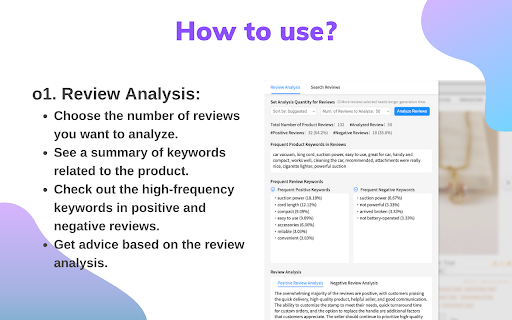

Find Profitable Niches on Amazon with this Review Audit and Niche Finder Tool 🚀 What is it? ● Amazon Finder&ChatGPT Review Analysis is a helpful Niche Finder tool for all Amazon sellers who wants to get a better review analysis and review audit. It's a chrome extension that uses OpenAI ChatGPT to analyze the reviews and pull out the most important keywords and takeaways. It can help sellers find the suitable product to sell. ● With this extension, you can easily tell if a review is positive, or negative. It's perfect for sellers who want to see what people are saying about the products. These information is presented to the you in an easy-to-understand format, helping you to quickly identify trends and patterns in the reviews. ● It can also search for reviews that have specific keywords. This is really useful if you're looking for feedback on a particular aspect of a product. ● Overall, if you want to know more about what people are saying about a product, this is the perfect tool for you. It's easy to use and provides valuable insights that you wouldn't be able to get otherwise. 🚀 Features Review Analysis: ● Choose the number of reviews you want to analyze: 10, 50, or 100. ● See a summary of common keywords related to the product. ● Check out the high-frequency words or phrases in positive and negative reviews. ● Get advice based on the review analysis. Review Search: ● Search for reviews that contain specific keywords. ● Add multiple keywords, separated by commas. ● Once you find the reviews you want, use the "copy all" function to easily save them.

GMB Everywhere - GBP Audit for Local SEO
Find GMB categories, GMB Audits, Review audit, and Post audit. Spy, audit, and crush your GMB competitor with this Local SEO tool. Your personal Google Business Profile tool that works on the browser. You will now be able to see Google My Business categories, do basic audits, do Review audits, do Post audits, check location ranking and many related GMB audits directly on Google itself. Now you can turbo charge your Google Business listing, GMB spy on your competitor, get google business analytics and win on Local SEO. 🚀 How to use it? - Install the extension from this page. - Go to Google, and you will see the GMB categories and audit buttons shown on every business page and search result page by default. It also works on Google, Local finder and Google Search result pages. 🚀 About us? GMB Everywhere is a extension that lets you view Google My Business categories on maps. We let you spy on your Google Business competitor and rank better on Local SEO. 🚀 Our features? Design and value to the customer is the number one parameter we aim for when we get our extension in public. Local SEO ranking can make or break your GMB listing. At present extension features includes. ⭐GMB Categories: The categories you assign to your Google listing is one of the top parameter when it comes to Google map business ranking. With our extension you can see the categories directly on Maps and Local Finder. The pages it shows up include: - Google Business Page - Google Search Result Page - Google Business Page with bottom selector. - Local Finder Page - Local Finder Search Result Page These categories automatically updates as you move from one page to another on these GMB resources above. ⭐Highlighting categories: Among the categories that you assign to your business, it is the primary category that is the primary mover. It makes the difference between being on the 3 pack or in the bottom. Our extension marks the primary category with a '⭐'. This way you can ideally differentiate between what is shown as the main category on google and what is the primary category. Unlike commonly believed, the default category shown is not always the primary category. ⭐Basic GMB Audit: This will allow you to do a basic audit on the business. This will give you a ton of details about the business. This includes: - Business claimed status. - Location information. - Place ID - CID - Business Profile Id - Knowledge Panel Link - GMB Review Request Link - GMB Review Display Link - Post Link - Other businesses at the same address - Other businesses using the same website - Many website auditing shortcuts. ⭐Teleport: You local ranking is very much dependent on the location from which your customer is searching. With our Teleport feature, you can now simulate a search from a particular location. The features include: - Adding a term and select and location and find the rank at the particular location. - Get the competition you have at that particular location. - You can draw and calculate the distance of your business from that particular location directly. ⭐GMB Review Audit: Quantity and quality of reviews are a very important parameter in GMB ranking. With this business review analysis, you would get vital information about the health of the GMB reviews. With this feature, you can find the following information about reviews: - Graphical representation of reviews with time. - Calculating rating of the reviews. - Get analysis of content of their reviews. - Get analysis of quality of their reviews. - Get valuable information about the strategy you would need to follow to be effective. ⭐GMB Post Audit: This feature will let you analyze the posts of a business on GMB. This uses the latest public data. This will give you a very accurate sense of the health of the posting frequency and other GMB Post parameters. With this feature, you can find the following information about posts: - Graphical representation of their post strategy. - Post frequency analysis. - Post content analysis. - Get valuable information about strategy you would need to follow to be effective. ⭐Category Finder: This feature will allow you to find the most relevant category and services for your business. This includes: - Find related category by providing a category. - Find search traffic associated with that category. - Find services associated with a category. - Shortcut to compare seasonal change in category search with external tool. ⭐ Local Scan: This is our most powerful feature for side-by-side competitor analysis. Local Scan allows you to compare multiple businesses in the search results with a single click, giving you a practical roadmap to outrank them. The insights include: - Category Analysis: Compare your categories against competitors to spot what you are missing. - Service Analysis: Discover service gaps and opportunities your competitors are leveraging. - Review Comparison: See exactly where you stand against the competition in terms of review quantity and rating. - Location & Proximity: Understand how location advantages are affecting the rankings in that specific area. ⭐Other features: - Transparent description about how we calculate data. - Show all the result in Maps Search, Google and Google Local Finder. 🚀 Some things to note: ⭐ We are not related to Keyword Everywhere, Keyword Surfer or PlePer. This extension can be used in addition to these extensions on Google. ⭐ We are also not related to GatherUp Google Review Link Generator or UberSuggest. They are just external links given in the audit result. ⭐ This is an independent extension that works on Maps and other Google resources. 🚀 Contact us: In you have any questions, you can contact us using the chat option on the bottom right of www.gmbeverywhere.com.

Titans Quick View - Amazon Niche Finder
Niche & Keyword Research Tool, Amazon Quick View BSR Data for Amazon KDP & MBA This Titans Amazon Quick View works on all Amazon marketplaces. This extension will help you with niche & keyword research for Amazon FBA, KDP and Merch by Amazon. TOP EXTENSION BAR DATA FEATURES: * Average Amazon BSR (Best Seller Rank) * Average BSR calculation * Average price calculation * Average reviews calculation * Keyword / Niche Score calculation * Download data option SINGLE PRODUCT BOX DATA FEATURES: * Main BSR & Sub BSR * Type of Book * Page count * Book size * Publish date You can simply click the download button, and it will create an excel file with all ASINs, Author/Seller names and all Titles for every product on the home page. You can use this for research and best of all for ads creations to target all the best sellers directly as a product campaign, a keyword campaign targeting their author name as well as the book title. This keyword niche score is an algorithm that I have been perfecting over the last year and use daily for research. It is recommend finding niches with a score of 62% and higher. This algorithm takes into account all listings on the first page and goes through how many exact product results there are, how many results on the first page, what all the prices are and the average, what the reviews are and the average, what all individual BSR are and the average and then uses all the data combined into a very thorough algorithm to determine how easy it will be to compete and rank on page 1 and what keywords to use for ads to get the best traction in rankings. You can't simply rely on just how many results and some BSR data. What is the results and BSR is good, but every book on page 1 has a TON of reviews, or MOST books have some low price that you can't really compete with, especially with no reviews and no ads... The algorithm takes everything into consideration. Imagine how much easier publishing book with Kindle Direct Publishing can become. No more guess work on Amazon search pages, no more time consuming copy & pasting, no more endless calculations. I hope this brings you lots of ease and success with your KDP Amazon journey.

ChatGPT for Amazon from ProductScope AI
All-in-One ChatGPT for Amazon Brands & Marketers by ProductScopeAI ProductScope AI’s Chrome extension for Amazon Insights helps brands research, optimize and grow their business faster & more efficiently with AI. Perfect for Amazon sellers (FBA, FBM, Merch by Amazon and even KDP sellers) who want to dive into their detailed customer insights harvested from their Amazon reviews and then make data-driven decisions about their products. With the free Amazon Seller Chrome Extension, you can gain unique review insights, download your reviews, optimize your Amazon listing, conduct in-depth product analysis, perform keyword research, create and edit amazon product photos and much more. Here are some of the features offered by the ProductScope AI Chrome Extension: Product Reviews Analyzer Reviews Insights Customer Purchase Motivations Customer Demographics Listing Improvements Product Keywords Amazon Product Photos Download Amazon Reviews Listing Quality Amazon SEO ChatGPT Assistant for Amazon Take advantage of the best Chrome extension for Amazon sellers, streamline your product research, optimize your listings & images, and ultimately increase your sales and profitability on Amazon. 🔍 Deep Customer Insights - Leveraging the Voice of Customer Analysis, we transform customer reviews into actionable strategies, helping you understand the likes, dislikes, and desires of your customer base to enhance conversion rates. ✏️ AI-Enhanced Listing Builder - Craft compelling product listings in minutes, infused with high-impact keywords and insights derived from your reviews, all thanks to our advanced language models. 📸 Stunning Product Images - Generate hundreds of lifestyle images effortlessly from your imagination with our AI Photoshoot tool & powerful but simple post-processing editor in minutes for 1/10th the cost of normal photoshoots, for all your social media/marketing needs. 🤖 Dobby - Your E-commerce Mentor - Meet Dobby, your round-the-clock e-commerce AI Chatbot assistant, ready to assist you in making data-driven decisions and staying competitive on Amazon. 🌟 What kind of Customer Insights are provided via the free Chrome Extension? 🌟 1️⃣ Deep Dive Analytics: Unravel the mysteries of your target audience. Discover the 'who', 'what', 'where', and 'why' behind every review, but aggregated for you. 2️⃣ Customer Sentiments (Pros & Cons): Pinpoint your product's strengths and areas of improvement from the customer's viewpoint. 3️⃣ Buyer Motivations: Craft irresistible product listing titles/bullets/descriptions by tapping into customer buying triggers. 4️⃣Product Improvement Suggestions: Insights into what the customers are wanting or expecting the product to include or offer in order to be valued more 5️⃣ One-Click Analysis: Instantly analyze reviews, spot opportunities, and uncover the pros & cons. 🔗Start Getting Unique Insights plus using all of our core ProductScope AI Tools Today for Free → https://productscope.ai 📌 FAQs: Q: How does the ProductScope AI Chrome Extension help me? A: Our Free Customer Insights Extension can pull all verified reviews for any ASIN on any marketplace, analyze them against multiple data points, leveraging the most advanced Amazon ChatGPT model (GPT-4) to offer strategic customer insights, use them to craft highly optimized Amazon listings and even tie in branded AI Photoshoots in minutes for any of your products or your clients brand's. Q: What's "Voice of Customer Analysis"? A: ProductScope AI’s Voice of Customer (VoC) Analysis utilizes Artificial Intelligence to analyze Amazon reviews, transforming them into meaningful insights about customer demographics, intent, sentiment, and motivation. This provides a comprehensive Amazon voice of the customer understanding, which can help shape your product development and market positioning strategies. Customer Profile - The "Who", "What", "Where" and "Why" for your product based on your customers reviews Pro Sentiments - Insights showcasing the positive sentiments of the ASIN product Con Sentiments - Insights showcasing the negative sentiments of the ASIN product Product Features - Features of the product taken directly from customer reviews in their language Buyer Motivations - these are the reasons the customers are buying the product Product Improvement Suggestions - Insights into what the customers are wanting or expecting the product to include or offer in order to be valued more Just hop onto your Amazon.com (or .ca or .uk) product detail page (i.e., www.amazon.com/dp/{ASIN}), click on our chrome extension (it looks like an orange bumblebee), and you can run Analyze Reviews to grab your customer insights, then you can choose to open up any other web tool directly from the extension. You can also grab the Amazon main image into our AI Photoshoot tool or optimize the listing directly from the Chrome extension as it's fully paired with our Web app tools! Q: How can Customer Review Analysis benefit me? A: Gain a deeper understanding of customer perceptions, refine your listings, influence product development, generate the right style product photoshoot images and help you tailor your marketing strategies. Q: How can I use the Chrome extension to download, export, or review insights from Amazon products? A: Our Chrome extension is designed as an all-encompassing tool for Amazon sellers and buyers alike, enabling you to download reviews from Amazon with ease. With features like the Amazon review downloader, you can effortlessly export Amazon reviews for comprehensive analysis. Whether you're looking to export reviews for a single product or download reviews in bulk, our tool simplifies the process, allowing for a seamless review export experience. This functionality is perfect for those seeking to gain deeper insights into customer feedback or to utilize review data for product improvement and competitive analysis. Q: Is a credit card needed for the Free tier? A: Absolutely not! The Chrome Extension is completely free and installing it or even creating an account at https://productscope.ai doesn’t require a credit Card. Your free account also gets you access to our full fledged Web application platform where you can try all our other AI-powered tools as part of a risk-free. So, why wait? Download the ProductScope AI Amazon Chrome extension for free today! 💌 Reach Out: For queries or feedback, drop us a line at [support@productscope.ai]

Amazon Product Finder - AMZScout PRO Extension
Find a profitable product and start selling on Amazon quickly! Amazon product research made easy! See sales estimates and FBA fees. How to check sales data for any product: 1. Install the AMZScout PRO Chrome Extension. Begin your FREE trial by entering your details with a quick sign-up. 2. Access Amazon and search for any items you want to analyze. 3. Open the extension. 4. Review the product and niche information. You can review sales history for both the product and the niche, as well as estimated net margin, sales, and revenue. You can also use a built-in FBA calculator to help you identify profitable products, and much more! What can you use the AMZScout PRO Extension for? • Evaluate niche potential • Check niche and product trends • Calculate potential product profitability • Check product and niche sales, price, and rank history • Evaluate competition in the niche • Estimate FBA costs • Find reliable suppliers • Monitor your competitors' sales, pricing, and keywords ✅ More than 300,000 users already trust AMZScout’s product analysis tools, keyword search, and much more. AMZScout PRO is simple to use and navigate. Here are some hacks for anyone who’s interested in become a seller: [Quickly assess the potential of your niche and product] AMZScout Product Finder provides a niche score rating and a product score for both the private label and reselling business models. With this tool, you can immediately determine if the product is worth considering without having to look deeper into detailed product analytics. [Find the best supplier] Find things to sell on Amazon, or any other marketplaces, to scale your business. Save time by filtering suppliers according to country and price range. [Improve your ranking] Export niche and product keywords to improve product listings and use them in your PPC campaigns. Help your listing rank higher in organic searches and get more sales. This smart product research tool is often considered to be the most accurate tool by sellers. It helps you find unsaturated opportunities, get sourcing options, monitor your competitors, and even improve your keyword research. Base your product choice on concrete data to protect your investment. Find a product to launch with FBA that will bring you $5,000/month or more! The AMZScout Chrome Extension works in the United States in addition to these other Amazon marketplaces: the UK, Germany, France, Italy, Spain, Canada, Mexico, India, Japan, UAE, Saudi Arabia, Australia, and Brazil. You can research 15 niches for free with the trial version. No credit card information is required. Download the PRO Extension and give this fantastic software a try! Q: How are the estimated values calculated? A: These values are calculated using formula-based, top-level categories (for example, Home & Garden or Books) and rank in one of these categories. Q: What does the “LQS” column mean? A: “LQS” is Listing Quality Score. AMZScout analyzes a variety of product description criteria and computes a score for it. A higher score indicates a higher position in the search results. To see details, place your cursor on any LQS value. Q: What does the “RPR” column mean? A: “RPR” means Revenue Per Review. A higher RPR means a better selling opportunity. Q: Can I also get help with how to start selling on Amazon? A: Of course, the AMZScout team publishes useful articles and videos every month that you can find on our blog. You can also participate in an AMZScout Seller's Course and free webinars. Q: If I have any other questions or problems with AMZScout, where can I get support? A: The fastest way to get support is by emailing your question to support@amzscout.net.
