
lfnokjkplgjoomdggbklpchebbbobibb
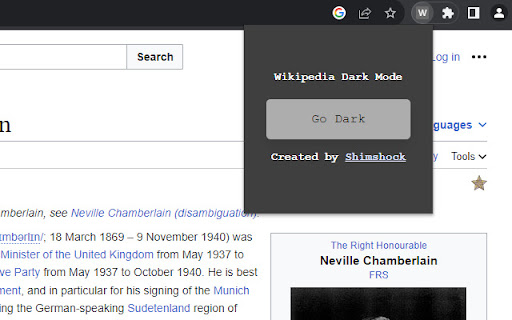

Description Turns a single wikipedia page into dark mode. Tutorial To enable, click the icon and then click the giant button that… Description Turns a single wikipedia page into dark mode. Tutorial To enable, click the icon and then click the giant button that says "Go Dark". How does it work? It turns the background to dark grey (#323232) and most of the other elements to white (#ffffff). Table backgrounds have been removed. Troubleshooting If you'd like to see any other changes or experience any issues, please provide a screenshot for me and I'll correct it and give you a shout-out in the change log.

Wikipedia +
WikipediaPlus is an extension that allows you to quickly and efficiently access all relevant links on the page you're visiting. WikipediaPlus is the perfect tool to enhance your browsing experience on Wikipedia. This extension allows you to quickly and efficiently access all relevant links on the page you're visiting. With its interactive banner, you can easily explore all links without interruptions. With WikipediaPlus, you can save time and increase productivity while learning and discovering new information on Wikipedia. Important: If you press "SHIFT + SCROLL" on the Wikipedia+ banner, you will be able to scroll and view all the existing tags of the page you are on.

Wikipedia Dark Mode
Enjoy reading Wikipedia with a comfortable dark mode theme. Simple Chrome extension that converts Wikipedia pages into a dark mode theme, making it more comfortable for long-term reading. The extension is designed to improve readability and reduce eye strain.

Wikipedia Dark Mode
Activate this extension to switch Wikipedia into dark mode with one click. Get rid of the eye pain from staying up all night reading Wikipedia! Install our Wikipedia Dark Mode chrome extension, bringing an updated look that automatically changes brightness for better readability. Get this free extension now and make your web browsing a visually calming experience – whether you are a student, a researcher or someone who casually reads on Wikipedia. Note: This extension works on Wikimedia as well. Key Features of this chrome extension Seamless Integration: Matches perfectly with the Wikipedia interface. Automated Adjustments: It picks out the brightness levels and contrasts to make texts legible in them. 1. Install The Extension Download and install the extension into your browser. Open Wikipedia using your browser. Press the add-on icon for it to get activated or deactivated, thus turning on or off the dark theme mode. Use a comfortable interface of Wiki which is saturated with darkness when you browse through articles on this site. The dark theme reduces eye strain enabling users to read lengthy articles without experiencing any strain. The dark background and white text give a high contrast experience that is soft on the eyes, specifically when reading in poorly lit rooms. This plug-in makes it easy to enhance reading comfort without manually adjusting settings or installing third-party software. For Whom Is It Useful? This plug-in is perfect for students who spend whole nights researching or reading from Wikipedia. Researchers going through multiple articles would appreciate reduced eye fatigue and better comfort they will feel as they go through different articles. Casual readers and knowledge lovers will also like its visually inviting design that makes browsing easier.

Retrospective History
Retrospective History indexes and allows you to search the full text content of your web history. Never lose track of a page again. Search the full text of everything you've read online - right from Chrome Have you ever had trouble recalling where on the internet you found an article, blog post, recipe, or snippet of text that you remember reading? Chrome’s default History stores the title and URL of the websites you visit, ignoring all of the page’s content. If you can’t remember the page title or URL, you’re out of luck. Retrospective History indexes the full text contents of the pages you read, creating a personal, private, and local search engine to make your browsing history truly useful. You can simply browse the web as usual, and Retrospective History will work in the background to automatically index the text content of the pages you visit. A red/green indicator on the toolbar icon shows whether the page you're currently viewing has been indexed. Be sure to pin the extension's icon to your Chrome toolbar so you can easily view this status indicator. If you want to delete the page that you're currently viewing from the index or add its domain to your ignore list, you can easily do so from the extension's toolbar popup window. When you need to find something you've read before, select "Search History" from the toolbar popup to open the search page. Enter your query to find matching results from your browsing history. Unlike Chrome's basic History which only shows page titles and URLs, this extension lets you search the full-text content of the pages you've visited. Please note that Retrospective History does not index certain single page applications and "infinite scroll" style pages. Most social media sites fall in this category. The toolbar icon will indicate whether or not these pages have been indexed. 🔍 Powerful Full-Text Search -Lightning-fast search across the full text of your browsing history -Filter and sort results by the date you accessed each page -View the context of your search term within each result -Easily find pages you visited even when you can't remember their title or URL 🔒 Private -All indexed data is stored locally on your computer -No data is ever transmitted from your system -Your browsing history remains your own 🦾 Flexible Configuration -Define a retention period for your history to automatically delete old entries -Add domains to a personal ignore list to prevent indexing pages you would rather not save -Choose between a Light and Dark mode user interface ⚡ Optimized Performance -Lightweight background indexing that won't slow down your browsing -Efficient storage management with auto deletion options available to clear old entries 👤 User-Friendly Interface -Clean, intuitive search interface -Easily see if the page you're currently viewing has been indexed with a red/green indicator on the extension's toolbar icon -Easy-to-use settings panel Your privacy is key. All indexed content stays on your computer - nothing is ever uploaded to the cloud or shared. You have complete control over what gets indexed and how long it's stored. Perfect For: Terms and Conditions: https://www.retrospectivehistory.com/terms
