
lfncinhjhjgebfnnblppmbmkgjgifhdf
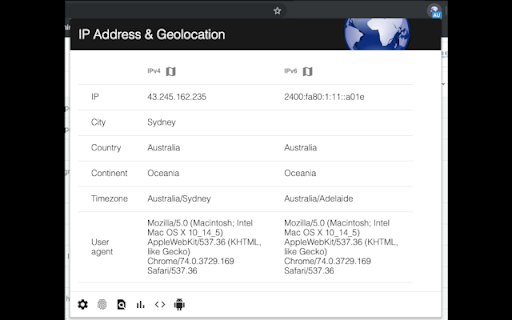
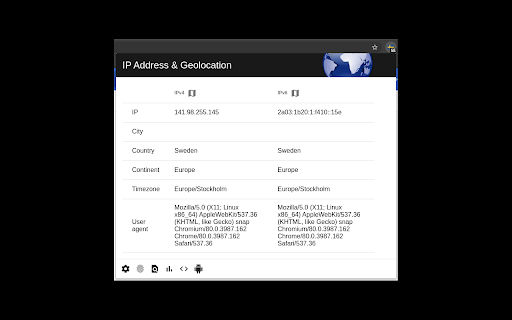
Shows your IPv4 & IPv6 address and also geolocational informations about your IP addresses. A badge of your current country is shown on the icon, which will refresh every 3s. So you can easily see, if you have a broken VPN or proxy connection when the country-code changes unexpectedly. Additionally a notification appears on your desktop when one of your IP addresses (IPv4 or IPv6) has changed - of course, it can be turned off in settings. You can also display your position on a map by clicking the corresponding button next to the IP address. Your user agent is shown in the entries as well. Please feel free to contribute at GitHub: https://github.com/AykutCevik/Geolocate-IP-Browser-Extension The request to the server to obtain your geolocational information is secured at least with TLSv1. Also Perfect Forward Secrecy is enabled.

MyIP - ip address and location details
This extension displays your public IPv4 address, provider name and some location. The MyIP extension displays the current IP address, approximate location and some provider information. It show some details like: ip address, provider name and the region by ip address. You can copy the ip address by clicking the ip and press crtl+c It's open source: https://codeberg.org/turbopixel/MyIP-Browser-Extension

Highlight This: finds and marks words
Automatically finds and highlights words and phrases on the web page according to your list - No registration required - Organize your search words in groups and lists - Use Regular Expressions (Regex tokens) - All data stored locally - Auto-refreshes highlights on page reload and content changes - Unlimited words and lists - Synchronise lists between your browsers Highlight This! comes: - as a Free version, limited to 200 words and limited highlighting styles - an Unlimited version with affiliate partner link highlighting https://highlightthis.net/PartnerLinks.html - 2 paid versions. Easy to use Chrome Extension that automatically searches for defined words in the current browser tab and marks them in a text. Many more advanced features available through settings: - Create color-coded keyword lists - Disable highlighting on certain sites - Export or import your settings and keyword lists - Define click action - Use lists from Pastebin, Google Sheets ** New in 6.3.10 - Fix: Issue with lookbehind regex ** New in 6.3.7 - Fix: Minor fix in detecting words after lower quotation marks - Fix: Incorrect highlighting with Regular Expressions that contain \b ** New in 6.3.6 - Fix: lists are not sorted anymore - Fix: breaking highlights due to specific control for "flex" containers ** New in 6.3.4 - Fix: an issue with sequence of Regex words - Fix: an issue with invalid characters in a wordlist - New: You can now order lists of words to give priority in highlighting if there are duplicate words ** New in 6.3.1 - Fix: zip file issue when installing extension ** New in 6.3 - New: Better support for languages which have no spaces or punctuation between words - New: Better support for languages with diacritics - Fixed: Sync with Google Sheets has been fixed ** New in 6.2.3 - New: You can now put a border around input fields if there is a matching word inside ** New in 6.2.1 - Fixed: an issue with highlighting in shadow-root elements ** New in 6.2 - New : Improved performance on large webpages - Fixed: an issue whereby words could disappear while filtering the list of words ** New in 6.0.10 - Fixed: an issue with highlighting of web components - Fixed: an issue with look behind regular expressions ** New in 6.0.6 - Fixed: highlighting on Single Page Apps - New: Form to send a bug to the developer ** New in 6.0.5 - Fixed: issue with corrupted synchronized lists which breaks the rendering of the lists ** New in 6.0.4 - Fixed: issue with restoring backups - New: ability to reset all data and settings ** New in 6.0.1 - Fixed: issue with transforming Synchronized lists ** New in 6.0.0 - Extra styles for highlighting : Bold, Italic, Underline - Ability to change highligting by selecting rounded corners, padding, shadow - Ability to define a zone on a page for highlighting - Switch to Manifest v3, which better protects user security - Subscriptions - Fixed: speed of editor - Fixed: various small issues with remote lists ** New in 5.3.6 - Fixed: an issue with scrolling to highlight tags ** New in 5.2 - Define click actions for highlighted words - Support for loading words from Google Sheets - Define download frequency for remote lists - Fixed: Negative reverse lookup regex - Fixed: Issue with Highlight overview - Fixed: Issue with download button ** New in 5.1 - Support for case sensitive matching - Manage words from context menu ** New in 5.0 - New editor to manage your words (filter, select, delete, move) - Support for Regex tokens ** Define words ** Easily specify words and phrases you want to be highlighted. ** Highlighting ** Highlights the words and phrases on the page Shows how many words have been highlighted ** Works on Ajax pages ** The extension detects changes to the page and re-highlights the words.

Show My IP Addresses
Show all of your local and external (IPv4 & IPv6) addresses Version 1.2.0 Updates: - Fixed issue where external IP addresses were not being displayed - Optimization for quicker load (We had a pesky one second delay that we couldn't stand) - Shrunk the size of the extension by 43% thanks to those optimizations! See all of your local and external IP addresses (IPv4 & IPv6) without being sent to another website! All IP addresses are shown in the extension popover when you click on the icon. Please post suggestions and reviews!

What is My IP Address
View your public ip address via toolbar popup. What is My IP Address is an extension that lets you view your public IP address in the toolbar popup UI. By default, no server is selected. Please open the UI and select a desired server from the list. Two types of servers are available in the list, HTTP or STUN. STUN servers use WebRTC technology to find your IP address. HTTP servers use fetch API to obtain the IP address. In general, all third-part servers should show a similar IP address. But, in some situations, they might show different IP addresses. All changes in the popup UI are auto-saved to the memory. Note: this addon uses several third-party API engines to render your IP address. Please note that, unless you select a server, this addon does NOT interact with any third-party website/service at all. Moreover, it does NOT store your IP address or any other information in any remote location. However, third-party servers (HTTP or STUN) have their policy and rules for storing IP addresses. Therefore, before using any server, please read their privacy policy. This addon does NOT have any control over their privacy policies. To report bugs or suggest a feature request, please fill the bug report form on the addon's homepage (https://mybrowseraddon.com/ip-address.html).
