
lfhnlieoomhlancdfhihpopgkiekbefd
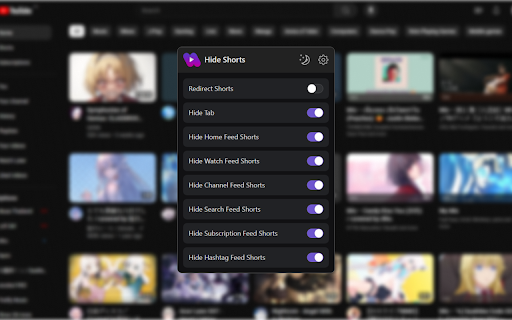
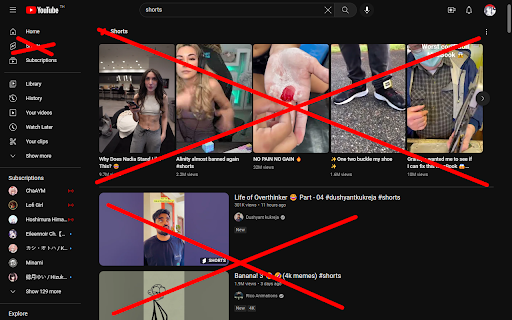
A chrome extension for hiding all shorts on YouTube Source code: https://github.com/sapondanaisriwan/hide-shorts-for-youtube Changelog:https://github.com/sapondanaisriwan/hide-shorts-for-youtube/blob/main/CHANGELOD.md Bug Report: https://github.com/sapondanaisriwan/hide-shorts-for-youtube/issues

Doomscroll protection
Extension for YouTube shorts to disable (doom)scrolling This extension prevents users from scrolling through YouTube shorts, allowing only the first to be viewed. It's helpful for people who find themselves watching YouTube shorts endlessly, and would rather not be doomscrolling.

Urban Abodes Posting Tool
Extension that allows for an effortless and rapid method to post apartments to various websites. This extension allows Urban Abodes Agents to rapidly post attractive apartment ads complete with pictures.

Hide Shorts
A Chrome extension that filters out YouTube Shorts content to provide a distraction-free browsing experience. Hide Shorts: Elevate Your YouTube Experience with a Simple Toggle In today's digital landscape, the luxury of choice is often overlooked. Enter Hide Shorts—a Chrome extension by Quiply designed to empower users in curating a personalized YouTube experience. With a simple ON/OFF button, this extension aims to eliminate distractions and enhance your online journey, making it perfect for those who value focused content consumption. What Does Hide Shorts Do? Hide Shorts comes with a straightforward ON/OFF toggle that works seamlessly in the background to filter out YouTube Shorts from your search results and suggested videos. When toggled ON, you won't see a single short video, allowing you to zero in on the content that truly matters to you. Whether you're a student seeking educational material, a professional in search of industry knowledge, or an individual who simply prefers long-form content, Hide Shorts promises a tailored YouTube experience. Why Should You Install Hide Shorts? Simplicity: With an easy-to-use ON/OFF button, controlling your YouTube experience has never been more straightforward. No complicated settings or configurations. Prioritize Your Interests: Choose what deserves your attention by filtering out short-form distractions, and engage with content that aligns with your goals. Boost Productivity: Minimize disruptions and stay on track by removing irrelevant content, allowing for a focused and efficient browsing experience. Enhanced User Experience: The extension not only removes distractions but also optimizes your search results, making your YouTube experience more meaningful and aligned with your needs. Time Efficiency: Avoid endless scrolling and wasted minutes. Hide Shorts lets you get straight to the content you're interested in, saving you valuable time. Adaptable: Tailor your online space according to your preferences. Whether you're a digital minimalist or a power user, Hide Shorts is versatile enough to meet a wide range of needs. How Does It Work? Installing Hide Shorts is a breeze. Once the extension is active, a simple ON/OFF toggle will appear in your browser. This button gives you full control over the extension's feature: when toggled ON, YouTube Shorts are automatically filtered out from your search results and recommended videos. You can easily toggle it OFF whenever you want to see Shorts again. Your Experience, Your Choice Hide Shorts is not just a product; it's a tool that gives you the agency to shape your digital environment. In a world increasingly driven by attention-grabbing algorithms, this Chrome extension serves as a breath of fresh air—a means to reclaim your focus and digital well-being. Embrace the luxury of a personalized, distraction-free YouTube experience. Install Hide Shorts today and be in complete control of your online life.

Hide shorts for Youtube™
Hides shorts from YouTube™ from home page, subscriptions and search results. Hides shorts videos from the YouTube website from its homepage, subscriptions, search results. It can also hide "Shorts" tab. Additional options: - hide videos only on specific pages (home/subscription/channel/search page) - hide shorts tab - setting a timeout to not allow checking for shorts more often than a specified time (to reduce calling hiding shorts function to reduce page load) - a button to close a section with shorts located on the subscriptions page - hiding shorts in notifications menu - hiding videos that are shorter than specified time (experimental; off by default) - hiding live videos (experimental; off by default) - hiding 'upcoming' videos (experimental; off by default) - redirect shorts to original video player (experimental; off by default; requires "tabs" permission) - hiding posts on m.youtube.com (experimental; off by default) - hiding YouTube's "playables" (experimental; off by default) - user can define own query selector for hiding elements
