
ankepacjgoajhjpenegknbefpmfffdic
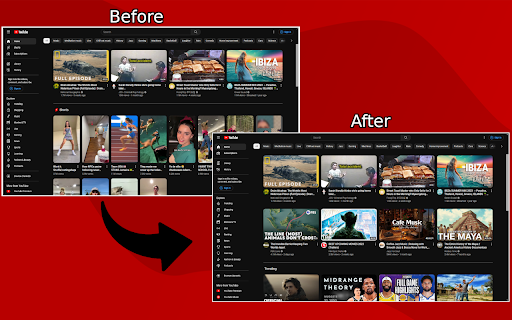
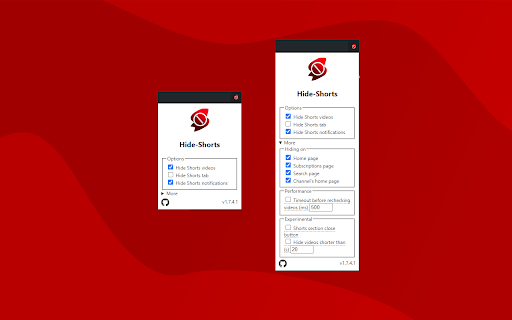
Hides shorts from YouTube™ from home page, subscriptions and search results. Hides shorts videos from the YouTube website from its homepage, subscriptions, search results. It can also hide "Shorts" tab. Additional options: - hide videos only on specific pages (home/subscription/channel/search page) - hide shorts tab - setting a timeout to not allow checking for shorts more often than a specified time (to reduce calling hiding shorts function to reduce page load) - a button to close a section with shorts located on the subscriptions page - hiding shorts in notifications menu - hiding videos that are shorter than specified time (experimental; off by default) - hiding live videos (experimental; off by default) - hiding 'upcoming' videos (experimental; off by default) - redirect shorts to original video player (experimental; off by default; requires "tabs" permission) - hiding posts on m.youtube.com (experimental; off by default) - hiding YouTube's "playables" (experimental; off by default) - user can define own query selector for hiding elements

Hide Shorts for YouTube
A chrome extension for hiding all shorts on YouTube Source code: https://github.com/sapondanaisriwan/hide-shorts-for-youtube Changelog:https://github.com/sapondanaisriwan/hide-shorts-for-youtube/blob/main/CHANGELOD.md Bug Report: https://github.com/sapondanaisriwan/hide-shorts-for-youtube/issues

Clean YouTube: Block Shorts, Hide Comments & Feeds
YouTube Distraction-free. Remove Shorts, Recommended Videos, Thumbnails, Comments and other Distractions. Clean YouTube is a browser extension that removes distractions from YouTube, including recommended videos, shorts, video suggestions at the end, comments, the homepage, the popular tab, disabling autoplay or annotations, and much more. Toggle settings via a pop-up window to personalize YouTube! Focus on the YouTube content you love without distractions! Make your YouTube clean and minimalistic. Clean YouTube — the ultimate YouTube Enhancer for focus and productivity. With Clean YouTube, you can: 💪 Remove Distractions: Hide shorts, comments, and recommended videos that take away from your viewing pleasure. 🧩 Customize Your View: Use only one video player without any distracting elements on the page. Try a Clean Mode in which there is only a video player on the page. Remove YouTube distractions and customize the user interface with options. Features: ✅Clean Mode - Show only Video Player on Page ✅Black and White Mode ✅Hide Home Feed ✅Hide or Blur Thumbnails ✅Hide Related (Recommended) Videos ✅Hide Explore, Trending ✅Hide Shorts ✅Hide Comments ✅Hide Subscribe Button ✅Hide Likes ✅Hide Views ✅Hide Playables ✅Hide Live Chat ✅Hide Top Header Bar ✅Hide the Top Bar including Search Box ✅Hide Subscriptions ✅Disable Autoplay ✅Disable End Screen Cards Streamline your YouTube experience with Clean YouTube – the essential extension for a cleaner, more enjoyable video watching experience. Feel free to contact me if you want to see any features in the next releases. Extension doesn't track any information about you and does not send data anywhere.

ShortsBlocker - Remove Shorts from YouTube
SHORTSBLOCKER CHROME EXTENSION ===================================== This extension removes all Shorts videos from the YouTube homepage, tabs, search, explore, and subscriptions. Good news! The free version of ShortsBlocker continues to work exactly as before. All core Shorts blocking functionality remains completely free for personal use. Free Features: * Blocks Shorts across YouTube * Lightweight, fast, and easy to use * No account required Premium Features: * Advanced customization settings * Daily Shorts limit (control how many Shorts you can watch per day) * Scheduled blocking (block Shorts on selected days and times) * Channel whitelist (allow Shorts only from selected channels) * Blocked Shorts statistics (today, weekly, total) with time-saved tracking * More premium features coming soon Please Note: The free version works great for most users and will continue to be maintained and updated. Only purchase premium if you need advanced customization. * Unauthorized commercial or institutional use violates our Terms of Service. * Personal, non-commercial users are welcome to continue using ShortsBlocker for free. ===================================== UPDATE 3.6.1 ===================================== * YouTube is changing the way Shorts are displayed, which broke the extension. * Fixed various bugs and stability issues. 👉 Please report any bugs you encounter so I can address them quickly. Love the extension? Give us a rating! ===================================== FAQ ===================================== 1. What information do you collect? * We do not collect any personal data from free users. Premium users require basic account information for authentication purposes only. 2. Do I need the premium version? * Most users are completely satisfied with the free version. Only upgrade if you need the advanced customization options. * Businesses, schools, or universities: License required. ===================================== CHROME PERMISSION JUSTIFICATION ===================================== 1. Single purpose: The extension runs on YouTube.com and adds additional features. 2. Host Permission: Used to access information and run content scripts on the YouTube website. 3. Storage Justification: Used to access and store extension settings that users can toggle manually using the popup interface.

Hide Shorts
A Chrome extension that filters out YouTube Shorts content to provide a distraction-free browsing experience. Hide Shorts: Elevate Your YouTube Experience with a Simple Toggle In today's digital landscape, the luxury of choice is often overlooked. Enter Hide Shorts—a Chrome extension by Quiply designed to empower users in curating a personalized YouTube experience. With a simple ON/OFF button, this extension aims to eliminate distractions and enhance your online journey, making it perfect for those who value focused content consumption. What Does Hide Shorts Do? Hide Shorts comes with a straightforward ON/OFF toggle that works seamlessly in the background to filter out YouTube Shorts from your search results and suggested videos. When toggled ON, you won't see a single short video, allowing you to zero in on the content that truly matters to you. Whether you're a student seeking educational material, a professional in search of industry knowledge, or an individual who simply prefers long-form content, Hide Shorts promises a tailored YouTube experience. Why Should You Install Hide Shorts? Simplicity: With an easy-to-use ON/OFF button, controlling your YouTube experience has never been more straightforward. No complicated settings or configurations. Prioritize Your Interests: Choose what deserves your attention by filtering out short-form distractions, and engage with content that aligns with your goals. Boost Productivity: Minimize disruptions and stay on track by removing irrelevant content, allowing for a focused and efficient browsing experience. Enhanced User Experience: The extension not only removes distractions but also optimizes your search results, making your YouTube experience more meaningful and aligned with your needs. Time Efficiency: Avoid endless scrolling and wasted minutes. Hide Shorts lets you get straight to the content you're interested in, saving you valuable time. Adaptable: Tailor your online space according to your preferences. Whether you're a digital minimalist or a power user, Hide Shorts is versatile enough to meet a wide range of needs. How Does It Work? Installing Hide Shorts is a breeze. Once the extension is active, a simple ON/OFF toggle will appear in your browser. This button gives you full control over the extension's feature: when toggled ON, YouTube Shorts are automatically filtered out from your search results and recommended videos. You can easily toggle it OFF whenever you want to see Shorts again. Your Experience, Your Choice Hide Shorts is not just a product; it's a tool that gives you the agency to shape your digital environment. In a world increasingly driven by attention-grabbing algorithms, this Chrome extension serves as a breath of fresh air—a means to reclaim your focus and digital well-being. Embrace the luxury of a personalized, distraction-free YouTube experience. Install Hide Shorts today and be in complete control of your online life.
