
lenfpplmnjplgfmcbahplpjpbfbbhnfp
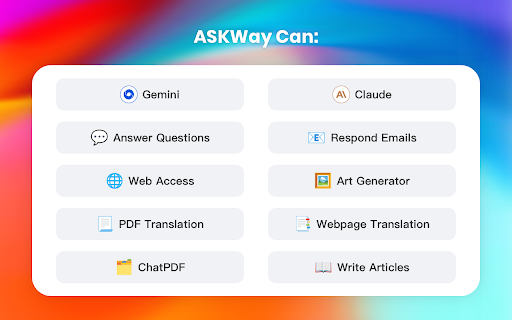
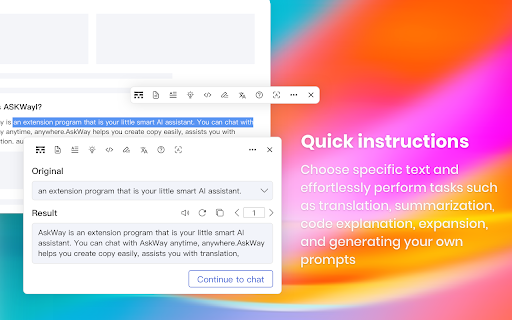

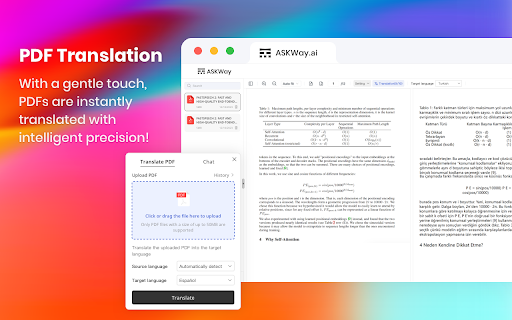

Your AI assistant for work and life ASKWay is an advanced AI model extension assistant (GPT-4, etc.) that integrates features such as writing, coding, PDF translation, web page translation, email responses, and is compatible with all browsers. 💡 Press cmd+i (macOS) or ctrl+i (Windows) to quickly summon the sidebar. 📌 Web access: ASKWay supports real-time networking data. 📌 Easy Chat: Open the sidebar and have a smooth conversation with ASKWay to answer your questions. Our chatbot is powered by GPT-4, which is far more intelligent than GPT-3.5. ✅ 📌 Intelligent Search: ASKWay intelligently answers in real time alongside search results such as Google and Bing, making your search experience more intelligent.✅ 📌 Copywriting: With ASKWay's artificial intelligence function, it is easy to write advertisement copy, so that you can get the best presentation of your creativity. ✅ 📌 Prompt Library: We provide a large number of prompt libraries based on GPT-3.5 and GPT-4 to help you get creative inspiration and guidance. ✅ 📌 Shortcut command bar: Select any text on the web page, ASKWay convenient shortcut commands to speed up the process of creating your text, including explanations, summaries, translations, code interpretations, rewriting and so on. ✅ 📌 Webpage translation: Intelligent web page translation, real-time translation, instant and effortless crossing of language barriers! Supports 30+ languages. ✅ 📌 PDF Translation: Display source text and translation side by side, one-click translation, making language barriers in PDF files a thing of the past! ✅ 📌 Email Reply: ASKWay intelligently analyzes emails and generates a variety of personified replies with just one click, helping you effortlessly handle email communication.✅ 1️⃣ What is ASKWay? ASKWay is an innovative Chrome extension fueled by the ChatGPT. It serves as a catalyst for your creativity, boosting productivity and empowering you to take control. With ASKWay, you can conveniently select any text, effortlessly translate it, summarize it, explain it, or perform a variety of other actions right from the sidebar! 2️⃣ How to use ASKWay? Once you have installed the ASKWay extension in your Chrome browser, simply initiate a conversation by pressing Cmd+i (macOS) or Ctrl+i (Windows). Let ASKWay become your creative ally as you navigate any website. By selecting text on a web page, ASKWay can assist you with various tasks such as translation, interpretation, rewriting, and more, providing you with a seamless and empowering experience. 3️⃣ How to update the ASKWay extension? Open the Chrome browser - Go to Settings - Manage Extensions - Update. 4️⃣ Is ASKWay free to use? Yes, ASKWay is free and each user has a fixed number of daily usage. However, if you want to use it without limitations and unlock advanced features, please feel free to check out our paid subscription plan at any time! 5️⃣ Do I need a ChatGPT/OpenAI account? No, you do not require a Chat GPT/OpenAI account to utilize this extension. You can freely access and use it by signing up with any email address of your choice. 6️⃣ Has ASKWay launched a mobile application? Yes, we have released iOS and Android versions, which are available for download on the App Store and Google Play. 7️⃣ What search engines does ASKWay currently support? At present, ASKWay supports popular search engines like Google and Baidu. However, we are continuously expanding our support and aim to include additional search engines in the future. Keep an eye out for updates as we strive to enhance your browsing experience! 💡 Contact Us:If you have any questions or any suggestions, Please contact us at cs@askway.ai 💡 Join our community and stay updated on our latest developments! 😍 Twitter: https://twitter.com/ASKWay_AI 😍 Discord: https://discord.gg/cZzYrxCkwt 😍 YouTube: https://youtube.com/@ASKWay_AI?si=4deE9AOTVDSbGrta

ChatGPT, Bing & Bard For Chrome: Kursor
Discover an unparalleled web browsing experience with Kursor, the comprehensive solution for all your online communication needs. Summarize, translate, rephrase, correct grammar, and create content with just one click. Experience the future of web surfing with Kursor, powered by GPT-AI ! Kursor utilizes the power of OpenAI's GPT- AI to revolutionize your browsing, ensuring seamless integration and the latest technology. 💸 100% Free and Unlimited Use Kursor is entirely free to use, with no restrictions on the number of searches you can perform. 🖱️ One-Click Functionality Effortlessly select any text on the web and access Kursor's powerful features like summarizing, translating, rephrasing, and grammar correction with just one click. 🔎 ChatGPT for LinkedIn: Gain valuable insights into job opportunities by seamlessly integrating LinkedIn's job data, helping you stay informed and connected in the professional world. 🌐 50+ Language Translations Translate text into over 50 languages, breaking down language barriers and accessing content from around the globe. 🎭 10+ Tonalities for Rephrasing Rephrase text in more than 10 different tonalities, giving your content a unique and customized feel. 💬 AI-Driven Chat Ask questions and resolve queries instantly with our AI chat window powered by ChatGPT. 📝 Versatile Composition Functionality Compose emails, messages, paragraphs, tweets, articles, or blog posts with specified objectives, length, and tone. 🔥 Easy Access to Third Window Open the third window effortlessly using cmd + shift (for Mac) / ctrl + shift (for Windows). ⚡ Swift Response Time Enjoy smooth and timely responses with our seamless integration of GPT technology. 📧 Contact Us for Support Reach out to our team anytime at contact@kursor.in for any assistance or inquiries. Install Kursor now and elevate your web browsing experience with the power of ChatGPT!

AI Assistant for Chrome | SidebarGPT
Access AI language model everywhere with SidebarGPT for Chrome. Enhance writing and communication skills with AI tech. SidebarGPT - AI Assistant for Chrome is a powerful browser extension that brings the convenience and efficiency of virtual assistant technology to your web browsing experience. By installing this extension, you can easily access AI, a cutting-edge language model that has been trained by OpenAI, as a sidebar on every website you visit. With AI by your side, you can get quick and accurate answers to all of your questions, without ever having to leave the website you're on. Whether you need help with a complex research topic, want to know more about a particular product or service, or just need some general advice or guidance, AI is there to help. One of the great things about this extension is how easy it is to use. Simply type in your question or query, and AI will use its advanced natural language processing capabilities to provide you with a response. The assistant is designed to be highly intuitive and responsive, so you can get the information you need quickly and easily. Another benefit of using this extension is that it can help you save time and be more productive. Instead of wasting time searching for answers on different websites or trying to navigate complex research topics on your own, you can rely on AI to provide you with accurate and useful information, all from the comfort of your web browser. Overall, the SidebarGPT - AI Assistant for Chrome is an incredibly useful tool for anyone who wants to improve their web browsing experience and get more done in their day. With its advanced features and intuitive design, this extension is a must-have for anyone who wants to stay informed and up-to-date in today's fast-paced digital world.

FunBlocks – Your All-in-One AI assistant | Sidebar | Monica
Available anywhere. Write emails, optimize text, assist with writing, read articles, answer complex questions, boost thinking skills Overview: Your AI Assistant powered by Gemini-3.1, Claude-4.6, GPT-5. Answers complex questions. Writes emails, reads articles, summary youtube, optimize writings. Usable everywhere. We offer assistance in various tasks including researching, reading, writing, translating, exploration, critical thinking, and more. Also support generate mindmap from web page texts, PDFs or youtube video subtitles. 💪 Key Features: 👉 Write: ✔️Compose: use 'compose' for quick, tailored writing of emails, blogs, social media posts, and more, with control over size, style, and tone. ✔️Write agent: provide a topic, and we'll auto-draft outlines with expanded content and references. ✔️Email reply: in Gmail/Outlook, we suggests reply options based on email content, allowing click-based responses without typing. ✔️Social reply: in popular social platform, we suggests reply options based on posts or comments, allowing click-based responses without typing. ✔️Grammar check: helps you find the words you need to write that tricky email, to get your point across, to keep your work moving. 👉Read and Summary ✔️Chat With Image: upload an image or screenshot and ask questions, powered by GPT-4V, Claude, and Gemini pro. ✔️Webpage Summary: get summaries and highlights without reading entire webpages. ✔️YouTube Summary: get summaries without watching entire videos. ✔️Error and Bias Detection: identify misinformation and biases for a more accurate understanding. ✔️Question Extraction: extract critical questions to deepen comprehension and thinking. 👉 Generate Mind Maps Instantly ✔️For quick understanding and deep exploration ✔️From web page texts, PDFs, YouTube videos, screen-shots and images ✔️More expressive and interactive than plain text 👉Translation ✔️Text Translation: translate selected text on webpages instantly. ✔️Writing Translation: write in your native language, then effortlessly polish and translate it into any language of your choice. 👉 Explore: ✔️AI Mind Flow: Elevate your thinking and creativity with AI-powered visual tools. ✔️Innovative Reading: Dive into articles and ideas using a mind-map approach, driven by LLM. ✔️Topic Breakdown: Receive AI-driven support for brainstorming and mastering any topic. ✔️Question Generation: Expand your thinking with AI-generated, insightful questions. ✔️Visual Exploration: Visually navigate and explore topics through intuitive mind-mapping tools. 👉 AI Memo: ✔️Memo is an AI knowledge base where you can save webpages, content clips, chats. It enable you save generated results from the AI assistant with a click. As it grows, we can offer more tailored and accurate responses for you. ✔️Further, at FunBlocks workspace, it offers a note-taking and writing experience similar to Notion. 👉 Prompt Library: ✔️Customize your AI Assistant by writing or adding any prompts to your toolkit, making it your personal tailored assistant 🎯 Complimentary Access: ✔️Use FunBlocks AI Assistant for free if you have an API Key from any major LLM provider, including OpenAI ChatGPT 4, Anthropic Claude 3.5, Google Gemini 1.5 Pro, or Groq Mixtral-32k & Llama3. ✔️FunBlocks AI also provides ready-to-use LLM services—just log in to access them, with daily free usage limits. 💻 How to uses: 🔸Click the "Add to Chrome" button and pin it to the toolbar. 🔸Log in to your account. 🔸Wake up FunBlocks at any page with text selection or from sidebar. 🔸Start working with AI! 🔥 Benefits: ✔️Save time and effort by automating writing and reading tasks. ✔️Improve writing skills by learning from the AI's suggestions and examples. ✔️Communicate more effectively with clear, concise, and persuasive content. ✔️Become a more informed and critical reader, able to discern facts from opinions and misinformation. ❓ Frequently Asked Questions: 📌 Do I need a ChatGPT/OpenAI account? - No, you do not need to have a ChatGPT account to use this extension. You can create a free account and then use with all mainstream LLMs, not limited to OpenAI ChatGPT. 📌 ChatGPT is banned in my country. Does it work in my country? - Yes. Our extension works in all countries. 📌Is it free to use? - Yes, we offer limited use for free. For unlimited access, you can choose the Premium Plan. - Or, you can use it for free with your self-owned LLM API Keys from OpenAI GPTs, Claude, Gemini, Llama, or any OpenAI compatibles APIs. 📌Do I need to pay for using my own LLM API Key? - No, you just pay the service provider for using their API Key, without any additional charges from this Extension. 🔥 FunBlocks AI is the ultimate productivity tool for students, writers, researchers, and anyone who wants to study, work and communicate more effectively. It helps you think critically, understand and evaluate information wisely, communicate and express confidently. 📪 Contact us: Any questions or suggestions? Please contact us at feedbacks@funblocks.net Try it now and experience the powerful features of LLM-driven AI assistants!

AIChatOne : AI ChatGPT Copilot (ChatHub tools)
Your AI Copilot powered by ChatGPT. Answers complex questions. Writes emails, reads articles, searches smartly. Usable everywhere. Your AI Copilot powered by GPT-5 offering you use all popular Chat LLMs with enhanced features like fast response, Integrated with Google web search, Chat search, AI characters, Prompt library, etc. You can chat with Multiple LLMs at the same time to get the best answer, and you can ask AI anything in the sidebar, Supports webapp, OpenRouter, Azure and API 🔥 AIChatOne is your all-in-one GPT-5 AI assistant. Hit Cmd/Ctrl+B to open sidebar or Cmd/Ctrl+M to open full chat page, and you're in with AIChatOne. AIChatOne offers assistance in various tasks including searching, reading, writing, translating, and more. 💪 The Key Features: 👉 Chat with AI ✔️ Multi chatbots support: chat with the different LLM models such as GPT-4, Gemini, Claude3, Perplexity etc all in one place and compare their results side by side. ✔️ Custom AI Characters: Built-in AI characters and Create your own custom AI Characters that perform a specific task ✔️ Prompt Library: a prompt base that offers a large number of prompts; just hit '/' to quickly access your saved prompts. ✔️ Real-Time Web Access: AIChatOne can answer with the latest internet info. ✔️ Voice Input and Output Support: using microphone button to communicate with the AI in multiple languages. ✔️ Chat Folders: Stay organized by creating your own Chat folders 👉 Chat and Summary ✔️ Chat with doc: Instantly feed the AI important context by uploading a doc file right into the chat and quickly grasp the core highlight. ✔️ Chat with Image: take a screenshot or upload an image and ask questions based on the content of the image, powered by GPT-4V. ✔️ Webpage Summary: get accurate summaries without having to read entire webpage articles or information. ✔️ YouTube Summary: generate a concise and accurate summary for your convenience in seconds. 📝 Writing Assistant: ✔️ Social writer: for Twitter、Reddit. Your best assistant, using AI when editing posts or replying ✔️ Write agent: just provide a topic, and AIChatOne can automatically draft outlines for you, expanding the content with references. Use it in any editbox on a webpage(Coming soon!) ✔️ Email reply: in Gmail、Outlook, AIChatOne analyzes emails content and suggests reply options, enabling you to send appropriate responses with just a click, no typing needed. (Coming soon!) 👉 Search ✔️ Powerful search and filter so you can find any of your previous chats instantly ✔️ Get AI search results in the sidebar when use google , bing , duckduckgo etc 👉 Powerful Sidebar ✔️ Ask AI anything in the sidebar 👉 Customizable ✔️ Dark Mode: Toggle between light and dark mode. ✔️ Adjusting response “temperature”. ✔️ Theme. 👉 Secure & Respect Your Privacy ✔️ Api keys encrypted and stored locally. No in-app analytics. No middle servers. Your prompts are sent directly to OpenAI 💻 How to use AIChatOne: 🔸 Click the ""Add to Chrome"" button in the upper right corner and pin it to the toolbar for easy access. 🔸 Simply hit Cmd/Ctrl+B to open sidebar or Cmd/Ctrl+M to open full chat page ,then start chatting with her. ❓ Frequently Asked Questions: 📌 What search engines are supported by AIChatOne? Currently, AIChatOne supports Google, Bing, DuckDuckGo and more search engines will be supported in the future. 📌 Do I need a ChatGPT/OpenAI account? Yes, we do not provide an OpenAI API key. 📌Is AIChatOne free to use? Yes, most features of AIChatOne is free to use, and we also have premium plans. 📪 Contact us: Any questions or suggestions? Please contact us at 💌 product@aichatone.com. Try AIChatOne now and experience the powerful features of ChatGPT-driven AI assistants! 🚀 The Ultimate All-in-One Extension for Unprecedented Productivity: AIChatOne AI Assistant Embark on a quantum leap in productivity with AIChatOne AI Assistant, a revolutionary tool that amalgamates an extensive suite of features comparable to some of the most prominent AI platforms and tools available today. This powerhouse integrates cutting-edge technology and up-to-date data, harnessing the capabilities of renowned models such as OpenAI, and Gemini AI. Picture the synergy of Bing Chat, the all-encompassing functions of Merlin and Monica, the chat with all LLMs power of ChatHub, the AI capabilities akin to Jasper.ai, and the versatility of Sider's toolkit—all seamlessly rolled into one.
