
leknmnfccgpmjkccjhbamjhehlgefifj
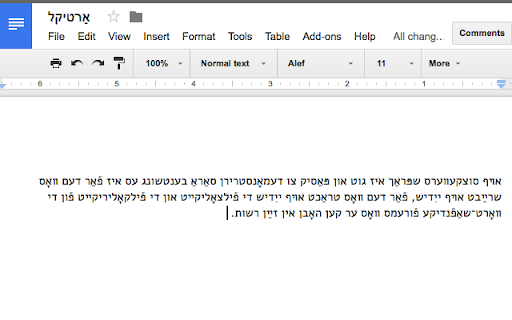
A phonetic (QWERTY) keyboard layout for Standard Yiddish. This extension installs a Standard Yiddish keyboard layout on your ChromeOS device. (If you are not using a Chromebook, but simply want to type in Yiddish in your Chrome browser, you should install this excellent transliteration-based extension: https://chrome.google.com/webstore/detail/yiddish-typer/higlebidpnhccabnhankdoiiccnnfkko) Yiddish Klal is based on a layout built for Mac. See instructions here: https://www.isaacbleaman.com/resources/yiddish_typing/ Note that the commands using Alt are not included in this version. Also, the Caps Lock feature is disabled (since Chromebook is missing a Caps Lock button). Once you've installed the extension, sign out of your Chromebook and then sign back in. Then go into your system settings, type "language" into the search bar, and click "Language and input settings..." Unfortunately, because Chromebook lacks native support for Yiddish, the keyboard can be found under English (United States). Select "Yiddish Klal" as an input method and click through to accept the third party terms (contrary to the warning, all this app does is take your keystroke and print out a Yiddish character; nothing is saved, and the app is completely offline). Finally, click "Done." I also recommend hiding the Yiddish Klal icon from your Chrome browser menu, since it doesn't do anything. Right click (or click with two fingers) on the Yiddish Klal icon and then "Hide in Chrome menu." To switch between Yiddish and other keyboards, click Ctrl + Shift + space. Updates: 0.5 - Update for Manifest V3 0.2-0.4 - bug fixes (and the "|" key now creates em-dash)

Yiddish Typer
This extension pops up a window where you can type in Yiddish without needing any other software. This extension allows you to type in Yiddish without needing any other software or installing any other keyboards on your computer. Simply type Yiddish phonetically and the correct letters will appear. Basically, you type in YIVO transcription and it outputs the correct Yiddish: typing 'sh' produces a ש, 'ay' produces ײַ, etc. Shtumer-alef and the final forms of khof, mem, etc. are automatically produced correctly. In addition to YIVO-compatible output, there is an option for an alternative orthography as used by the Algemeiner Zhurnal. The functionality is closely modeled -- with a few minor modifications -- on that of the "Yiddish Pasekh" keyboard designed by Gyula "Ziggy" Zsigri for use with the software utility "Keyman". Inspired by the work of Noyekh Miller, Shoshke-Rayzl Yuni, and Refoyel Finkl. Please let me know about any bugs you find and any features you'd like to see by using the support options on the extension page. Changelog: 0.8 -- added more robust backup functionality 0.7 -- khirek-yud/shtumer-alef now added after tsvey-yudn (e.g., shneyik) 0.6 -- in accordance with new security features removed inline javascript. updated jquery. 0.5.0 -- added option to choose between "YIVO style" orthography and "Algemeiner style" -- where the latter differs from the former in that it employs the shtumer alef (rules taken from Dovid Katz's grammar), does not use the rafeh or pasekh-tvey-yudn, as well as some other minor changes. Also tried to fix some bugs. 0.4.2 -- changed Twittify function name to Condense since it's actually useless in Twitter (their/Unicode's fault, not mine), fixed a bug that was inserting khireks in some cases extraneously, changed font of textbox 0.4.0 -- added Twittify button, updated hints, fixed css bugs 0.3.0 -- added full screen option, hints page, and checkbox to turn on/off Yiddish letters.

Techloq
Users of Techloq Parental Control Software can easily login/logout of their personal Techloq filter profile and request filter… Users of Techloq Parental Control Software can easily login/logout of their personal Techloq filter profile and request filter profile changes when needed directly from browser. This extension is only to be used in conjunction with Techloq Parental Control Software.

TAG Image Filter
The TAG Image Filter blocks out skin color when it senses any skin colors in an image. This way you can surf safely without accidentally seeing any adult images and not modest pictures. *Comments and Feedback* • We regularly monitor this google form, for your comments and feedback https://forms.gle/XeepEpexzu8tWTr26 Always on (Default) - • By default the filter is on for every website. Use the options to enable/disable different filter features. Note that filters currently do not wok on IFrame contents (embedded content from third parties, such as ads). You can select to hide all IFrames in the options, but this may cause issues with some normal website functionality (e.g. captcha). *Warnings* • This is not a replacement for an internet filter and should not be relied upon. It is only to provide you with an extra level of protection or for situations where you don’t have the option of installing a filter, such as your office computer. • Flash will not be blocked by the filter; you will also have to set Flash not to run automatically. To back Flash, type chrome://settings/content in the address bar, scroll down to the 'Plug-ins' section, and select 'Click to play'. • Videos will not be blocked by the filter. *Our mission* • Our mission is to help people surf safely, especially where a regular internet filter is not an option. • The extension will update itself automatically as we improve it and will always be 100% free. • This filter is donated for the hatzlacha of Moshe ben Ruth, and family. • This filter is donated for the Refuah Shelemah of Moshe Ben Chana by the Setton Family. • This filter is donated in memory of Elan Ganeles by the Simhon Family.

Sound Hints
Add pronouncing details and display non-Latin texts with Latin letters Sound Hints Browser Extension An (outdated) description at http://panlatin.blogspot.si/2017/04/panlatin-browser-extension.html
