
higlebidpnhccabnhankdoiiccnnfkko
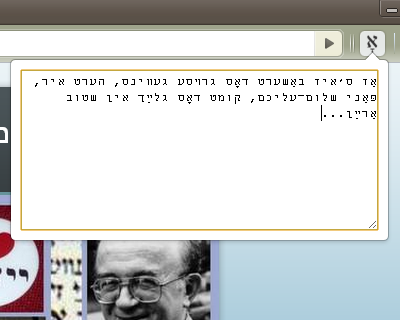

This extension pops up a window where you can type in Yiddish without needing any other software. This extension allows you to type in Yiddish without needing any other software or installing any other keyboards on your computer. Simply type Yiddish phonetically and the correct letters will appear. Basically, you type in YIVO transcription and it outputs the correct Yiddish: typing 'sh' produces a ש, 'ay' produces ײַ, etc. Shtumer-alef and the final forms of khof, mem, etc. are automatically produced correctly. In addition to YIVO-compatible output, there is an option for an alternative orthography as used by the Algemeiner Zhurnal. The functionality is closely modeled -- with a few minor modifications -- on that of the "Yiddish Pasekh" keyboard designed by Gyula "Ziggy" Zsigri for use with the software utility "Keyman". Inspired by the work of Noyekh Miller, Shoshke-Rayzl Yuni, and Refoyel Finkl. Please let me know about any bugs you find and any features you'd like to see by using the support options on the extension page. Changelog: 0.8 -- added more robust backup functionality 0.7 -- khirek-yud/shtumer-alef now added after tsvey-yudn (e.g., shneyik) 0.6 -- in accordance with new security features removed inline javascript. updated jquery. 0.5.0 -- added option to choose between "YIVO style" orthography and "Algemeiner style" -- where the latter differs from the former in that it employs the shtumer alef (rules taken from Dovid Katz's grammar), does not use the rafeh or pasekh-tvey-yudn, as well as some other minor changes. Also tried to fix some bugs. 0.4.2 -- changed Twittify function name to Condense since it's actually useless in Twitter (their/Unicode's fault, not mine), fixed a bug that was inserting khireks in some cases extraneously, changed font of textbox 0.4.0 -- added Twittify button, updated hints, fixed css bugs 0.3.0 -- added full screen option, hints page, and checkbox to turn on/off Yiddish letters.

Michael's Upgrade for TrakED
Upgraded features for TrakED in the THS. (This extension is not an official product of the THS or Intersystems TrakCare software.) Upgraded features for Trak ED in the LGH. Features: - Re-enable spell check in the triage page - Use the enter key when logging in - Handover sheet for ED Main Floor and EMU - ED Main Floor filters and persistent sort - Triage Summary print out - Filter and count results of an enquiry - Count patients currently breaching length of stay targets -- This extension is not an official product of the LGH or InterSystems Trak software.

Salesforce Shortcuts
Quickly open the most used URLs in your Salesforce Orgs. How to use it: 1) Open the extension using the "Alt + S" keyboard shortcut ("Option + S" on macOS). 2) Select your Salesforce Org with up and down arrows 3) Press "Control + 1" to open its Home page 3.a) use "Control + 2" to open Setup, or "Control + 3" to open Developer Console You can change the default "Alt + S" shortcut by opening the following URL in your browser: chrome://extensions/shortcuts 100% safe and private. No tracking and no permissions required to run. Also, completely free. There is also a version of this plugin that allows changing the colour of Salesforce Favicons: https://chromewebstore.google.com/detail/salesforce-shortcuts-with/pegpfhbecbiefakehnmehoaembjmican Features: - Allow exporting and importing of settings Improvements: - Ask for a review on 200th usage Features: - It is now possible to configure the plugin to search through all the orgs even if a tag is selected Improvements: - Minor styling improvements in Help page Fixes: - Fixed the issue where the Alt keyboard shortcuts are ignored when not using the Numeric Pad Fixes: - Fixed the issue where the Alt keyboard shortcuts sometimes didn't execute the correct shortcut Improvements: - New "Help" page with basic instructions on how to use the plugin - New "Settings" page where a different shortcut activation key can be selected (Control vs Alt/Option) Improvements: - Width of the Name cell will remain constant independent of the Name length - Improved spelling in some labels Improvements: - Reduced the size of the drop down icon in Tag selector - Added more robust handling of Salesforce domains to prevent adding duplicate orgs Features: - Orgs can now be assigned different colors - Holding down "CTRL" will show shortcut numbers instead of icons for easier use of keyboard shortcuts Improvements: - 12 new icons are available for custom shortcuts - When 7 or more shortcuts are displayed in the home page they are now not as narrow as before Improvements: - Explanation for "System" theme is provided Fixes: - Fixed the scrollbar look in Dark mode Improvements: - Moved "Delete Org" button to Reordering screen to prevent accidental deletions - Display plugin version in Settings - Added "Arrow Up" and "Arrow Down" icons for Custom Shortcuts - Added help text next to "Shortcut URL" field to make it more clear how it functions Fixes: - Fix the flickering when opening pages - Focused buttons couldn't be executed when pressing "Enter" key before. Now they can, but in order to open the selected Org "Ctrl + Enter" has to be pressed. Features: - Allow adding custom shortcuts that are applied across all Orgs - When Org is selected, pressing the "Enter" key will execute the first action - Allow reordering of Orgs

Buy Local Sunshine Coast
Boost your LinkedIn outreach with this tool. Initiate quality connections, track chats, and expand your network seamlessly. With an overwhelming number of LinkedIn connections and the rise of spam, bots, and fake profiles, business professionals on the Sunshine Coast struggle to cultivate authentic relationships. The time and effort spent sifting through superficial interactions is exhausting and unproductive. As the digital realm becomes increasingly impersonal, professionals miss out on genuine business opportunities. The core essence of networking—trust, reliability, and human connection—becomes lost amidst the noise. Without genuine connections, your business loses potential collaborations, client opportunities, and essential growth avenues. The B2B Sunshine Coast Chrome extension, in collaboration with My Most Trusted Network, is the answer. It’s tailor-made to filter out the noise and focus on what truly matters: authentic connections. Designed to bring together your trusted business community, it allows you to tap into each other’s networks, request referrals, and foster genuine collaborations. Say goodbye to spam and bots and welcome meaningful, human-centred business relationships.

brocrobes
Browser plugin for https://transcrob.es Brocrobes is the Chrome-compatible web extension for interacting with the open source foreign language content enrichment system of Transcrobes (https://transcrob.es). It allows you to take any webpage and enrich it with personalised, hypertext-based comprehension aids. It requires an existing account on a Transcrobes server. Free accounts are available at https://am.transcrob.es NEW! Now with personalised language learning support for watching many of your favourite movies on Netflix or Youku (in Mainland China)!
