
legkbfahnlgegnaciihgojmckminpgei
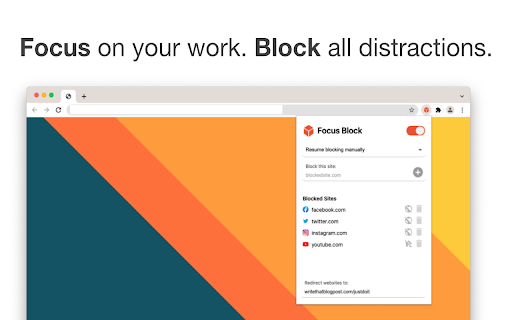
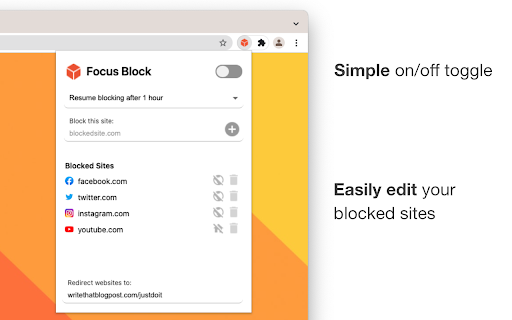
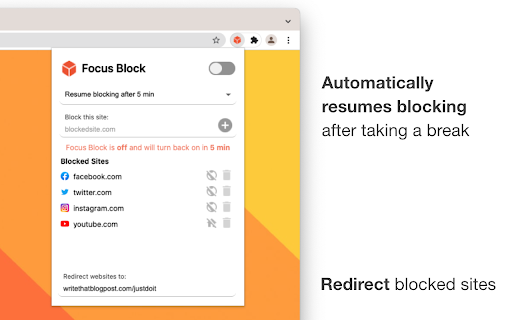

😵 After spending hours on Youtube, Twitter, or Facebook while "working", it's time to take control of your browsing habits! 🧘🧊 Focus Block lets you focus on your most important tasks by blocking websites without getting in the way of your work. 🙋 WHAT ARE THE FEATURES OF FOCUS BLOCK? 🔁 Redirect Blocked Websites - Redirect your blocked sites to any website you choose, like to that google doc you're working on or that online course you've signed up for. ⏳ Automatically Resume Blocking After Taking a Break - Tell Focus Block to automatically resume blocking after a certain time period so you can get back to focusing after taking a break. 🏠 Block the Homepage Only - You can block just the homepage instead of the entire domain. This allows you to watch that Youtube video for work or write that social media post without being distracted by the homepage. 🔒 Focus Block is designed to protect your privacy. Focus Block only uses the current URL in the address bar so it know when to block a website and the last time it was turned off so it knows when to resume blocking again. All of this data lives in your chrome account and is never transferred outside. Note: You may be asked to share browsing history upon installation but this permission is only used for checking the current URL. FOCUS on your work. BLOCK all distractions.

Focus AI - Block Site & Focus
Block sites and stay focused with AI. Remove distractions, boost productivity and more. Are you tired of falling down the digital rabbit hole? 🕳️ Do unwanted emails and distracting websites constantly derail your productivity train? 🚂 Fret not! Introducing Focus AI, the ultimate Chrome Extension designed to empower you to stay focused, minimize distractions, and seize control of your online world. 🌐💡 Focus AI: Unleash Your Focus Power Imagine your mind as a superhero HQ 🦸♂️, where you plan, create, and accomplish amazing things. But what if that HQ is under constant attack by unwanted emails 📧 and tempting websites 🌐? That's where Focus AI steps in – your digital fortress 🏰 that shields your mind from unwanted invaders. With Focus AI, you're the commander of your digital universe. Just like a fortress gatekeeper 🛡️, you choose which websites get access and which ones get the cold shoulder. Say goodbye to mindless scrolling and endless YouTube loops – Focus AI lets you create a distraction-free zone so you can channel your energy into meaningful tasks. Unwanted emails are like digital ninjas 🥋 – they sneak into your inbox and disrupt your focus. Not anymore! Focus AI empowers you to sort the digital wheat from the chaff. Train it to identify spammy senders 📤, irrelevant newsletters 📰, and promotions that clutter your inbox. Say hello to a tidier inbox and a clearer mind. 🚫 Site Blocking Power: Regain control of your time by blocking distracting websites that steal your attention. Rediscover the joy of uninterrupted work and leisure. 💌 Email Zen: Declutter your inbox effortlessly. Weed out spam and unimportant emails, and cherish the messages that truly matter. 🤖 Smart Learning: Focus AI evolves with you. As you fine-tune your preferences, it becomes an AI-powered ally, ensuring you're always in the zone. ⏰ Boosted Productivity: Embrace laser-sharp focus and skyrocket your productivity levels. Dive into deep work without the constant ping of notifications. 🛡️ User-Friendly Experience: Focus AI's interface is as intuitive as a favorite board game. Install it, set the rules, and relish a distraction-free digital experience. Trying out Focus AI is a breeze. Simply visit the Google Chrome Web Store 🏪, and with a click of a button, you'll add a new layer of focus and efficiency to your browsing experience. Ready to wield the power of Focus AI? 🛡️ Say goodbye to digital distractions, skyrocket your productivity, and embrace a clutter-free online haven. Click 'Install' now to embark on your journey to a more focused you.

Focused
Improve focus and increase productivity by blocking distracting websites while working or studying. Focused is an open-source, lightweight extension that helps you to improve focus and increase productivity by blocking distracting websites. It's super simple to use. Just add distracting website domains to the blocked list once, and the extension will prevent you from visiting them. After work, you can turn off the focus mode and surf the internet without limitation. A list of the blocked websites is being saved only in your Browser storage. Therefore only you have access to it. Moreover, the software is an open-source project, meaning its source code is open to everyone, which is an assurance that your data is accessible only within your browser. Source code of the project: https://github.com/dimimikadze/focused

Block Site : Block websites and be focused
Block time-consuming websites to explode your productivity. Block Site is your ultimate solution to take control of your online browsing experience. This powerful and user-friendly Chrome extension allows you to effectively block unwanted websites, helping you maximize your productivity, avoid distractions, and maintain a healthy online environment. Custom Website Blocking: Block Site enables you to create a personalized list of websites you want to block. Whether it's social media, entertainment sites, or any other distracting website, simply add them to your blacklist. Work/Productivity Mode: Block Site offers a special mode designed to maximize your productivity. When activated, it automatically blocks distraction websites during scheduled work hours, helping you stay focused. Block Site is the ideal Chrome extension for those looking to regain control of their online time. Whether you want to increase productivity at work, minimize distractions during studies, or reduce your time spent on social networks, Block Site is your ally in creating a healthier and balanced online environment. Install it now and discover the difference Block Site can make in your digital life.

Block Sites 2.0
An all-in-one add-on that lets you custom blocklist, scheduled site blocking, and password protection. 1. Install the extension. 2. Sync your schedule with the extension. 3. Turn on Focus, block unrelated sites 🚫, or even schedule the blocking to focus more in your busy hours. 1. Focus timer removes all distracting and blocked content from your sight. 🧘♀️ 2. Focus Mode lets you set times when to disable websites and when to browse freely. 3. Block adult content on your device. 🚫 4. Set a passcode for the extension to restrict yourself from procrastination. 5. Sync the extension with your devices to have total control over your schedule. This extension makes you more productive with customized working-schedule features.
