
lefofhdldjphdggnbigcgdbbdllfbgfc

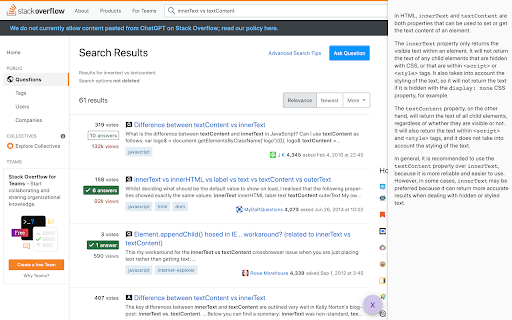
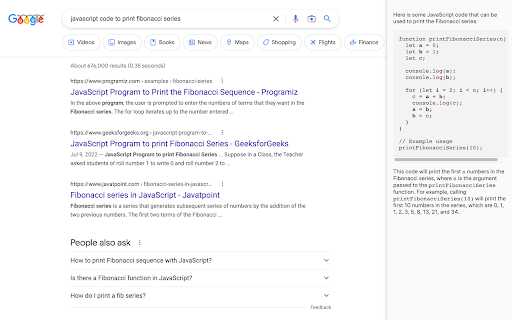
A plugin that augments Google and Stackoverflow search results with ChatGPT responses. When you search for something on Google or Stackoverflow, this extension will try to augment the results with the response from OpenAI's ChatGPT. You must have the ChatGPT bot open in a tab (https://chat.openai.com/chat). This extension will ask the bot the searched query in that chat tab, and pipe the results into your Google and Stackoverflow search results. By default, the extension only sends the query to ChatGPT window when you open the sidebar by clicking on the 🤖 button. But you can change the extension settings to automatically trigger ChatGPT search. Note that if set to automatic, you may inadvertently reach limits to your free ChatGPT usage.

ChatGPT Degrade Checker 降级检查
ChatGPT Downgrade Check Tool 🔧 / ChatGPT Service Status Monitoring🕵️♂️ A Chrome extension that displays PoW information and IP quality for ChatGPT. You can easily detect if the GPT model has been downgraded.

OptiSearch
OptiSearch is a powerful Chrome extension that revolutionizes your web search experience. It seamlessly integrates with your favorite search engines and enhances your search results with useful content retrieved from popular websites and forums such as the StackExchange sites or Wikipedia. With OptiSearch, you can find answers to your questions faster and more easily. The extension parses relevant and high-quality information from various sources and displays it alongside your search results, giving you a comprehensive view of the topic you're interested in. OptiSearch also includes advanced features such as graph plotting and math expression evaluation. It's a reliable and efficient tool that helps you find what you're looking for faster, and makes your search journey more enjoyable and rewarding. Download OptiSearch now and discover a new way of searching the web that's smarter, faster, and more fun!

ChatGPT for Google by cloudHQ
This extension gives you ChatGPT query responses alongside Google search engine results. This extension is easy to use and enhances your Google search experience. Features: ✅ OpenAI Responses alongside your Google search results ✅ A summary of search results ✅ Supplement responses with data after 2021 via search results ✅ OpenAI API and multiple version support ✅ Toggle on/off as desired ✅ Copy to clipboard ~~~How to use it~~~ 1. Get an OpenAI account here if you don't already have one: https://chat.openai.com/chat and create an account 2. Install this extension 3. Open Chrome and search for anything in Google Search 4. AI-generated responses alongside conventional search engine results will be displayed on the right side of your window 5. When in ChatGPT, simply type in your prompt, and the results will be ChatGPT's response, and will then provide you with a Google Search summary on the subject (very helpful for up to date information) ~~~FAQ~~~ 1. What is ChatGPT? ChatGPT is a computer program created by OpenAI that can generate human-like text. It's like a super-advanced version of autocorrect: it predicts and generates what it thinks should come next in a conversation or a piece of writing. This is useful for many things, such as writing emails, creating content, answering questions, and even tutoring in different subjects. It's important to note that it doesn't know any personal data unless you tell it during the conversation, and it doesn't know specifics about the documents it learned from. 2. What does this extension do? This browser extension is developed by cloudHQ LLC. The extension enhances search engine results with the power of artificial intelligence from OpenAI. The extension operates by displaying AI-generated responses alongside conventional Google search engine results, offering users an enhanced search result experience. 3. Is this extension free to use? Yes, the extension is free to use. 4. Is this extension integrated with other cloudHQ products? Yes. This extension is fully integrated with other cloudHQ products such as Save Emails to PDF by cloudHQ, Export Emails to Sheets by cloudHQ, and more. 5. Do I need an OpenAI (chat.openai.com) account? Yes, you need to have an OpenAI account to use this extension. Go to https://chat.openai.com/chat and create an account. If you choose to use an API, you need to have a developer account. You can create it here: https://platform.openai.com/ We hope you enjoy your new search result experience and find it helpful for your overall knowledge about anything you wish to know about. cloudHQ. Helping your productivity, 1 click at a time. cloudHQ website: https://www.cloudhq.net/ App website: https://www.chatgpt-for-google-search.com/ Pricing: https://www.chatgpt-for-google-search.com/pricing Support page: https://support.cloudhq.net/category/browser-extensions/chatgpt-for-google/ FAQ page: https://support.cloudhq.net/ Blog: https://blog.cloudhq.net

Stape GTM Helper
Enhance your Google Tag Manager debugging. Stape GTM Helper is a free Google Tag Manager Chrome extension designed to speed up and simplify GTM debugging. This GTM tool helps you bring order to containers packed with tags and improves your workflow in Google Tag Manager preview mode. ➤ Google Tag Manager tools and features for a cleaner GTM preview - Tag Type Coloring – add color and platform logos for Meta, GA4, Google Ads, Microsoft, and more for easier navigation in preview mode. - Entities Filter – focus only on the tags or variables you’re testing for cleaner, faster debugging. - JSON Formatter – make incoming and outgoing JSON requests easy to read. - Consent Status in sGTM – view consent states (granted or denied) directly in your server GTM preview. ➤ Clarity through a tag assistant extension that organizes the GTM preview mode - Debug Google Tag Manager for both web and server containers - Get a structured, color-coded view of all your GTM tags - Improve your Google Tag Manager debugging and testing experience ➤ Perfect For - Developers and analysts working with GTM tools - Anyone who uses Google Tag Manager preview and debug mode daily
