
ldojecagppaiodalfjnhandfjkiljplm

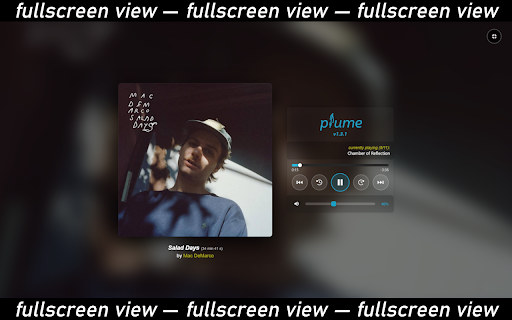


Bandcamp extension: volume slider, hotkeys, loop modes, fullscreen mode, playback speed, waveform progress bar & beat visualizer. Plume is a free, lightweight browser extension that replaces the default Bandcamp audio player with a modern, feature-rich alternative. Plume makes listening to music on Bandcamp dramatically better. • Volume Slider — Finally, a visible volume control on Bandcamp. A mute button is also present. Your volume preference is saved automatically and restored on every page. • Click-to-Seek Progress Bar — Click or drag anywhere on the progress bar to jump to that point in the track. No more guessing. • Configurable Skip — Rewind or fast-forward by a custom duration (default 10 s). • Playback Speed — Choose from preset speeds (0.5×, 1×, 1.5×, 2×, 3×) or enter a custom value. A live badge shows the active multiplier at a glance. • Looping Modes — Enable smooth track/collection replay. • Tracklist Dropdown — Browse a collection's tracks from the header. A link button next to the title opens the current track's Bandcamp page. • Track Skip & Restart — Navigate between tracks on album pages. The previous track button restarts the current track within a configurable threshold. • Runtime Display — See the total album runtime at a glance. Toggle between elapsed time and remaining time. • Waveform Progress Bar — The progress bar renders the audio waveform for the track, making the song structure visible at a glance (toggleable). • Fullscreen Mode — Press F or click the fullscreen button to enjoy an immersive listening view with album art and track info. • Customizable Hotkeys — Space (play/pause), arrows (seek/volume), 0–9 (seek), L (loop), M (mute), F (fullscreen), PageUp/PageDown (previous/next track). Supports modifier keys (Ctrl, Alt, Shift). • Playback Settings — Fine-tune the seek hotkey step, volume hotkey step, and track restart threshold from the popup panel. • BPM Detection — Detects and displays the live tempo of each track, with per-track badges in the tracklist. • Beat Visualizer — A BPM-driven canvas animation plays in the fullscreen view in sync with the music's tempo (toggleable). • Multi-Language — Available in English, French, Spanish, Italian, Brazilian Portuguese, Romanian, and Russian. • Feature Flags — Toggle individual features on or off from the popup panel. • Accessible Player — Bandcamp is sadly not accessible to impaired users... Plume was designed to pair seamlessly with NVDA. Install Plume, then visit any Bandcamp album or track page. The extension automatically replaces the original player with the enhanced Plume player. Your preferences (volume, time display mode) are saved in your browser and persist across sessions. No more worries about scrolling down too, the player sticks to the top of the window. Works on Chrome, Firefox, Edge, and all Chromium- and Firefox-based browsers. Built with Manifest V3 for modern security and performance standards. Found a bug or have a feature idea? Open an issue on GitHub: https://github.com/QuentindiMeo/BC-Plume/issues Plume is open-source (MIT license) and has zero external dependencies.

Bandcamp+
- Arrange Bandcamp layout - Wishlist single tracks from release page - Add volume control - Add speed control with vinyl and stretched modes - Copy track info to clipboard

better feed for bandcamp
Replace the default bandcamp player with a better html embedding player. Also adds embedding player to artist/labels' page and your collection page.

Shovel for Discogs
Queue and listen to releases as you browse Discogs. Dig faster with Shovel. Shovel is a music player that lives in the Chrome side panel. It lets you listen to releases instantly as you're browsing. No new tabs and no YouTube errors... Just click the Shovel button next to a release on Discogs to add it to your listening queue. Your queue persists as you browse different pages or even leave Discogs. So you can create a playlist and let Shovel autoplay, or actively skip through tracks in record time. Shovel works on every key page on Discogs - Artists, Labels, Sellers, Search, Collection, Wantlist and many others. There's more: * Connect your YouTube account and add to playlists directly from Shovel * See genres and styles inline on Marketplace, Artist and Label * Skip broken YouTube links automatically * Queue in bulk on the Artist, Label, Search, Collection and Wantlist pages (25/100/250+ releases in a single click!) Shovel is the tool that makes exploring Discogs fast and intuitive.

Bandcamp Enhancement Suite
Provides extra functionality for Bandcamp The purpose of this extension is to make Bandcamp easier to navigate for larger collections of music. It has been designed with DJs in mind. 1.19.0 changes: * add Preview button in Feed page 1.17.0 Changes: * add (optional) FindMusic.club metadata caching * fix FindMusic.club login button MUI brittleness by @sabjorn in #244 * reorganize drawer: move FindMusic.club to top and enlarge Settings * add (optional) FindMusic.club API caching integration 1.16.1 Changes: * add injection of login button when loading findmusic.club and not logged in (requires having accepted permissions previously) 1.16.0 Changes: * add new settings menu * add support for FindMusic.club integration * update privacy policy 1.15.0 Changes: * update cart import/export to better handle potential changes in item prices * add cart import support for urls * add post-checkout 'Download Zip' button for downloading purchases in browser 1.14.0 Changes: * add hide/unhide all button for collections page * full re-factor of codebase into typescript 1.12.0 Changes: * add support for parallel downloading for purchase download script 1.10.5 Changes * fix another issue with 1-click buy button 1.10.4 Changes * fix issue with 1-click buy button and re-enable 1.10.3 Changes: * emergency release rolling back the 1-click buy feature. This feature contained a major bug that could cause the cart to be cleared (and not recovered) 1.10.2 Changes: * fix bug where 'undefined' was displayed on track/album pages with non-purchasable items * removed 1-click button for track/album already owned by user * improved 1-click buy button UI for consistently across platforms * moved 1-click buy button for albums 1.9.0 Change: * add 1-click add to cart on album and track pages 1.8.0 Change: * BPM in Album/Track page player 1.7.1 Change: * remove 'offlineAudioContext' with simpler code calling 'decodeAudioData' by @sabjorn in #150 * Bump ua-parser-js from 0.7.31 to 0.7.33 by @dependabot in #151 * Bump socket.io-parser from 4.2.1 to 4.2.3 by @dependabot in #156 * Bump engine.io and socket.io by @dependabot in #155 * Bump yaml from 2.1.1 to 2.2.2 by @dependabot in #154 * add Stripe links in call to support popup by @sabjorn in #159 1.6.1 Change: * update to Manifest v3 for Firefox (now version parity) 1.5.0 Changes: * Add popup when users check out to provide information about how to contribute to the plugin 1.4.0 Changes: * add github sponsorship link in browser action page * add Half Past Vibes records link in browser action page 1.3.0 Changes: * playlist in album views to be right below the player * state of the waveform toggle persists (config backend) 1.1.0 Changes: * Keyboard control for player * Mouse control for player playbar to jump to time selection * Purchased download assistance * Volume control. 1.0.4 Changes: * Update storage backend for larger capacity (and versatility for future developments). 1.0.3 Changes: * Preview state tracked when loading albums on their own page * Preview state is accessible from multiple machines using the same google account (chrome storage api) * Tool tips pop up on injected UI elements * Single track "albums" preview properly * Featured albums are made visible in main grid view and can thus be previewed * Improperly rendered UI elements removed completely from "collection" pages 0.6.0 Changes: * adds tracking (local cache) of albums preview history * adds clickable element to represent (and alter) previewed history 0.4.1 Changes: * iFrames always in front (no longer occluded by any other element on screen) 0.4.0 Changes: * Collections and Wishlist now have preview button * Clicking on any preview button with close any open preview before starting next preview.
