
gpkbfofholjgdgeiihmahcomieglcapn
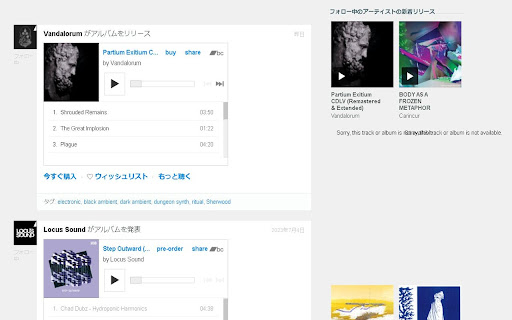


Replace the default bandcamp player with a better html embedding player. Also adds embedding player to artist/labels' page and your collection page.

Bandcamp Wishlist Tagger & Organizer
Tag your Bandcamp wishlist by genre, manage your genres, and view your full wishlist in a standalone organizer. Organize your Bandcamp wishlist. Organize your favorites by genre, filter easily, and rediscover your hidden gems — all locally, with full privacy. HOW TO USE: 1. Go to wishlist tab and REFRESH the page 2. Tag dropdowns and buttons will appear. TAG albums from your wishlist! 3. Click OPEN ORGANIZER 4. A new organizer tab will appear. In here, you can filter tagged albums, add new genres, and BACKUP your tagged data. 5. Happy Digging! ** All data is stored locally and does not sync between devices. *** Be sure to back up your data regularly — Chrome may clear local storage unexpectedly. You can import the exported json to restore your tagged data

Odesli for Bandcamp
What's new? • Improved layout and new icons and Complete update of the Server API. • Upgrade to Manifest v3, Fixed incompatibility with LastFM Web Scrobbler. • Icon set updated. • Removed SoundCloud API request. Closed for developers. • The problem with CORS requests has been solved. • Added Soundcloud API. Search in Soundcloud API if iTunes API fails. • Added the ability to select the type of Spotify and Apple Music links: web links or links to desktop applications. Extension options are available by clicking the extension icon and selecting "Options" from the drop-down menu. This extension embeds links to albums from Bandcamp to all available streaming services (Apple Music, Spotify, etc.) Works on album pages, track pages and on discovery page. If the album is only available on Bandcamp, you will see a corresponding message.

Bandcamp Tagger
Simple extension that adds tagging functionality to your Bandcamp collection and wishlist. A lightweight extension that adds tagging functionality to your Bandcamp collection and wishlist. Organize and filter your music easily with custom tags. Key Features: - Add custom tags to tracks and albums - Filter your collection/wishlist by tags - Quick access to untagged items - Manage tags (add, rename, delete) - Works on both collection and wishlist pages Important Instructions: Before using filters, please ensure all items are loaded: 1. Click the "view all items" button at the bottom of the page 2. Scroll down until no more items appear 3. Now you can use tags effectively to filter your entire collection Usage Tips: - Use the "Untagged" filter to find items that need categorization - Create tags for genres, moods, or any custom categories - Items will stay tagged between sessions - Tags sync across your collection and wishlist Privacy Note: All tag data is stored locally in your browser. No data is collected or transmitted. Version 0.9.0 Initial release with core tagging functionality. Version 0.9.1 - Added support for multiple tags per item - Improved tag management with tag pills - Enhanced filtering to support multiple tag selection - Fixed various UI issues with long tag names - Improved tag removal and re-adding functionality Version 0.9.3 - Export your data: Save all your tags, categories, and settings to a JSON file for backup or migration - Import data: Restore your collection from a backup file or transfer data between browsers/devices - Automatic Data Backup: The extension will create its first automatic backup on startup - Fixed conflicts with the Batchcamp extension (thanks Guillermo) - Your current data is automatically preserved during this update

Bandcamp Enhancement Suite
Provides extra functionality for Bandcamp The purpose of this extension is to make Bandcamp easier to navigate for larger collections of music. It has been designed with DJs in mind. 1.17.0 Changes: * add (optional) FindMusic.club metadata caching * fix FindMusic.club login button MUI brittleness by @sabjorn in #244 * reorganize drawer: move FindMusic.club to top and enlarge Settings * add (optional) FindMusic.club API caching integration 1.16.1 Changes: * add injection of login button when loading findmusic.club and not logged in (requires having accepted permissions previously) 1.16.0 Changes: * add new settings menu * add support for FindMusic.club integration * update privacy policy 1.15.0 Changes: * update cart import/export to better handle potential changes in item prices * add cart import support for urls * add post-checkout 'Download Zip' button for downloading purchases in browser 1.14.0 Changes: * add hide/unhide all button for collections page * full re-factor of codebase into typescript 1.12.0 Changes: * add support for parallel downloading for purchase download script 1.10.5 Changes * fix another issue with 1-click buy button 1.10.4 Changes * fix issue with 1-click buy button and re-enable 1.10.3 Changes: * emergency release rolling back the 1-click buy feature. This feature contained a major bug that could cause the cart to be cleared (and not recovered) 1.10.2 Changes: * fix bug where 'undefined' was displayed on track/album pages with non-purchasable items * removed 1-click button for track/album already owned by user * improved 1-click buy button UI for consistently across platforms * moved 1-click buy button for albums 1.9.0 Change: * add 1-click add to cart on album and track pages 1.8.0 Change: * BPM in Album/Track page player 1.7.1 Change: * remove 'offlineAudioContext' with simpler code calling 'decodeAudioData' by @sabjorn in #150 * Bump ua-parser-js from 0.7.31 to 0.7.33 by @dependabot in #151 * Bump socket.io-parser from 4.2.1 to 4.2.3 by @dependabot in #156 * Bump engine.io and socket.io by @dependabot in #155 * Bump yaml from 2.1.1 to 2.2.2 by @dependabot in #154 * add Stripe links in call to support popup by @sabjorn in #159 1.6.1 Change: * update to Manifest v3 for Firefox (now version parity) 1.5.0 Changes: * Add popup when users check out to provide information about how to contribute to the plugin 1.4.0 Changes: * add github sponsorship link in browser action page * add Half Past Vibes records link in browser action page 1.3.0 Changes: * playlist in album views to be right below the player * state of the waveform toggle persists (config backend) 1.1.0 Changes: * Keyboard control for player * Mouse control for player playbar to jump to time selection * Purchased download assistance * Volume control. 1.0.4 Changes: * Update storage backend for larger capacity (and versatility for future developments). 1.0.3 Changes: * Preview state tracked when loading albums on their own page * Preview state is accessible from multiple machines using the same google account (chrome storage api) * Tool tips pop up on injected UI elements * Single track "albums" preview properly * Featured albums are made visible in main grid view and can thus be previewed * Improperly rendered UI elements removed completely from "collection" pages 0.6.0 Changes: * adds tracking (local cache) of albums preview history * adds clickable element to represent (and alter) previewed history 0.4.1 Changes: * iFrames always in front (no longer occluded by any other element on screen) 0.4.0 Changes: * Collections and Wishlist now have preview button * Clicking on any preview button with close any open preview before starting next preview.
