
ldnkgcpeljjhpfkpapknhjhnninfelga
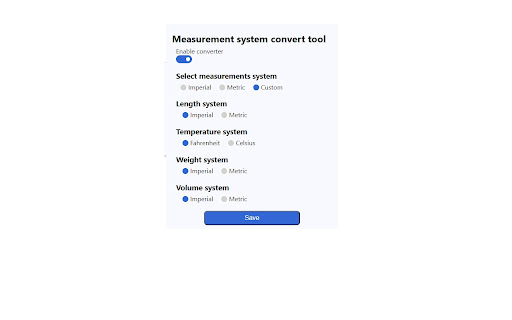

Plugin for automatic conversion of measurements units from the metric system to imperial and vice versa. Converts units in page automatically. Supports converting the following: - length(metric imperial) - weight(metric imperial) - temperature(Celsius Fahrenheit) - volume (metric imperial)

AutoConvert - you select, it converts
Automatically converts values from other units, currencies and time zones AutoConvert converts units, time zones and currencies, when you select them on a webpage. Selecting metric units (e.g. 16 km) converts them to the imperial units (e.g. 10 mi), and vice versa (10 inch to 25 cm). Time zones are converted to the detected local time zone. Supported currencies are converted to your home currencies. Conversions are automattic, and appear in a corner of the page as soon as you select any text containing convertible units. Alternatively, convert any values by using the text box in the extension popup (press the extension button in the toolbar). A list of supported units, currencies and time zones is available here: https://updatenotes.blog/autoconvert-list-of-supported-units-time-zones-and-currencies/ ** Currency conversion is a premium feature, and requires a purchase after the trial period. Please check if your currency is supported before purchasing. * Converts up to 6 values in a selection. Unlimited conversions in popup. - All supporter features are now free for everyone Update 30 Jul 2021: 1. Integrated new supporter subscriptions with Stripe. Existing supporters were not charged for last ~6 months, but will now need to re-subscribe. 1. Clocks have gone back, so the extension now supports a dark toolbar icon. Select light, dark or system theme icon on options screen. 2. Choose 12 or 24 hour format for time conversion on options screen. 3. Bug fixes 1. Add support for reward codes 2. Bug fixes 1. Show alternate conversions for ambiguous units, e.g. convert 'gallons' to both 'US gallon' and 'Imperial gallon (UK)' 2. Add conversion for 'quarts' 3. Big code architecture update to allow easier addition for new units. 4. Bug fixes 1. Support for alternate currency names, e.g 'roubles' and 'rubles', 'yuan' and 'renminbi' 2. Add conversion for 'hectares' 3. Bug fix for date translation in some time zone conversions 1. Initial support for parsing currency names, e.g. '20 dollars' or '50mn rubles' 1. New: 'Follow system theme' for dark or light mode in extension window and in on-page selections 2. Conversions to yards also show value in feet. 3. Background code updates to prepare for Manifest V3 1. If currency has million/billion/trillion specified, scale converted value to show appropriate digits 2. Show as many decimals as needed to show a non zero converted currency value (ignore 2 decimal places rule) 3. Background code update to prepare for Manifest V3 1. Initial support for period (.) an Space as thousands separators, comma (,) as decimal separator (European number formats) 2. Drag and drop reordering of favourite time zones on settings screen (Supporters only) 3. Initial support for ranges of time zones, e.g. '5 PM to 8 PM London' 1. Convert *C and *F as temperature. 2. Convert '' (two single quotes) as inches. Earlier this was converted as feet, only " (double quote) was converted as inches. 3. Improvement to dimensions conversion: e.g. 20x30x60cm . 4. Show current time in all provided time zones when no text is present in popup. Update 20 Jan 2020: 1. Conversion to inches also shows feet & inches conversion when relevant (e.g. 16 in also appears as 1 ft 4 in) 2. Locale-specific number formatting for conversions (lakh/crores for India, '.' as 1000-separators for some European countries) 3. New app icon 4. Bug fixes 5. Notification about AutoConvert for Android Update 11 Jul 2019: Supporter update: multiple time zones 1. Give your own, easily identifiable names to custom time zones (e.g. 'Matt in SF') - Edit or add on settings page 2. Set up time zone conversions to show just custom name, or both name and time zone Update 5/8 Jul 2019: Supporter update: dark theme, unlimited conversions, and multiple time zones 1. Convert to multiple time zones. Configure in options. - Extension window always shows current time in other chosen time zones. 2. Unlimited conversions on selecting text (restricted to 6 in one go previously) 3. Dark theme in extension window. Configure in options. Update 8 May 2019: 1. Guest trial period for premium features (incl. Currency conversion) increased to 10 days 2. After-signup trial period removed 3. Bug fixes 4. Currency rate fetch updates Update 1 Feb 2019: 1. Longer currency names are shown below the value being converted 2. Clicking on currency rate link opens Google with live currency conversion 3. Text in conversion box is pinned by default 4. Bug Fix: Currency conversion span took full height on some websites Update 1 Nov 2018: 1. Currency conversion is now a premium feature, free trial has ended. 2. Currency rates fetched every 3 hours for subscribers, and ever 12 hours during guest trial 3. Show hours since last fetched in tooltip on exchange rates Update 18 Oct 2018: 1. Currency conversion for common symbols - $, £, ¥, Rs, kr - converts based on top-level-domain of the website. Update 17 Oct 2018: 1. Free trial of Currency conversion enabled for everyone. 2. Added option to convert to a third currency or time zone in popup (premium / free trial only) 3. Conversions appear in the same order as in text Update 2 Oct 2018: 1. Enabled currency conversion trial for more users. 2. Added 'tbs' as alternate unit for 'tablespoon'. Update 18 Sep 2018: 1. Show values in both Pounds/lb and Stones/st (if more than 1st) when converting mass to Imperial units. 2. Limited test of currency conversion - available to a few randomly selected users. Update 13 Sep 2018: 1. Keyboard shortcut to open extension window (Ctrl/Cmd + Period). 2. Pin text in conversion box to prevent it from clearing when the window closes. Update 11 Sep 2018: 1. Convert any text (typed or copied from other apps) using the extension window. 2. Conversion in extension window allows unlimited conversions at a time.

UnitSwitch
Convert between units quickly without leaving the current tab. UnitSwitch is a simple and intuitive Chrome extension that allows users to quickly and easily convert various units of measurement, including temperature, length, weight, speed, and cooking measurements. The extension is designed to provide fast and accurate conversions, all within a clean and user-friendly interface. Whether you're converting Celsius to Fahrenheit, miles to kilometers, or gallons to liters, UnitSwitch offers a seamless experience for all your unit conversion needs without having to leave your browser tab. Created by Shawn Wheeler and Amanda Treutler http://shawnwheeler.dev/ http://amandatreutler.com/

Unit Converter 📅
convert units (e.g. Celsius to Fahrenheit, kilometers to miles) directly from the toolbar. 🔢 Introducing the Ultimate Unit Converter Extension: Transform Your Toolbar into a Powerful Conversion Tool ! 🌟 Unlock a world of convenience with our revolutionary Unit Converter Extension! Imagine having the power to convert units seamlessly, right from your browser’s toolbar. Whether you’re dealing with temperatures, distances, weights, or any other units, this extension is your new best friend. ➡️ Convert units effortlessly from Celsius to Fahrenheit, kilometers to miles, grams to ounces, and so much more. ➡️ Say goodbye to manual calculations and tedious online searches. ➡️ Enjoy a sleek, intuitive design that makes unit conversion a breeze. ➡️ Access all your conversions with just a few clicks, straight from the toolbar. ➡️ From temperature and distance to volume and weight, convert all types of units with ease. ➡️ Never get stuck on a conversion problem again, whether you’re cooking, traveling, or studying. ➡️ Save time and effort by having a powerful conversion tool at your fingertips. ➡️ Focus on what matters most without getting distracted by complex unit conversions. ➡️ Streamline your workflow with quick and easy access to unit conversions. ➡️ Improve your efficiency in tasks ranging from everyday activities to professional projects. 🚀 Perfect for Everyone: ➡️ Ideal for students, professionals, travelers, and anyone in need of quick and accurate unit conversions. ➡️ Whether you’re a chef needing to convert recipes, a traveler navigating different units of measure, or a student tackling homework, this extension is for you. Why Choose Our Extension? Step up your browsing game with the Unit Converter Extension and experience unparalleled convenience. Transform your toolbar into a powerful conversion tool and make unit conversions a thing of the past. Try it now and revolutionize the way you handle unit conversions ! 🌟 Thanks you ! ❤️

Unit Converter
Unlock the power of effortless unit conversion with the Unit Converter Chrome extension! Seamlessly convert units across Length, Volume, Weight, Temperature, Time, Percentage, and Number categories right from your browser. - Versatile Unit Support: Easily convert between different units within categories such as meters, feet, liters, gallons, kilograms, pounds, Celsius, Fahrenheit, seconds, minutes, hours, and more. - Intuitive Interface: Streamlined design for a user-friendly experience. Access the converter with just a click, and enjoy a straightforward interface for quick and precise unit conversions. - Comprehensive Categories: Covering a wide range of everyday units, including Length for measurements, Volume for liquids and solids, Weight for mass calculations, Temperature for weather or cooking, Time for all your temporal and chronological needs, Percentage for quick ratios, and Number for basic numeric base conversions. - Real-time Results: Witness instant and accurate unit conversions as you type, making your workflow more efficient and eliminating the need for manual calculations. - Customizable Settings: Tailor the extension to fit your preferences. Adjust decimal precision and choose your preferred units for quick access to your most frequently used conversions. - Time-Saving: Boost your productivity by eliminating the need to search for unit conversion websites. Convert units directly in your Chrome browser. - All-in-One Solution: No need to install multiple extensions for different unit categories. Unit Converter has you covered with its comprehensive range. - Offline Access: Once installed, enjoy unit conversions even when you're offline. Perfect for when you're on the go or in areas with limited internet connectivity. Added a new Settings panel for default unit preferences Minor performance improvements and UI tweaks Upgrade your browsing experience with the Unit Converter Chrome extension and say goodbye to unit conversion headaches. Install now and simplify your daily calculations effortlessly!
