
einokpbfcmmopbfbpiofaeohhkmcbbcg


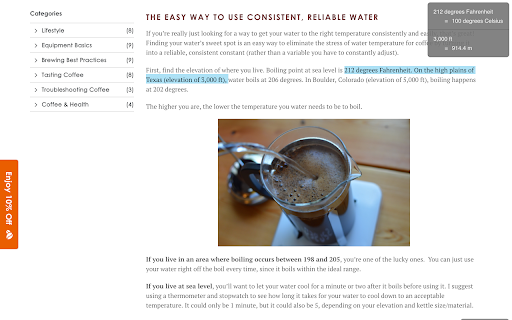

Automatically converts values from other units, currencies and time zones AutoConvert converts units, time zones and currencies, when you select them on a webpage. Selecting metric units (e.g. 16 km) converts them to the imperial units (e.g. 10 mi), and vice versa (10 inch to 25 cm). Time zones are converted to the detected local time zone. Supported currencies are converted to your home currencies. Conversions are automattic, and appear in a corner of the page as soon as you select any text containing convertible units. Alternatively, convert any values by using the text box in the extension popup (press the extension button in the toolbar). A list of supported units, currencies and time zones is available here: https://updatenotes.blog/autoconvert-list-of-supported-units-time-zones-and-currencies/ ** Currency conversion is a premium feature, and requires a purchase after the trial period. Please check if your currency is supported before purchasing. * Converts up to 6 values in a selection. Unlimited conversions in popup. - All supporter features are now free for everyone Update 30 Jul 2021: 1. Integrated new supporter subscriptions with Stripe. Existing supporters were not charged for last ~6 months, but will now need to re-subscribe. 1. Clocks have gone back, so the extension now supports a dark toolbar icon. Select light, dark or system theme icon on options screen. 2. Choose 12 or 24 hour format for time conversion on options screen. 3. Bug fixes 1. Add support for reward codes 2. Bug fixes 1. Show alternate conversions for ambiguous units, e.g. convert 'gallons' to both 'US gallon' and 'Imperial gallon (UK)' 2. Add conversion for 'quarts' 3. Big code architecture update to allow easier addition for new units. 4. Bug fixes 1. Support for alternate currency names, e.g 'roubles' and 'rubles', 'yuan' and 'renminbi' 2. Add conversion for 'hectares' 3. Bug fix for date translation in some time zone conversions 1. Initial support for parsing currency names, e.g. '20 dollars' or '50mn rubles' 1. New: 'Follow system theme' for dark or light mode in extension window and in on-page selections 2. Conversions to yards also show value in feet. 3. Background code updates to prepare for Manifest V3 1. If currency has million/billion/trillion specified, scale converted value to show appropriate digits 2. Show as many decimals as needed to show a non zero converted currency value (ignore 2 decimal places rule) 3. Background code update to prepare for Manifest V3 1. Initial support for period (.) an Space as thousands separators, comma (,) as decimal separator (European number formats) 2. Drag and drop reordering of favourite time zones on settings screen (Supporters only) 3. Initial support for ranges of time zones, e.g. '5 PM to 8 PM London' 1. Convert *C and *F as temperature. 2. Convert '' (two single quotes) as inches. Earlier this was converted as feet, only " (double quote) was converted as inches. 3. Improvement to dimensions conversion: e.g. 20x30x60cm . 4. Show current time in all provided time zones when no text is present in popup. Update 20 Jan 2020: 1. Conversion to inches also shows feet & inches conversion when relevant (e.g. 16 in also appears as 1 ft 4 in) 2. Locale-specific number formatting for conversions (lakh/crores for India, '.' as 1000-separators for some European countries) 3. New app icon 4. Bug fixes 5. Notification about AutoConvert for Android Update 11 Jul 2019: Supporter update: multiple time zones 1. Give your own, easily identifiable names to custom time zones (e.g. 'Matt in SF') - Edit or add on settings page 2. Set up time zone conversions to show just custom name, or both name and time zone Update 5/8 Jul 2019: Supporter update: dark theme, unlimited conversions, and multiple time zones 1. Convert to multiple time zones. Configure in options. - Extension window always shows current time in other chosen time zones. 2. Unlimited conversions on selecting text (restricted to 6 in one go previously) 3. Dark theme in extension window. Configure in options. Update 8 May 2019: 1. Guest trial period for premium features (incl. Currency conversion) increased to 10 days 2. After-signup trial period removed 3. Bug fixes 4. Currency rate fetch updates Update 1 Feb 2019: 1. Longer currency names are shown below the value being converted 2. Clicking on currency rate link opens Google with live currency conversion 3. Text in conversion box is pinned by default 4. Bug Fix: Currency conversion span took full height on some websites Update 1 Nov 2018: 1. Currency conversion is now a premium feature, free trial has ended. 2. Currency rates fetched every 3 hours for subscribers, and ever 12 hours during guest trial 3. Show hours since last fetched in tooltip on exchange rates Update 18 Oct 2018: 1. Currency conversion for common symbols - $, £, ¥, Rs, kr - converts based on top-level-domain of the website. Update 17 Oct 2018: 1. Free trial of Currency conversion enabled for everyone. 2. Added option to convert to a third currency or time zone in popup (premium / free trial only) 3. Conversions appear in the same order as in text Update 2 Oct 2018: 1. Enabled currency conversion trial for more users. 2. Added 'tbs' as alternate unit for 'tablespoon'. Update 18 Sep 2018: 1. Show values in both Pounds/lb and Stones/st (if more than 1st) when converting mass to Imperial units. 2. Limited test of currency conversion - available to a few randomly selected users. Update 13 Sep 2018: 1. Keyboard shortcut to open extension window (Ctrl/Cmd + Period). 2. Pin text in conversion box to prevent it from clearing when the window closes. Update 11 Sep 2018: 1. Convert any text (typed or copied from other apps) using the extension window. 2. Conversion in extension window allows unlimited conversions at a time.

Smart Converter
Supper easy to use currency converter extension How to use: 1. Select source currency 2. Type value 3. Get conversion for all other currencies 💵 Multiple conversions 56 currencies available for conversion.

Metric Cooking
Annotates US cooking units with their metric equivalent (e.g. 1 3/4 cups sugar [350 g]) Do you have no idea what "a stick of butter" is, or how to measure "a cup plus two tablespoons"? This add-on provides a button that when pressed, annotates US cooking units with their metric equivalent, while also trying to convert from volumes to weights, such that you can simply use your kitchen scale. Examples, where the part in [] would be added by this add-on: * I used about 1/4 to 1/3 of a cup [60–80 ml] * 3/4 cup plus 2 tablespoons packed light-brown sugar [190 g] * 1 1/2 sticks chilled unsalted butter [175 g] * a tablespoon of heavy cream [15 g] * 2/3 cup freshly grated Parmigiano-Reggiano [65 g] * sides about 2 1/2 to 3 inches [6.5–7.5 cm] high * ¾ cup plus 2 Tbs sugar [175 g] * mandoline set to 1/16th of an inch [2 mm]. * a 5- to 6-quart [4.75–5.75 l] heavy pot * between 12 ounces and a pound [350–450 g] * at about 350-380 degrees (F) [175–195 °C] * Butter a 13- by 9- by 2-inch [32.5×22.5×5 cm] baking pan

QuickCConverter - Quick Currency Converter
QuickCConverter (Quick Currency Converter) - Fastest currency converter extension. Experience lightning-fast currency conversions. Modern exchange app, next gen currency converter extension! 📄 Description: QuickCConverter or Quick Currency Converter is your ultimate companion for seamless and real-time currency conversion directly within your Chrome browser. Stay on top of exchange rates, effortlessly convert currencies, and make informed financial decisions, all with the convenience of a quick and reliable extension. ✨ How to Use: 1. Install QuickCConverter from the Chrome Web Store. 2. Click on the extension icon in your browser or use keyboard shortcut. 3. Select the source and target currencies for conversion. 4. Instantly view accurate and up-to-date conversion results! ⚡️Features: ➡️ Real-time exchange rates: Stay informed with the latest currency values ➡️ Can work offline. Currency list is auto-updating every 30 min ➡️ Support for 100+ currencies: Covering a wide range of international currencies ➡️ Open extension in window mode, like a native app ➡️ Supported 16 languages ➡️ One to one currency converter or multiple live currency converter ➡️ Auto-save last selected currency ➡️ Auto-save last currency value(s) ➡️ Format customization, digits, decimal and more ➡️ Easy-to-use interface: Effortlessly convert currencies with a user-friendly design ➡️ No ADS, clicks, video-ads, clear and minimal UI design 🚀 Release notes: v.3.2.1: ✅ Implemented possibility to drag and drop the currencies in the list, replace currency and delete moved to three dots menu for better user experience; ✅ Added categories to the currency list, now all currencies are grouped by categories; ✅ Updated Settings UI, added the number format presets, increased the number of digits to 10, fixed issues comma and dot for decimals, added on-page-conversion feature; ✅ Optimizations & bug fixes. v.3.1.1: ✅ Added possibility to open extension in sidebar ✅ Improved "on-page conversion" performance and appearance (previously not appear in certain conditions, now it will) ✅ Improved DOM element appearance, instead of appearing every time, make it appear only after first select v.3.1.0: ✅ Added over 100+ new currencies and crypto currencies ✅ Added possibility to convert single or multiple currencies on-page selection. Check the new option in the settings - "On page-conversion" with available options for Single/Multiple conversion ✅ Enjoy new, fastest on-page select feature. Works in the same previews way but now is faster and smoother. Also, it is quickly updating when you changing the settings ✅ Improved user experience and interface ✅ Optimizations & bug fixes. The extension now runs even more smoothly than before v.3.0.7: ✅ Added UAH symbol (₴) for On-page converter feature. v.3.0.6: ✅ Added new currencies ✅ Fixed wrong Danish flag ✅ Bug fixes and improvements v.3.0.5: ✅ UI/UX Improvements ✅ Added "Buy Me A Coffee" button, users now can support us😗 ✅ Added new translations ✅ Bug fixes and improvements v.3.0: ✅ Extension redesign ✅ Rewrites all code from vanilla to Vue.js ✅ Added possibility to change digits, decimals, separator ✅ Added Bitcoin currency ✅ Added new language - Chinese ✅ Translation improvements ✅ Extension speed improvement v.2.0.6: ✅ Added possibility to convert currency by selecting text on pages. How it work? You just need to select value (for example 100 USD), and extension automatically will convert your value to your currency value (from "one currency" tab in popup window (last currency)). Works for main currency list. ✅ Fixed last update issue ✅ Translation improvements ✅ Extension speed improvement v.1.0.4: ✅ Extension speed improvement v.1.0.3: ✅ Added search input, now you can search faster your currency ✅ Four currencies values are also stocked in local storage ✅ New extension icon, more useful and obvious ✅ Translation improvements ❔Created with ❤️ by DanRotaru 🌐https://dan13.me/ ------------------------------------------------------------------------- By installing the app, you agree to these terms and conditions: PLEASE NOTE: Refer to your license terms for Quick Currency Converter browser extension software (the "software") to identify the entity licensing this supplement to you and for support information. You may use a copy of this supplement with each validly licensed copy of the software. You may not use the supplement if you do not have a license for the software. The license terms for the software apply to your use of this supplement.

Currency.Wiki - Currency Converter Widget & Rates
Smart currency converter tool with AI price detection, live rates, charts & privacy protection Currency.Wiki brings real-time currency conversion, AI-powered price detection, and financial privacy protection to your browser — supporting 170+ currencies worldwide. Stop switching between tabs to convert prices. Whether you're comparing products on international stores, reviewing overseas invoices, or planning travel budgets, Currency.Wiki handles it all from your current page. AI-Powered Price Detection Unlike basic converters that only work in a popup, Currency.Wiki reads the actual page. Our AI Smart Scanner finds every price on Amazon, eBay, Walmart, or any website and converts them all at once. One click, every price converted. Conversions Right on the Page Hover over any price to see a detailed conversion card with multiple currencies, exchange rates, and country flags. Or enable inline mode to see small conversion badges next to every price as you browse — no clicking required. Built-In Privacy Protection Currency.Wiki automatically turns off on 1,000+ financial websites — banks, brokerages, tax platforms — so your sensitive browsing stays private. A timed unblock option lets you temporarily enable the extension with automatic re-lock after your chosen duration. - Popup converter with 170+ currencies, drag-and-drop reordering, and one-click copy - Interactive charts with 5 time periods (24h, 7d, 30d, 90d, 1y) - Custom exchange rates for business or personal use - AI Smart Scanner that detects all prices on any page (PRO) - Hover cards and inline conversion pills for live on-page conversions - Export scan results as CSV, HTML, or TXT - Cloud storage integration (Google Drive, Dropbox, Box) - 78 fully translated languages - Keyboard shortcut (Ctrl+Shift+U) - Light and dark themes - Number formats: US (1,234.56), EU (1.234,56), and more Free users get the full converter, charts, and limited AI scans. Pro unlocks unlimited in-page detection, 150 AI scans per month, all export formats, and cloud storage. Disclaimer: Exchange rates provided by this extension are for informational purposes only. Please verify currency rates with your financial representative before making international money transfers and transactions.
