
lbjjliediibjgglhhmnpanncbkchpmeg

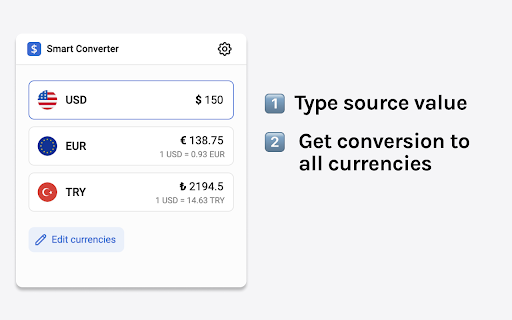
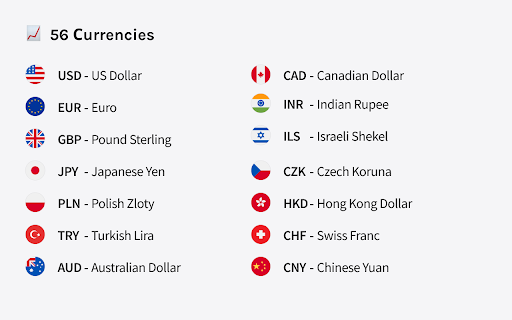
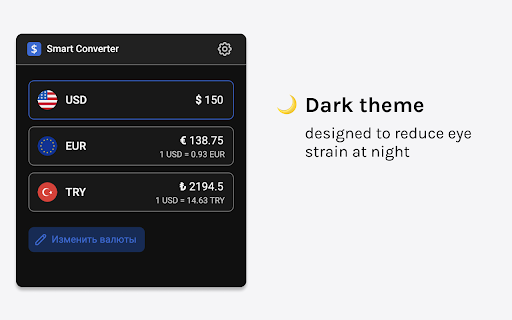
Supper easy to use currency converter extension How to use: 1. Select source currency 2. Type value 3. Get conversion for all other currencies 💵 Multiple conversions 56 currencies available for conversion.

Minimal Currency Converter
Multiple currency converter with real-time exchange rates and a minimalistic user interface. Discover the ultimate tool for quick and accurate currency conversions right in your browser. Powered by real-time data from the European Central Bank and CoinGecko.com, our extension lets you effortlessly swap between 33 world currencies — and even Bitcoin & Ethereum! Why You'll Love It: - Lightning-Fast & Reliable: Get up-to-date exchange rates whenever you need them. - Sleek, Minimal Design: Enjoy a clean, intuitive interface that’s easy to use. - Zero Hassle: No permissions required — just install and start converting. - Community-Driven: Open-source and available on GitHub for full transparency. - Wide Range of Support: Includes major currencies such as USD, EUR, GBP, JPY, and many more, as well as multiple cryptocurrencies. Upgrade your browsing experience with smart, hassle-free currency conversion!

Currency converter +
Smart converter for currencies 'Currency converter +' is a smart tool that converts your default currency (Base currency) to several currencies of your choice from a list of the most used currencies. It fetches daily updates every business day from reliable sources, including the European Central Bank, Frankfurter, and Open Exchange Rates for enhanced accuracy. The extension automatically saves its state, allows a reset to defaults, and supports custom commissions for bank fees. Key Features: - Convert to multiple currencies with a user-friendly interface. - Automatic state saving and reset option. - Custom commission input to adjust for bank fees. - Daily rate updates from trusted financial APIs. - Swap currencies feature for quick adjustments. - Lightweight design with improved performance. Ver 2.05 -------------- - Improved performance by removing jQuery and background.js. - Removed unnecessary broad permissions, added specific API access for security. - Fixed bugs, including commission input state on load. - Added currency swap feature for easier conversions. - Enhanced rate updates with multiple APIs (Frankfurter and Open Exchange Rates) and caching. Ver 2.01 -------------- - Updated extension architecture to comply with Chrome's latest Manifest V3 requirements. - Improved performance and security under the new framework. ### Contact & Support: If you have any questions, email me at: removeoverlay@gmail.com Source code: https://github.com/gilgol2016/Currency-converter Thanks, and may the extension help you with all your currency conversions!

Quick Currency Converter
Simple in use extension which allows to convert values of one currency to another. In addition it displays, in quick preview field, six user defined currencies. It has a lot of options that you can adjust to your needs. By selecting any number on the page it will be copied to the extension. If you also select a text that represents a currency (name, symbol or currency code) it will select the proper value on the list as well. Extension supports a lot of worldwide used currencies. Now, the add-on also allows you to perform simple mathematical operations in the field of the entered value, i.e. add, subtract, multiply and divide. The result of the operation is converted into individual currencies on an ongoing basis. The '=' button or enter button replaces individual operations with their result.

AutoConvert - you select, it converts
Automatically converts values from other units, currencies and time zones AutoConvert converts units, time zones and currencies, when you select them on a webpage. Selecting metric units (e.g. 16 km) converts them to the imperial units (e.g. 10 mi), and vice versa (10 inch to 25 cm). Time zones are converted to the detected local time zone. Supported currencies are converted to your home currencies. Conversions are automattic, and appear in a corner of the page as soon as you select any text containing convertible units. Alternatively, convert any values by using the text box in the extension popup (press the extension button in the toolbar). A list of supported units, currencies and time zones is available here: https://updatenotes.blog/autoconvert-list-of-supported-units-time-zones-and-currencies/ ** Currency conversion is a premium feature, and requires a purchase after the trial period. Please check if your currency is supported before purchasing. * Converts up to 6 values in a selection. Unlimited conversions in popup. - All supporter features are now free for everyone Update 30 Jul 2021: 1. Integrated new supporter subscriptions with Stripe. Existing supporters were not charged for last ~6 months, but will now need to re-subscribe. 1. Clocks have gone back, so the extension now supports a dark toolbar icon. Select light, dark or system theme icon on options screen. 2. Choose 12 or 24 hour format for time conversion on options screen. 3. Bug fixes 1. Add support for reward codes 2. Bug fixes 1. Show alternate conversions for ambiguous units, e.g. convert 'gallons' to both 'US gallon' and 'Imperial gallon (UK)' 2. Add conversion for 'quarts' 3. Big code architecture update to allow easier addition for new units. 4. Bug fixes 1. Support for alternate currency names, e.g 'roubles' and 'rubles', 'yuan' and 'renminbi' 2. Add conversion for 'hectares' 3. Bug fix for date translation in some time zone conversions 1. Initial support for parsing currency names, e.g. '20 dollars' or '50mn rubles' 1. New: 'Follow system theme' for dark or light mode in extension window and in on-page selections 2. Conversions to yards also show value in feet. 3. Background code updates to prepare for Manifest V3 1. If currency has million/billion/trillion specified, scale converted value to show appropriate digits 2. Show as many decimals as needed to show a non zero converted currency value (ignore 2 decimal places rule) 3. Background code update to prepare for Manifest V3 1. Initial support for period (.) an Space as thousands separators, comma (,) as decimal separator (European number formats) 2. Drag and drop reordering of favourite time zones on settings screen (Supporters only) 3. Initial support for ranges of time zones, e.g. '5 PM to 8 PM London' 1. Convert *C and *F as temperature. 2. Convert '' (two single quotes) as inches. Earlier this was converted as feet, only " (double quote) was converted as inches. 3. Improvement to dimensions conversion: e.g. 20x30x60cm . 4. Show current time in all provided time zones when no text is present in popup. Update 20 Jan 2020: 1. Conversion to inches also shows feet & inches conversion when relevant (e.g. 16 in also appears as 1 ft 4 in) 2. Locale-specific number formatting for conversions (lakh/crores for India, '.' as 1000-separators for some European countries) 3. New app icon 4. Bug fixes 5. Notification about AutoConvert for Android Update 11 Jul 2019: Supporter update: multiple time zones 1. Give your own, easily identifiable names to custom time zones (e.g. 'Matt in SF') - Edit or add on settings page 2. Set up time zone conversions to show just custom name, or both name and time zone Update 5/8 Jul 2019: Supporter update: dark theme, unlimited conversions, and multiple time zones 1. Convert to multiple time zones. Configure in options. - Extension window always shows current time in other chosen time zones. 2. Unlimited conversions on selecting text (restricted to 6 in one go previously) 3. Dark theme in extension window. Configure in options. Update 8 May 2019: 1. Guest trial period for premium features (incl. Currency conversion) increased to 10 days 2. After-signup trial period removed 3. Bug fixes 4. Currency rate fetch updates Update 1 Feb 2019: 1. Longer currency names are shown below the value being converted 2. Clicking on currency rate link opens Google with live currency conversion 3. Text in conversion box is pinned by default 4. Bug Fix: Currency conversion span took full height on some websites Update 1 Nov 2018: 1. Currency conversion is now a premium feature, free trial has ended. 2. Currency rates fetched every 3 hours for subscribers, and ever 12 hours during guest trial 3. Show hours since last fetched in tooltip on exchange rates Update 18 Oct 2018: 1. Currency conversion for common symbols - $, £, ¥, Rs, kr - converts based on top-level-domain of the website. Update 17 Oct 2018: 1. Free trial of Currency conversion enabled for everyone. 2. Added option to convert to a third currency or time zone in popup (premium / free trial only) 3. Conversions appear in the same order as in text Update 2 Oct 2018: 1. Enabled currency conversion trial for more users. 2. Added 'tbs' as alternate unit for 'tablespoon'. Update 18 Sep 2018: 1. Show values in both Pounds/lb and Stones/st (if more than 1st) when converting mass to Imperial units. 2. Limited test of currency conversion - available to a few randomly selected users. Update 13 Sep 2018: 1. Keyboard shortcut to open extension window (Ctrl/Cmd + Period). 2. Pin text in conversion box to prevent it from clearing when the window closes. Update 11 Sep 2018: 1. Convert any text (typed or copied from other apps) using the extension window. 2. Conversion in extension window allows unlimited conversions at a time.
