
ldmoiegjhmdnlkfempmgogekheocimdc
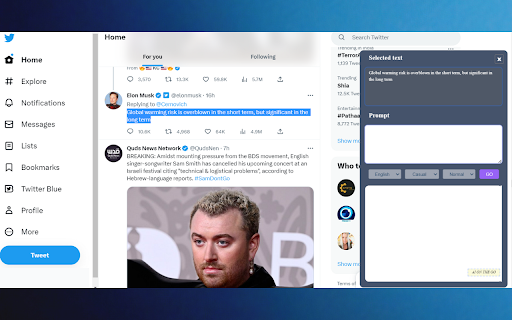
Get instant, personalized AI assistance on any website with AI ON THE GO, powered by ChatGPT. Streamline your workflow today! 🌟 Get hours worth of work done in seconds with AI ON THE GO! 🚀 AI ON THE GO is the ultimate ChatGPT-enabled app and Chrome extension that provides AI-powered assistance on almost any website. With this tool, you can seamlessly integrate AI into your browsing experience and access its features without interrupting your workflow. Effortlessly rephrase, summarize, translate, explain, or reply to text on any website without the need for copy-pasting with AI ON THE GO. Guess what? You don't even need a ChatGPT (OpenAI) Plus account to use our extension anymore! This means you can enjoy the benefits without paying or having an OpenAI account. aionthego.net is a complimentary Chrome extension designed to supercharge your productivity by harnessing the power of ChatGPT by OpenAI and making it readily available at your fingertips! 🌟 We recognize the importance of your time and your dedication to productivity. That's why we've crafted this nifty tool to assist you in writing, rephrasing, summarizing, translating, explaining, or replying to any text on any website, eliminating the need for copy-pasting. Think of it as your personal AI assistant, but working seamlessly across the entire web. 🪄 🚀 1) Quickest access to ChatGPT and GPT-4 ✔️ Just click on the icon present at the right button corner of your computer screen while browsing any website. ✔️ The Chat sidebar will appear on the right. 📝 2) Effortlessly rewrite, summarize, translate, or explain with just one click selected text ✔️ Choose any text on any website ✔️ Click on the icon and all your selected text is already in the input field. (You can edit this text as you like) ✔️ In the prompt field just give it a command to rewrite, summarize, explain or anything that you can think of. ✔️ Click “GO” and see it transforming your text. 💬 4) Generate replies for selected text 🏆 How is AI ON THE GO different from other extensions? ✔️ Choose a desired output language from a list of 14 Languages. ✔️ Chose a desired output tone from Casual, Humorous, Informative, Professional, Convincing, Inspirational, and Critical) ✔️ Choose the output sentences length (Small, Normal, or Long) ✔️ Works seamlessly everywhere - ANY text on ANY website. ✔️ Use the chat feature to ask follow-up questions or refine results in the sidebar. ✔️ Supports all languages. ✔️ Completely free to use. (Subject to the available plans) ✔️ 100% privacy-friendly. ✔️ Click the "Add to Chrome" button at the upper right corner. ✔️ Refresh all tabs - Refresh all websites to activate the extension on them. ✔️ Create your AI ON THE GO ACCOUNT and Login. ✔️ Select any text, and click the icon at the right bottom corner of your browser screen. 🚀 Turbocharge your productivity with ChatGPT by 10X! 🎉💯 ✔️ ChatGPT uses reinforcement learning to improve its responses over time, allowing for personalized and relevant assistance. This means that the more you use AI ON THE GO, the more it understands your needs and preferences. ✔️ AI ON THE GO supports multiple languages, making it accessible to users around the world. Whether you're browsing in English, Spanish, French, or any other language, AI ON THE GO has got you covered. ✔️ ChatGPT is proficient with STEM disciplines, making it a useful tool for coding and technical assistance. With AI ON THE GO, you can get AI-powered coding help and technical support, making your work much easier and more efficient. ✔️ AI ON THE GO can help generate various types of content, including articles, social media posts, and product descriptions. With this tool, you can save time and generate high-quality content in seconds. 📈 Revolutionize Your Workflow: ✔️ With AI ON THE GO, you can revolutionize your workflow and get hours worth of work done in seconds. Whether you're a content creator, a coder, or a business owner, this tool will help you save time and streamline your work.

Muse GPT Page
Muse GPT Page Get instant summaries, highlight timestamps, user comments and automatic classification of the website you’re currently browsing including Youtube, Bilibili videos through OpenAI ChatGPT with a single click. With another click, you can save these summaries and website information to your own Notion tables! Efficiently and effectively obtain and organize valuable and interesting content from the internet! The existing features are permanently free, try it now! 🌟 I know your time and knowledge are valuable, and I want to create a more effective way to organize the valuable and interesting content you gain from the web. And with AI, we can better integrate these together. That’s why I developed this extension to help you do all of this with AI, without lifting a finger. 🎉 With the AI built into Notion, you can now benefit even more from the content you obtain from the internet. ## More features included in ❇️ Get a summary and classification of the currently open website through ChatGPT with a single click ❇️ One-click to save the current page summary and classification to Notion ❇️ Summarize video site content, including YouTube, Bilibili, etc. ❇️ Support for extracting and analyzing YouTube and Bilibili video subtitles (Bilibili does not currently support series) ❇️ AI automatically refines the highlight timestamps of YouTube and Bilibili videos ❇️ Download extracted YouTube or Bilibili subtitles as srt files (only supports default language temporarily) ❇️ Quickly extract key content from news websites ❇️ Supports translating any page language into your language ❇️ Supports Command+Shift+X shortcut to call out the panel for extraction (Ctrl+Shift+X for Windows) ❇️ Supports Markdown formatted display ❇️ Comes with prompts for YouTube, Bilibili and Github ❇️ Customizable prompts ❇️ Supports adapting prompts to domain names, to automatically enable different prompts for different websites ❇️ Editable generated webpage summaries ❇️ Google Material UI ❇️ The summary panel can be dragged anywhere on the page ❇️ Supports automatic popup summary panel on YouTube and Bilibili video pages ❇️ Supports light and dark skin ❇️ Multi-language support ## New features coming soon * Deep analysis of key content automatically connected to the internet * Embedding the highlight timestamps display function in video pages * Summary and translation of copied content * One-click save copied content to Notion * Prompt engineering guide * Connect to Prmpt engineering community * AutoGPT * Analysis and summary of Instagram content and user comments * Analysis and summary of Twitter content and user comments * Summary of Reddit community content After installing this extension, a clear and easy-to-understand usage guide will pop up immediately, just follow the guide to start using it right away. After finishing the guide, click the icon in Chrome, or the shortcut Command+Shift+X (Ctrl+Shift+X for Windows) to start using it immediately ## Please support me on my GitHub page https://github.com/feynmandj/MuseGPT-Page If you find this extension helpful, please give me a Star. Thank you.

Speed Master By UnFluffer
Control video speed on all websites. Useful for speeding up long videos or slowing down fast ones. 💤 Ever found yourself stuck with a slow-paced video tutorial or lecture online? Websites that don't allow you to control video playback speed can turn a valuable learning experience into a drag. ⏰ You could be spending hours watching a video that could be understood much faster. Or perhaps, the fast-paced video that leaves you hitting pause every few seconds. Sounds frustrating, right? 🚀 Meet "Speed Master", a Chrome Extension designed to solve this exact problem. Speed Master allows you to adjust the speed of ANY video across ALL websites, making your viewing experience fully customizable. Whether you want to breeze through a video or take it slow, the control is at your fingertips. 🌟 With Speed Master, save valuable time and tailor your learning pace according to your needs. Now, no more being stuck with the default speed. You're the master of your time! Complete Control: 🎛️ Adjust the speed of any video on any website. Whether it's a tutorial, lecture, documentary, or entertainment video, you have total control over the playback speed. Time Efficiency: ⏱️ Save your precious time by speeding up slow-paced videos. Learning a new skill or catching up on a webinar doesn't have to take hours anymore. Enhanced Comprehension: 🧠 Slow down videos that are too fast to comprehend. Grasp complex concepts with ease, without constantly having to pause and play. Customized Learning: 🎓 Everyone has a unique learning pace. Speed Master allows you to tailor your video learning experience as per your personal pace. User-Friendly Interface: 👌 Easy to install and simpler to use, Speed Master doesn’t require any technical expertise. With just a few clicks, you can change the playback speed of the video. Compatibility: 🌐 Works seamlessly across all websites. Whether it's educational platforms, entertainment sites, or social media platforms, Speed Master has got you covered. Remember, these are just a few of the many benefits of using Speed Master. We're continuously working on adding more features to enhance your video viewing experience.

GPT Digest
A Chrome extension that displays the Summery of the page using chat GPT GPT Digest is here to help you understand the web content you come across every day. With ChatGPT 4 integration, you can get summaries of pages no matter where you are - and it's absolutely free! No ChatGPT API required either. Plus, if you're willing to pay for extra features, you'll get the full author's background and credibility & authority score. Gain a full understanding of any topic with interactive Q&A with ChatGPT. Get up to speed quickly and never miss out on a detail again. Don't spend your time blindly browsing the internet - GPT Digest has all the tools you need to make sense of any page quickly and efficiently for an unbeatable reading experience. Features: - Use the power of ChatGPT 4 to get summaries of pages you browse. - Free to use anywhere! No geo-restrictions. - ChatGPT API is not required. - (Paid) Understand the core concepts in the article explained by ChatGPT. - (Paid) Get full author's background and credibility & authority score. - (Paid) Fully understand the topic you are reading about with interactive Q&A with ChatGPT. Q: How many free pages can I summarize before subscribing to the Pro version? A: As a new user, you can summarize a limited number of web pages for free. After reaching this limit, you must upgrade to our Pro version to continue enjoying the summarization service. Q: What are the benefits of upgrading to the Pro version? A: With the Pro version, you'll enjoy unlimited web page summarization, regular summary reports, and the ability to summarize private pages, making your browsing experience even more efficient and personalized. Q: How do I upgrade to the Pro version? A: To upgrade to the Pro version, install the Chrome addon, navigate to settings, and follow the instructions to complete the upgrade process. Q: How does the summarization process work? A: Our service uses advanced ChatGPT technology to analyze web content and generate concise, accurate summaries of the main points, allowing you to understand the core information on a page quickly. Q: Can I customize the length of the summaries? A: Yes, you can adjust the summary length according to your preference by accessing the plugin settings and selecting your desired summary length. Q: How do I summarize a private web page? A: With the Pro version, you'll have the ability to summarize private pages. Simply navigate to the private page and click on the plugin icon. The summary will be generated without compromising your privacy. Q: Will my data be secure when using this service? A: We take data security very seriously. Our service ensures that your personal information and browsing history remain private and secure. We do not store the original content. Q: What if I need help or have questions about the service? A: Our customer support team is always available to help you with any questions or concerns. You can reach us through the contact form on our website or by emailing contact@gptdigest.ai .

SachaSoft
AI assistant for LinkedIn Introducing SachaSoft Extension – your AI assistant for LinkedIn! Grow your personal brand and your business on LinkedIn with SachaSoft. ⭐ Main features: ✔️ Write high-quality LinkedIn posts ✔️ Generate smart replies to comments and messages directly on LinkedIn ✔️ Grow your personal brand ✔️ Find hot leads ready for your business ⭐ How to use: ➡️ Install the extension – a SachaSoft badge will appear on LinkedIn ➡️ Click the badge or the extension icon to open the SachaSoft sidebar ➡️ Sign in to access all features Our extension is constantly improving. If you encounter any issues, please reach out – we're here to help!
