
ldkfpahjhbighlajfnbehegfpmjpfgmj
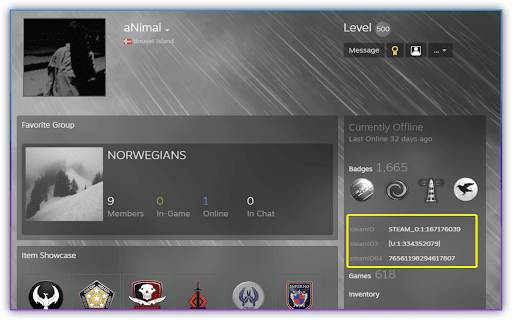
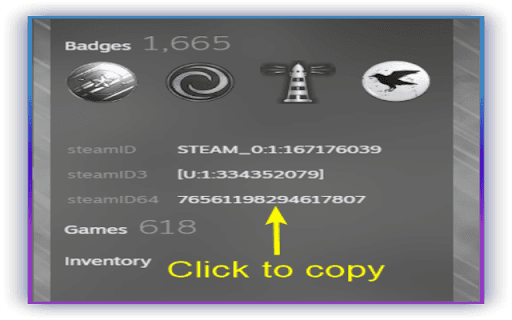
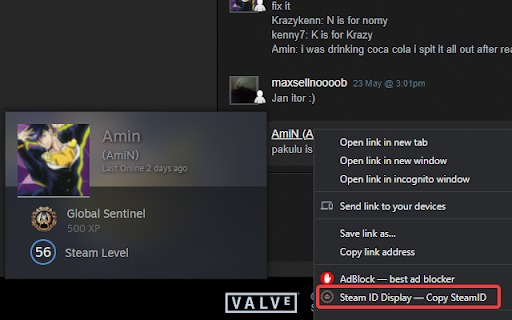

You will see steamIDs of the corresponding profile you are looking at. Click on the white highlighted steamID to copy! You can even copy your friends SteamID by right-clicking and selecting what format you need. The extension was made for admins to find players steamID. Gratitude to: xPaw for providing a reliable steamID library & Valve for providing an API. Dedicated for Unloze Community

Steam Market History Helper
Automatically saves and displays your Steam Market transaction history Steam's market history page is slow, paginated, and impossible to search. This extension fixes all of that. Steam Market History Helper syncs your complete transaction history into a local SQLite database — right in your browser. No servers, no accounts, no data collection. Your trades stay on your machine. 🗄️ REAL DATABASE — NOT A TOY Built on SQLite with Origin Private File System — the same database engine used by apps processing billions of rows. Tested and proven with over 1,000,000 transactions across multiple accounts. No crashes, no slowdowns, no data corruption. Other tools choke at a fraction of this scale. 🔄 RELIABLE BACKGROUND SYNC Set it and forget it. The extension fetches your history automatically with smart resume — it picks up exactly where it left off, even after browser restarts or connection errors. Exponential backoff handles Steam's rate limits gracefully. Real-time progress tracking in the popup, with milestone notifications every 10,000 items during bulk sync. 🔍 15+ SEARCH FILTERS — SQL FAST Filter by item name, buyer/seller, date range, price range, game, transaction type, currency, CS2 item type, collection, StatTrak, Souvenir, or custom filter groups. Every query runs as optimized SQL — instant results even on massive datasets. Save your favorite filter combinations for one-click access later. Optional performance indexes speed up filtered queries and pagination by ~4x with only 5–10% increase in database size. 📊 12 INTERACTIVE CHARTS — TABBED DASHBOARD Charts are organized into 3 tabs — Financial Overview, Items & Games, and Activity & Comparison — with lazy loading per tab: Financial Overview: Purchases vs Sales over time Cumulative Profit/Loss tracking Monthly Summary with buy/sell split Price Distribution histogram Spending Trend with 3-month moving average Top Items breakdown Top Games breakdown Game Breakdown with year filter Activity Heatmap — day-of-week × hour-of-day patterns Day of Week distribution (filterable by year and month) Hour of Day distribution (filterable by year and month) Year-over-Year comparison — overlay monthly data across years with spending/earnings/transaction count selector All charts support per-currency toggle for multi-currency traders. 📤 FULL EXPORT CONTROL CSV or JSON with a column picker — choose exactly which of the 13 available columns to include. File size estimation before export so you know what to expect. Chunked processing for massive datasets — no browser freezing, and cancellable mid-export. Dates formatted in your locale. 🔗 LISTING PAGE INTEGRATION Visit any item's market page on Steam and see your complete buy/sell history for that item injected directly into the page. Per-item summary with buy/sell totals broken down by currency. Click any price to see the full fee breakdown (Steam Fee + Publisher Fee + net amount). CS2 items get an Inspect in Game overlay on hover. 🛠️ DIAGNOSTICS & REPAIR A full diagnostic suite for power users — no other market history extension offers this: Database health overview with row counts and coverage percentage Fill Gaps — automatically detect and re-fetch missing transactions Rebuild Database — recover data from a corrupted database by batch-reading Vacuum — reindex and reclaim unused disk space Performance index sizes visible in the diagnostics dashboard Real-time action log for all diagnostic operations 👥 MULTI-ACCOUNT SUPPORT Automatically detects Steam account switches. Each account gets isolated data, independent sync settings, and separate notification preferences. Quick account switcher in the popup — no manual configuration needed. 💾 FULL DATABASE BACKUP & RESTORE Stream-download your entire SQLite database — handles files well over 1.5 GB without loading into memory. Restore from any backup with automatic account reconciliation. Your data is always portable. 🔒 ZERO DATA COLLECTION No analytics. No telemetry. No external requests except to Steam for your own transaction data. No sign-up, no cloud sync, no servers. Everything stays in your browser's local storage. Your SQLite database is yours — backup it, inspect it, migrate it however you want. ⚡ BUILT FOR THE MODERN WEB Chrome Manifest V3. SQLite with WAL journal mode on a dedicated Web Worker — database operations never block the UI. Optimized indexes across all filter dimensions. Optional composite indexes for power users who want even faster queries. Streaming backup and restore with no file size limits. 🌐 11 Languages English, Türkçe, Русский, 中文 (简体), Français, Deutsch, Español, Português (Brasil), Polski, 日本語, 한국어 Language is auto-detected from your Steam profile or set manually.

Open in Steam
An extension to open a Steam website page directly in the Steam client via a simple button Tired of having to login on the Steam website all the time? This is where OIS can help you! The ability to open Steam web pages pages in the Steam desktop client isn't as easy as it could be, so here's to an easier way. A simple button will appear on most Steam webpages which when clicked will reopen that exact page, just in the Steam desktop client. I'm just a guy who loves to write code. I'm only human, so there will likely be bugs somewhere. If you find any bugs, please report them to me (preferably on this project's Github issues page) with details of it and the page you were on at the time if relevant: https://github.com/PurplProto/OIS/issues

Steam ID Finder
Features: 1. Visit a Steam profile to see & copy the user's IDs 2. Right-click a profile URL to copy an associated ID 3. Visit the Friends Manager to copy multiple user IDs at once 4. Generate a line for SourceMod admin configuration when copying an ID

Faceit Stats by Eloking
Faceit Stats by Eloking is a Google Chrome extension that displays a user's CS2 stats on FACEIT on their Steam profile. Faceit Stats by Eloking is a Google Chrome extension that displays user stats from FACEIT.com on their Steam profile. Therefore it may be used as a shortcut to find more information quickly on the users FACEIT stats without having to go over to the platform. Extensions shows data as FACEIT level, elo, premium or not, when was the profile made, how many times the player has been afk, how many times player has left any FACEIT game and if player is banned or not on FACEIT. It works on any Steam profile, doesn't matter if it is private or not, as far as the Steam profile has been connected to FACEIT account, it will show data. Is pretty useful if you want to understand how good the player is before adding him or easily find out if the player is smurf or not and how old is their steam account. Features: - 1-click open Faceit profile - Country display from faceit on steam profile - ELO and level display on profile - Last match played on faceit information Report a problem or send feedback about the Faceit stats to info@eloking.com
