
iaeodlelphecgkpneeifmgcjgeoobjah


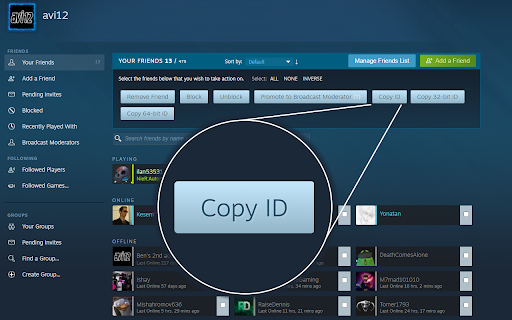

Features: 1. Visit a Steam profile to see & copy the user's IDs 2. Right-click a profile URL to copy an associated ID 3. Visit the Friends Manager to copy multiple user IDs at once 4. Generate a line for SourceMod admin configuration when copying an ID

SteamChecker
FEATURES: Shows owned/wishlisted games: * on the Humble Choice pages (https://www.humblebundle.com/membership/home) * on the main game bundle pages * in the Humble Bundle Store and Search pages * keys in your Humble Bundle library (https://www.humblebundle.com/home/keys) Besides looking through every one of your steam games, searching for a specific title to see if you own it or not, there is no way of determining if a bundle you're about to get on HumbleBundle.com has games in your Steam library. Although it may be cheap, spending money on a 10-game bundle where you already owned 9 of the games always makes me frustrated, so I created this extension! This will gray-out any game you own on Steam that is on any of the weekly bundles, store pages, and keys to let you know if you own the game or not. Additionally, it will highlight wishlisted games you may have forgotten about so you don't miss a great deal on a wanted game! HOW TO USE: There will be a new extension icon in Chrome. Click on that to input your 64bit SteamID or steam profile name (NOT nickname) if you have set your URL. Click "Save" and you're done! This information can be found in your profile URL "steamcommunity.com/id/XXXXXXXXXX/" or "steamcommunity.com/profiles/XXXXXXXXXXXXXXXXXX/" NOTE: Humble Bundle uses a different naming format than Steam does for some games, but I will try to keep the alias file as up to date as possible whenever new bundles come out or new games are added to a bundle. If you see that games aren't showing up in a bundle, don't hesitate to contact me! The extension currently doesn't support steam DLC collections (Season Pass, Master Collection, Collector's Edition, etc.). VERSION 1.0 CHANGES: * Manifest V3 update * Changed how styles are applied for easier maintenance VERSION 0.9 CHANGES: * Added support for the Humble Choice subscription page * Fixed game aliases not loading in some circumstances VERSION 0.8 CHANGES: * Added support for the Humble Bundle Store and Search pages * Fixed for new Humble Bundle keys layout * Fixed single quote in game title issues

Steam Plus
SteamPlus is an extension that will enhance your steam experience (Like Steam Inventory Helper, Csgofloat or Csgotrader.app)… SteamPlus is an extension that will enhance your steam experience (Like Steam Inventory Helper, Csgofloat or Csgotrader.app) Enhance work with tradeoffers (Fast check summary of offer, total cost). Auto accept gift offers (Empty from your side). With SteamPlus you can list multiple items, quick remove items from listing, edit etc. With SteamPlus you can check who's selling a specific item on Steam Market. You can quickly inspect on csgo items floats,rare patterns and prices (including extra charges). You can quickly inspect how much your csgo inventory costs. Check lowest price and volume of sales on steam market. Fast inspect items, stickers, prices on csgo items. Quick sell or quick buy items on steam market

Steamify - Faceit stats checker
Steamify is a Chrome extension that displays a users detailed stats on FACEIT on their Steam profile. Steamify is a Chrome extension that enhances the experience on steamcommunity.com with faceit.com. It works on any Steam profile, doesn't matter if it is private or not, as far as the Steam profile has been connected to FACEIT account, it will show data. Is pretty useful if you want to understand how good the player is before adding him or easily find out if the player is smurf or not. This extension will replace all similar online-services. NOTE: To keep this extension frequently updated, Steamify is supported by clash.gg. You can hide these promotions forever at any time. NOTE: Steamify is developed independently, and is not officially endorsed by or affiliated with Steam or FACEIT. Report a problem or send feedback about the Steamify to rockwasnthere@gmail.com

Faceit Stats by Eloking
Faceit Stats by Eloking is a Google Chrome extension that displays a user's CS2 stats on FACEIT on their Steam profile. Faceit Stats by Eloking is a Google Chrome extension that displays user stats from FACEIT.com on their Steam profile. Therefore it may be used as a shortcut to find more information quickly on the users FACEIT stats without having to go over to the platform. Extensions shows data as FACEIT level, elo, premium or not, when was the profile made, how many times the player has been afk, how many times player has left any FACEIT game and if player is banned or not on FACEIT. It works on any Steam profile, doesn't matter if it is private or not, as far as the Steam profile has been connected to FACEIT account, it will show data. Is pretty useful if you want to understand how good the player is before adding him or easily find out if the player is smurf or not and how old is their steam account. Features: - 1-click open Faceit profile - Country display from faceit on steam profile - ELO and level display on profile - Last match played on faceit information Report a problem or send feedback about the Faceit stats to info@eloking.com
