
ldeofbdmhnnocclkaddcnamhbhanaiaj
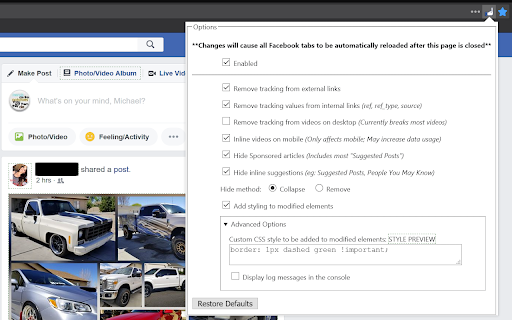


Removes Ads and the user interaction tracking from content on Facebook™ NOTICE: Google is making it increasingly difficult to maintain and publish extensions in their webstore, and Facebook keeps trying to take the extension down, so I may stop updating in chrome at any time. I recommend using Firefox if you want continued support, and it's better for privacy in general. ---------- "Facebook" and "FB" are registered trademarks of Facebook Inc. This extension is neither endorsed by nor affiliated with Facebook. ---------- Please report bugs at https://github.com/mgziminsky/FacebookTrackingRemoval/issues Removes Ads and the user interaction tracking from content on Facebook™. Modified elements can optionally have a custom CSS style applied to them so that cleaned items can be more easily identified. For links, the event listeners on the link and its parents are removed and/or disabled and a proper href is set. For videos on mobile, all Facebook™ event-listeners and custom controls are removed, and the video is simplified into just the bare HTML5 video tag. PRIVACY POLICY: I don't, and never will, collect or send any data to myself or any third parties Explanation of permissions: - Access to facebook.com, messenger.com, and facebookwkhpilnemxj7asaniu7vnjjbiltxjqhye3mhbshg7kx5tfyd.onion is needed for main functionality, in order to work on those pages. - Access to mgziminsky.gitlab.io, more specifically https://mgziminsky.gitlab.io/FacebookTrackingRemoval/*, is used to download blocking rules only - `webNavigation`: Needed to handle cleaning FB interactions that use the browser history API instead of doing a normal page navigation - Firefox: "Access browser activity during navigation" - Chrome: "Read your browsing history" - This is misleading. See https://github.com/mgziminsky/FacebookTrackingRemoval/issues/67#issuecomment-1346953059 Project is completely open source, so you are welcome, and encouraged, to check the code yourself before installing. v1.13.0 - New option to detect ads with canvas labels (Default: Enabled) v1.11.3 - Link cleaning fix for FF115+ v1.11.1 - Fix for split text in svg labels See https://github.com/mgziminsky/FacebookTrackingRemoval/blob/master/CHANGELOG for full list

Linkumori (URLs Cleaner) - formerly Neat URL
Remove tracking parameters from URLs and protect your privacy Remove tracking parameters from URLs and protect your privacy Linkumori (Clean URLs) - Reclaim Your Online Privacy In today's data-driven world, your browsing habits and online activities are constantly being tracked and analyzed by a myriad of third-party services. One of the primary ways this is accomplished is through the use of tracking parameters embedded in the URLs you visit. These parameters allow advertisers, analytics providers, and other companies to follow your digital footprint across the web, compromising your privacy. The Linkumori (Clean URLs) Chrome extension is designed to combat this pervasive issue by automatically cleaning and purifying the URLs you encounter. It methodically removes the various tracking identifiers and parameters that are appended to URLs, preventing these third-party services from collecting and aggregating your personal data. By installing Linkumori, you can enjoy a more private and secure browsing experience, where your online activities are shielded from unwanted surveillance and profiling. The extension works seamlessly in the background, ensuring that your URLs are cleansed without interrupting your normal browsing workflow. Automatic URL cleaning: The extension automatically identifies and removes tracking parameters from the URLs you visit, protecting your privacy. Comprehensive coverage: Linkumori is equipped with an extensive set of rules to handle a wide range of URL-based tracking mechanisms, ensuring a robust and effective cleaning process. Whitelist support: You can easily add domains to a whitelist, allowing you to exclude specific websites from the URL cleaning process if needed. Minimal impact: The extension's efficient design ensures that the URL cleaning process has negligible impact on your browsing performance, providing a seamless user experience. Customizable settings: Linkumori offers the flexibility to enable or disable the extension's features, allowing you to tailor the privacy protection to your preferences. In today's digital landscape, where our online lives are increasingly exposed to data collection and monetization, the Linkumori (Clean URLs) extension stands as a powerful tool to reclaim your privacy. By installing this extension, you can take a proactive step in safeguarding your personal information and regaining control over your digital footprint. Download Linkumori (Clean URLs) now and experience the freedom of browsing the web with enhanced privacy protection. Before: http://www.phoronix.com/scan.php?page=news_item&px=Ioquake3-Auto-Updater&utm_source=feedburner&utm_medium=feed&utm_campaign=Feed%3A+Phoronix+(Phoronix) After: http://www.phoronix.com/scan.php?page=news_item&px=Ioquake3-Auto-Updater Custom rules can be added in the settings. Bug reports and feature requests -------------------------------- You can open an issue on GitHub: https://github.com/Linkumori/Linkumori-Extension/issues/new

Security Tweaks
Improve your online security with few tweaks via toolbar popup! Security Tweaks is an extension that helps you improve your security while browsing by using eight different techniques. Simply open toolbar popup UI and mark a desired tweak. Please note that, only few tweaks are selected by default. There are few settings (related to JavaScript, inline-script and cookie) available in toolbar popup to adjust. Currently there are 8 tweaks available for this add-on: 1. Block most common ads. 2. Block third-party JavaScript. 3. Enable safe-browsing. 4. Block cookies. 5. Block inline-script. 6. Block Flash contents. 7. Disable window.eval(). 8. Block most common malware URLs. Note 1: I have made this extension with Yubi's collaboration. This add-on is inspired by Speed Tweaks made by Yubi: https://chrome.google.com/webstore/detail/speed-tweaks/afebilemcaepdkmhmibgmnpfppnjimjf Note 2: to report bugs, please fill the bug report form in the addon's homepage (https://mybrowseraddon.com/security-tweaks.html).

Host AdBlocker
The "Host AdBlocker" is an ad-blocking extension that uses host matching instead of RegExp matching to increase blocking performance and reduce memory footprint. How it works: This extension installs a static hostname list to the incoming filter to block advertisement, tracker, and analytic sources. If a hostname matches, the request gets blocked. If not, the request gets processed as usual. Extensions like "uBlock Origin" or "AdBlock Plus" use the RegExp matching method. Although this method is more powerful, it is computationally expensive. Features: 1. You can extend the default filtering list by adding your custom domain names in the backlist hostnames on the options page. 2. To completely ignore a hostname, add it to the whitelist 3. This extension runs on manifest v3. This means that blocking performance is native. 4. You can toggle the extension on and off with a single click on the action button.

Video Ad Blocker for Facebook™ App Extension
Blocks video and image ads from the facebook app news feed. And it actually works Are you upset about Facebook's tremendous power? Do you want Facebook to stop abusing your attention just to make more money? Is Facebook violating your privacy because they're too greedy? Then use this free video and image sponsored adblocker! It blocks image- and video-based sponsored posts and sponsored ads from showing up in your Facebook News Feed. This is where 90+% of their revenue comes from. Did you know Facebook is **actively sabotaging** video and image sponsored ad blockers? That's why half of the most popular sponsored ad blockers aren't effectively blocking Facebook sponsored posts or sponsored ads. That's why this extension was created: so that Facebook video and image sponsored ads can once again be blocked easily! I personally tested these sponsored adblockers and NONE of them are working: * Ghostery * Adlock * Adblock for Facebook * uBlock Origin * Fair AdBlocker The only ones I found to be working were: * Adguard * Adblock Plus * Total Adblock Please contact me if this ad blocker is not blocking ads for Facebook used in your language. We are not affiliated, associated, authorized, endorsed by, or in any way officially connected with Facebook. Facebook is a registered trademark of the Facebook, Inc.
