
ldcdibnleabohdaokkopkkhblnbknjlg
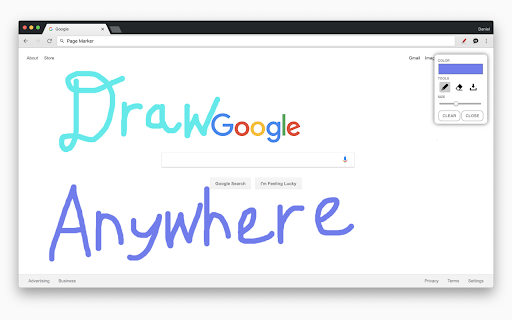
Advanced web page annotation tool with drawing, highlighting, and marking capabilities Page Marker is a powerful web annotation tool that transforms how you interact with web content. With an intuitive interface and comprehensive drawing tools, you can highlight, mark up, and annotate any webpage for research, teaching, collaboration, or personal reference. Key Features Versatile Annotation Tools • Precision Pen Tool: Draw freehand with customizable colors and line thickness • Semi-Transparent Highlighter: Emphasize important text while keeping it readable • Eraser Tool: Remove annotations with pixel-perfect precision • Selection Tool: Navigate webpages without accidentally drawing User-Friendly Interface • Floating Tool Panel: Clean, modern interface that stays out of your way • 16-Color Palette: Choose from preset colors or use the custom color picker • Adjustable Brush Sizes: Fine-tune your drawing with sizes from 1-20px • Undo/Redo: Full history management for mistake-free annotation Seamless Data Management • Automatic Saving: Annotations persist between browser sessions • Domain-Based Storage: Annotations are saved per website, keeping your work organized • Export/Import: Back up your annotations or transfer them between devices • One-Click Clearing: Remove annotations from a single page or globally Productivity Enhancements • Keyboard Shortcuts: Quick access to tools for efficient workflow • Responsive Design: Works on any screen size or device • Non-Intrusive: Doesn't interfere with normal webpage functionality • Performance Optimized: Smooth drawing experience with minimal resource usage Whether you're a student annotating research materials, a teacher creating visual explanations, a developer marking up design changes, or simply someone who likes to highlight important information, Page Marker provides the perfect toolset for your web annotation needs.

Page Marker - Draw on Web
Draw or highlight on any website in real time. Add text, lines, and shapes. Move, undo, or redo anything you draw. Draw on any website, add text, add lines, and highlight! With Page Marker, you can use your mouse or touchscreen to draw on the web or on PDFs and save it to your computer. Paint, draw, and mark on any webpage or website. Instructions: 1. Click the puzzle piece-shaped extensions icon in the top right corner of your browser. Pin the Page Marker red marker icon for ease of access. 2. Begin drawing on any webpage with your mouse or touchscreen. 3. To change the color of the marker, click on the color selecting box. 4. To change thickness, use the size slider. 5. Use the highlighter tool to highlight lines of text. 6. Use the eraser tool to erase parts of your drawing. 7. Use the text tool to add text to the website. 8. Use the line tool to draw straight lines. 9. To undo or redo, click the corresponding undo/redo buttons. 10. Change the default color or thickness in the options menu when you right click the Page Marker icon.

Page Marker Extension
Use Page Marker Extension — Website Annotation Tool. Draw on page, draw on screen, annotate website, work in whiteboard online mode. 🚀 Page Marker — Website Annotation Tool is the browser app that transforms any tab into a creative canvas. In a single click you can add a chrome pen highlight, or flip the page into a full virtual whiteboard. Meetings, tutorials, code reviews, and brainstorming sessions become faster because you can draw on browser chrome instead of switching apps.

Web Annotator - Webpage Highlight Notes
Add text notes, sticky notes, drawings, and auto highlights on any webpage Web Annotator: Your private, local web knowledge base. Capture ideas and organize notes directly in your browser. 1. Add text highlights, sticky notes, image notes, link notes, and page notes on any webpage 2. Draw directly on webpages and save as notes, with support for editing drawings 3. Built-in tools to make all text and images selectable and top-layer for easy note-taking 4. Customize tags, colors, and styles for notes, including background, underline, wavy line, and strikethrough 5. View notes in a tree structure organized by website and path 6. All notes automatically capture webpage snapshots to preserve context 7. 100% local data storage with one-click import/export and WebDAV sync support

Web Page Markup Tool
Highlight, underline, and take notes on any webpage. --- 21/9/25 1.1 Updates + Inserted highlight and underline colour customisation + Tool now supports Single-Page Application websites (even more pages for you to annotate). --- Turn the Web Into Your Personal Notebook We've all been there. You're deep into an amazing article or critical piece of research, and you find a flash of brilliance—a perfect quote, a crucial statistic, a key idea. You promise yourself you'll remember it, but a dozen tabs later, that insight is gone. What if the web wasn't just for reading, but for thinking? Introducing the Internet Markup Tool—a simple, powerful extension that transforms any webpage into your personal canvas. Engage Directly with Content Effortlessly highlight what matters and underline key phrases to make them pop. Go beyond passive reading and start actively engaging with information. Have a sudden idea or question? Drop a sticky note anywhere on the page to capture your thoughts in the moment. It’s like having a conversation with the content itself. Never Lose Your Work Again Here’s where the magic happens: your work is automatically saved. When you return to a page tomorrow, next week, or next year, all your highlights, underlines, and notes will be waiting for you, exactly as you left them. Your insights become a permanent, valuable layer on top of the web. Gather Your Research in Seconds When you're ready to consolidate your findings, the toolbar menu makes it easy. Instantly copy all your marked text to your clipboard, or save the entire annotated page as a PDF. Your scattered research from across the web now comes together seamlessly. Private and Secure, Always Work with complete peace of mind. Your markups and notes are your own. They are saved only on your local computer and are never collected or seen by anyone else. That's our promise. Perfect for: Students: Turning online articles and textbooks into powerful study guides by highlighting key concepts and adding notes for exams. Researchers: Effortlessly collecting data, quotes, and sources from across the web and exporting them into a single, organized document. Writers & Professionals: Gathering inspiration, annotating articles, and saving crucial information for reports, client work, or creative projects. Curious Minds & Lifelong Learners: Building a personal knowledge base and ensuring that valuable insights from their reading are never forgotten. Stop just browsing. Start building your personal library of knowledge, one highlight at a time. Add the Markup Tool to Chrome today and never lose a thought again.
