
ldbehgakcmbdalmpdfjedahogegmgpba
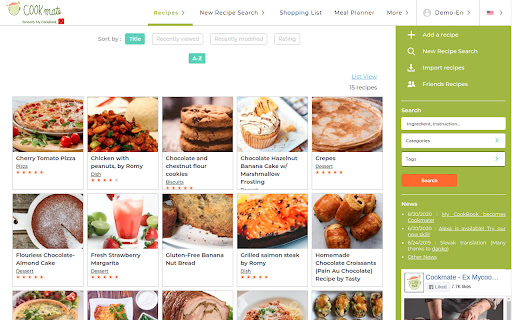
Store all your favorite recipes in one place! COOKmate is a recipe manager with search and import features. Build your private cookbook by gathering recipes on the web and using the import features. Use this extension to import your favorite recipes into your personal cookbook Cookmate https://www.cookmate.online

Easy Cookie Editor
Easy Cookie Editor is a cookie manager. Control your cookies! You can add, delete, edit, and search. Easy Cookie Editor: A complete manager for cookies accumulated during browsing. It allows you to view, edit, create, delete cookies and search them by domain names. Contextual Identities such as Private Browsing, First-Party Isolation, and SameSite flag are also supported. Easy Cookie Editor is designed for developers, testers or people concerned about their privacy on the Internet.

Foryoueats: Recipe Importer & Saver
Save recipes from any website in one click. Import into your recipe manager, plan meals & build grocery lists. Foryoueats: Recipe Importer & Saver Never lose a recipe again. Save recipes from any website, YouTube, TikTok, Instagram, or Facebook directly to your Foryoueats collection — no manual entry, ever. Foryoueats brings your entire cooking life into one place: recipe saving, meal planning, pantry tracking, and grocery lists, organized and always with you. Key Features: 🍽 Recipe Manager & Organizer Create, edit, and organize your personal digital cookbook. Make collections public or keep them private — because nana's secret strudel recipe should stay in the family. Tag and categorize recipes for instant access anytime. 📥 Recipe Importer & Saver Found a recipe mid-scroll? Import it instantly from any website, YouTube, TikTok, Instagram, or Facebook directly into your collection. One click and it's yours. 🛒 Grocery List Builder Add ingredients from any recipe to your grocery list in one tap. Shop smarter, forget nothing, and stop writing lists on the back of envelopes. 📅 Meal Planner Plan your weekly meals with our simple meal planner. Always know what's for dinner and stop the 6pm "what should I cook?" panic. 🥫 Pantry Manager Track what you have at home and cook smarter with what's already in your kitchen. 🤝 Recipe Sharing Share recipes with friends, family, or the entire Foryoueats community. Keep collections private or share them with just a select few. 🍎 AI Nutrition Insights Every recipe comes with AI-generated nutrition data so you can make informed choices without doing the math yourself. 🔢 Recipe Scaling Cooking for two or feeding a crowd? Our smart scaling tool recalculates every ingredient automatically. 🔍 Powerful Recipe Search Search by ingredient, cuisine, dietary requirement, or keyword. Your perfect recipe is always one search away.

CookBook Manager - Recipe Importer
Import recipes to your CookBook Manager App account from Chrome! CookBook Recipe Clipper for Chrome Save any recipe you find online straight to your CookBook library with one click. The CookBook extension turns your browser into the fastest recipe collector so you never lose a dish again. KEY FEATURES • One‑click capture: grabs ingredients, instructions, images and nutrition data while you browse. • Import from anywhere: clip recipes from Instagram, TikTok, Facebook, Pinterest, your cookbooks and more! • AI smart import: cleans up formatting and links ingredient amounts • AI Chef: generate new recipe ideas, variations and ingredient swaps in seconds. • Sync everywhere: recipes appear instantly in your CookBook iPhone, iPad, Android and web apps. • Meal planning and grocery lists: send saved recipes to your meal planner and create a smart shopping list that syncs across devices. • Macros and nutrition tracking: view calories, protein, carbs and fats for each recipe, then track daily totals in the planner. • Organise your way: tag by cuisine, course or diet, create custom tag collections and mark family favourites. HOW TO USE 1. Click “Add to Chrome” and pin the CookBook icon to your toolbar. 2. Log in with your CookBook account or start a free 7‑day trial. 3. When you are on a recipe page, click the CookBook icon. 4. Either click Save or Edit. FAQ Q: Is it free? A: We offer limited use for free. Unlimited clipping needs an active CookBook subscription. Q: Does my subscription work on mobile and web? A: Yes. Sign in with the same CookBook account on any device. SUPPORT Questions or feedback? Email team@cookbookmanager.com and we will help.

Search Potato
Search Potato is your shopping and browsing pal - All your important and useful links are in one place. "Search Potato" - Your Gateway to Effortless Browsing: Introducing "Search Potato," a sleek new tab extension designed to transform your browsing experience. Say goodbye to distractions and hello to a streamlined interface that provides quick access to the most useful shortcuts right from your new tab page. 🔍 Powerful Bing-Powered Search: Harness the strength of the Bing engine seamlessly integrated into your new tab. Enjoy lightning-fast and accurate search results without leaving the comfort of your browsing space. 🚀 Instant Shortcut Access: Boost your productivity with easy access to essential shortcuts directly on your new tab page. Navigate swiftly between your favorite websites and tools, eliminating unnecessary clicks. 🎨 Customizable Shortcut Carousel: Tailor your shortcut carousel to suit your preferences. Organize, add, or remove shortcuts based on your most frequent tasks, creating a personalized browsing experience that revolves around your needs. Upgrade Your Browsing Journey: Enhance your Chrome New Tab experience by adding the "Search Potato" extension. Click "Add to Chrome" now and embark on a browsing adventure where efficiency meets simplicity! Note: By clicking "Add to Chrome," you willingly install the Search Potato extension. Additionally, the extension optimizes Chrome New Tab's search functionality for a smoother and more intuitive browsing experience.
