
hcbjpficgoncibphmgngnbmkghogdelj

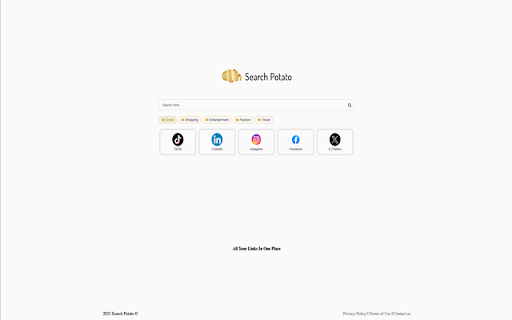
Search Potato is your shopping and browsing pal - All your important and useful links are in one place. "Search Potato" - Your Gateway to Effortless Browsing: Introducing "Search Potato," a sleek new tab extension designed to transform your browsing experience. Say goodbye to distractions and hello to a streamlined interface that provides quick access to the most useful shortcuts right from your new tab page. 🔍 Powerful Bing-Powered Search: Harness the strength of the Bing engine seamlessly integrated into your new tab. Enjoy lightning-fast and accurate search results without leaving the comfort of your browsing space. 🚀 Instant Shortcut Access: Boost your productivity with easy access to essential shortcuts directly on your new tab page. Navigate swiftly between your favorite websites and tools, eliminating unnecessary clicks. 🎨 Customizable Shortcut Carousel: Tailor your shortcut carousel to suit your preferences. Organize, add, or remove shortcuts based on your most frequent tasks, creating a personalized browsing experience that revolves around your needs. Upgrade Your Browsing Journey: Enhance your Chrome New Tab experience by adding the "Search Potato" extension. Click "Add to Chrome" now and embark on a browsing adventure where efficiency meets simplicity! Note: By clicking "Add to Chrome," you willingly install the Search Potato extension. Additionally, the extension optimizes Chrome New Tab's search functionality for a smoother and more intuitive browsing experience.

The Big 5
The perfect way to explore the most dangerous wild animals of Africa right from your browser home page. With stunning images and daily quotes related to The Big 5, you'll be able to select your favorite from our image bank. The Big 5 extension also provides easy navigation to your frequently used tabs, ensuring an efficient and enjoyable browsing experience. We welcome your feedback and suggestions as we continue to add and upgrade features to make The Big 5 browser extension the ultimate destination for wildlife enthusiasts. Download The Big 5 extension today and start your virtual safari! By clicking "Add to chrome", I accept and agree to installing The Big 5 extension and setting Chrome™ New Tab search to Microsoft Bing provided by the service and the Terms of Use at https://the-big-5.mnsdigitalmedia.com/terms-and-conditions and Privacy Policy at https://sites.google.com/mnsdigitalmedia.com/privacy-policy. The Big 5 extension replaces your New Tab search engine and provides a new search experience with search results by Microsoft Bing.

MetricMaster
'MetricMaster' is a powerful Chrome extension that lets you easily convert units of measurement. With MetricMaster, users can effortlessly compare various measurement units, making unit conversions a breeze. Whether you need to convert length, weight, volume, or any other unit, MetricMaster has got you covered, providing accurate and instant results. But that's not all! This versatile extension also offers a convenient search bar Provided by Microsoft Bing, allowing users to seamlessly explore the web without leaving their browser. Enhance your browsing experience with MetricMaster, the ultimate measurement conversion and search tool. By clicking “ADD TO CHROME”, I accept and agree to install the MetricMaster extension and set Chrome's new tab search provider to Microsoft Bing as described by the service in our Terms of Use and Privacy policy Privacy Policy: https://mild-ads.com/Privacy-Policy/ Terms of Use: https://mild-ads.com/Terms-and-Conditions/ You may uninstall the extension at any time To remove our extension from Google Chrome: 1) Click on the three vertical dots icon in the upper right-hand corner of your Chrome browser 2) Go to "Settings" 3) In the left menu that appears, click on "Extensions" 4) From the list of installed Extensions, locate the extension you would like to uninstall

Ultimate Basketball Fan Extension
The ultimate basketball themed extension, made by fans - for fans. If you're a true basketball fan, this extension is made for you. The extension adds a scoring table to your home page that's updated in real time with live scores of all recent basketball games that occur in the US. Also, by downloading the extension you'll receive a basketball themed wallpaper (which you can change by pressing the shuffle button on the top right corner of the homepage). On top of that, the extensions adds an active clock and the current date to the bottom of your homepage, which will always tell the current time wherever you are located. By clicking "Add to Chrome" I accept and agree to install the Ultimate Basketball Fan Extension Chrome extension and hereby agree to set the Chrome New Tab to that provided by the service and the Privacy policy and Terms of Use. The search results will be provided by Microsoft Bing. *This Extension is an unofficial extension. It's not connected to or affiliated with any basketball team or league in any way. *We collect search queries to enhance the functionality of the "Ultimate Basketball Fan Extension" and provide users with a more personalized experience. Methods of Data Collection: Data is collected when users interact with the extension, specifically during search activities. Data Usage: Collected search queries are used solely for the purpose of improving search functionality and enhancing user experience within the extension. *You may uninstall the extension at any time. To remove our extension from Google Chrome: 1) Click on the three vertical dots icon in the upper right-hand corner of your Chrome browser. 2) Go to "Settings.” 3) In the left menu that appears, click on "Extensions.” 4) From the list of installed Extensions, locate the extension you would like to uninstall.chrome

Wingman Clock
Wingman Clock: Keep track of time with style. A sleek and reliable Chrome extension for your daily time management needs. Introducing the WingMan-Clock Extension for Chrome! This user-friendly extension allows you to easily add and customize multiple clocks to your browser, so you can keep track of the time in various cities around the world. Simply select the cities you want to monitor and view their current time at a glance on your new tab. The extension also conveniently displays the time differences between the selected cities, making it easy to schedule meetings and stay organized across time zones. With its sleek design and practical functionality, the WingMan-Clock Extension is a must-have tool for anyone who works with colleagues or friends across different regions. By clicking “Add to Chrome”, I accept and agree to install the WingMan-Clock Extension, to set the Chrome™ New Tab search to Yahoo, and to our Terms of Use - https://searchologic.com/Terms-Conditions/, and Privacy Policy -https://searchologic.com/Privacy-Policy/. You may uninstall the extension at any time. To remove our extension from Google Chrome: 1) Click on the three vertical dots icon in the upper right-hand corner of your Chrome browser. 2) Go to "Settings.” 3) In the left menu that appears, click on "Extensions.” 4) From the list of installed Extensions, locate the extension you would like to uninstall.
