
ldacgepjfajfdaodegphiolcelhlnkfm
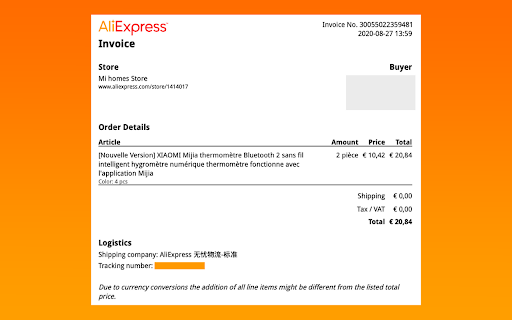


Extract your AliExpress order details to a printable PDF The free extension to download an invoice on AliExpress using Google Chrome. The free AliExpress invoice generator plugin allows you to download the your AliExpress receipt. ✜ Download To use our “AliExpress Invoice” extension, simply follow the procedure below: ▻ Find “AliExpress invoice free” directly on the Google Web Store ▻ Press “Add to Chrome” which downloads the tool to your computer ✜ Use There will thus be two possibilities to download your receipts: From the extension a) By pressing “My Orders” b) Following procedure 2) directly on AliExpress Directly on the website, a) Go to the website by logging into your account b) Then click on the “View details” button c) a button appears with “Download PDF INVOICE” This button is displayed on all your orders, you just have to keep the extension installed on your browser it will work during all your orders. This extension is useful both for generating an Aliexpress invoice for customs. ✜ AliExpress It's a website for connecting different merchants with buyers, the interface connecting buyers and sellers. The platform sends an order confirmation email but does not take care of providing you with the justification for purchases after purchasing your products ordered on the site and receiving your order. To be able to justify in your accounts, your expense report or even track your purchases, the "AliExpress bill" extension allows you to generate order PDFs, this is a layout of the justified order. On Ali-express the VAT invoice is not automatic because the law and tax rules are not the same in each country, this extension allows you to generate an order PDF file to justify your costs and to issue a file similar to the purchase receipt. ✜ Customs In case of customs control, you may need to justify your purchases, or when purchasing from dropshipping, you may need to obtain a receipt from Alibaba; by installing the AliExpress download invoice. Usage corresponds perfectly to Ali customs bill or Ali-Express dropshipping invoice. ✜ Operation This extension works the same way Ali invoice however it works free of charge and without subscription. ✜ Legal We are in no way related to Alibaba Inc, AliExpress Inc, or any of Alibaba's subsidiaries. Our extension allows you to generate PDFs to allow you to justify your purchases and simplify your accounting, it is not an invoice in the French legal sense of the term because it is not issued by the Alibaba company or reseller ( https://www.economie.gouv.fr/entreprises/factures-mentions-obligatoires). Nevertheless, our software does not make fake receipts as it only issues documents that have been paid and confirmed by Alibaba. SAS AUNALA, responsible for creating the software, is not responsible for your use of these documents. You can find our privacy policy here: http://aliexpress-invoice.com/privacy-and-cookies-policy.html ✜ Privacy and collection We do not collect any of your personal data, only anonymous data is sent to Google Analytics for statistical purposes. Your data are collected securely and never leaves your browser, it is used to generate the documents and add the download button. The extension is free and will remain so. Nevertheless, by downloading this software and accepting the general conditions of sale, you agree that there is a sharing of data of your orders (no collection of personal data) between AliExpress and the extension. To create the PDF document and that the creators of the software be paid by Alibaba in percentage as business introducers. This system makes it possible to make the extension free for users and to pay the costs relating to the creation and maintenance of this software

AliBilling - Download AliExpress Invoice
Download AliExpress invoices with AliBilling - AliExpress invoice generator. AliBilling is an invoice generating tool for your orders from AliExpress website. You can download invoices for any order that you placed on AliExpress with just a click of a button. It is the simplest solution for your invoice needs whether you need one for tax purposes or book keeping. You can add your own details such as your company’s name, tax information, and supplier details or anything else that you want on the invoice before downloading the invoice. AliBilling makes record keeping easier with a digitally generated invoice in a PDF format. The format works on almost any computer or mobile device. AliBilling is available with three different plans. All the plans include an unlimited number of invoice downloads. $20 for 3 months. $35 for 6 months. $60 for lifetime. You can now get “Lifetime access” for just $60 and become a lifetime member of AliBilling, available to serve your invoice needs anytime and anywhere. Try AliBilling now and get 3 free invoice downloads. To sign up: 1. Install the chrome extension 2. Go to https://alibilling.com/ 3. Click on the “Sign Up” button 4. Create a new account 5. Log in to your AliExpress website account to open the “Orders” Page 6. Start downloading invoices by clicking on the “Download Invoice” button and save them to your computer 7. You can keep your invoices in the digital format or print them Now, there is no need to log in to your AliExpress account again and again to view your order details. If you are a dropshipper then invoices can be very useful in case your orders/parcels need a clearance certificate from the customs and duties department.

AliBill – AliExpress Invoice Generator
Create invoices from your AliExpress orders. AliBill is the ultimate tool for AliExpress shoppers and resellers who need quick and easy invoice generation. With just a few clicks, transform your AliExpress order details into a clean, professional invoice—perfect for expense tracking, accounting, or reimbursement purposes. 🔹 Key Features: ✔️ Instant Invoice Generation – Convert your AliExpress order details into an invoice in seconds. ✔️ Customizable Fields – Edit buyer and seller details for a personalized invoice. ✔️ Download & Print – Save invoices as PDF or print them instantly. ✔️ Multi-Currency Support – Generates invoices based on your order’s currency. ✔️ User-Friendly Interface – Seamless integration into the AliExpress orders page. 1. Install the AliBill extension. 2. Go to your AliExpress Orders page. 3. Click the "Generate Invoice" button next to your order. 4. Customize details (if needed) and download or print the invoice. ⚠️ Disclaimer: AliBill generates invoices based on AliExpress order details, but these are not official tax invoices. Always consult your local tax regulations for compliance. 🚀 Start simplifying your order management today! Install AliBill and take control of your invoices effortlessly.

Profitario - AliExpress Invoice Generator & Reports
Create an AliExpress invoice and analyse your expenses with powerful reports. Watch the How-To Video here: https://youtu.be/3cOBjiDxwoQ With this extension, you can easily upload your orders to Profitario.com, where you can create AliExpress invoices and analyze your sales data to gain valuable insights into your business performance. Profitario offers many more features for Dropshippers here is a list of the most important ones: - Automatically convert the currency of your orders - Create reports to monitor the status of your purchases - Automatic profit calculations for every order on shopify After installing the extension: 1. Sign up on profitario.com 2. Go to the Integrations -> Extensions and then click on „Upload Orders“. - You might need to authenticate your Extension. 3. Click Start Export to start your first export. This will first save your order information and then send the data encrypted to our server. 4. Go back to app.profitario.com and navigate to Reports -> AliExpress -> Invoices to download you Invoices.

AliExpress Parcels - My Orders
View and search for AliExpress orders. Quick links will help you instantly switch to your favorite pages. Now it's much easier and faster to track your parcels from AliExpress. Enter your list of numbers and go to view the status of the delivery in one click. In version 3.1.1, we added a 5post tracking button in the Pyaterochka store In version 3.1.0, the code has been rewritten to reflect the changes in the AliExpress code. In version 2.0.0 the code was rewritten taking into account the Google Manifest v.3 policy In version 1.5.0 Correction of double track numbers. Added support for the ".ru" domain. Added a direct link to the product from the extension. Changed the style of the button. Other fixes. In version 1.4.0 Added instructions, added a quick search in AliExpress, added manual addition of track numbers, fixed minor bugs. In version 1.3.4 we added multilanguage, fixed several bugs. In version 1.3.0, we made the changes that affected the storage of tracks. Please re-enter the data. Now the track is entered on the order page with the click of the "TRACK" button
