
jeboiblbjpbhkpphfbjepnelgbcjgcjc

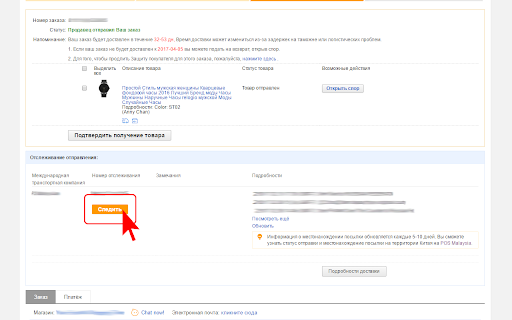
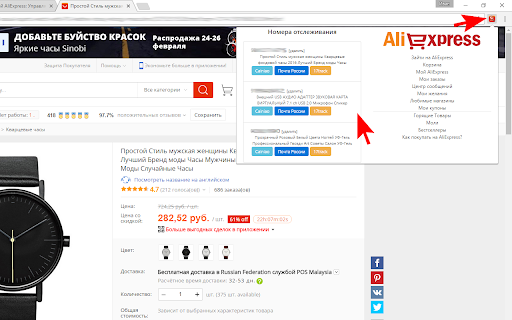
View and search for AliExpress orders. Quick links will help you instantly switch to your favorite pages. Now it's much easier and faster to track your parcels from AliExpress. Enter your list of numbers and go to view the status of the delivery in one click. In version 3.1.1, we added a 5post tracking button in the Pyaterochka store In version 3.1.0, the code has been rewritten to reflect the changes in the AliExpress code. In version 2.0.0 the code was rewritten taking into account the Google Manifest v.3 policy In version 1.5.0 Correction of double track numbers. Added support for the ".ru" domain. Added a direct link to the product from the extension. Changed the style of the button. Other fixes. In version 1.4.0 Added instructions, added a quick search in AliExpress, added manual addition of track numbers, fixed minor bugs. In version 1.3.4 we added multilanguage, fixed several bugs. In version 1.3.0, we made the changes that affected the storage of tracks. Please re-enter the data. Now the track is entered on the order page with the click of the "TRACK" button

Ebay To AliExpress Autofill address
Save time on AliExpress - auto-fill your address in seconds. Supports US, UK & AU addresses. Tired of copy-pasting your customer's address from eBay to AliExpress every single time? This extension does it all in ONE CLICK. Just copy the address from eBay — and let the extension automatically fill every field on AliExpress for you. No more typos. No more wasted time. ──────────────────────────────────────── ✅ WHAT THIS EXTENSION DOES ──────────────────────────────────────── ► ONE-CLICK AUTOFILL Copy an address from eBay, click the floating 📋 button on AliExpress — and watch every field fill itself automatically. First name, last name, address, city, postcode, phone — all done in seconds. ► SUPPORTS 3 COUNTRIES Works perfectly with: • 🇬🇧 United Kingdom — Full postcode lookup & validation • 🇺🇸 United States — ZIP code detection & state auto-fill • 🇦🇺 Australia — State & postcode auto-detection ► SMART ADDRESS DETECTION The extension automatically detects which country the address is from and applies the correct formatting rules — no manual switching needed. ► AUTO-SAVE AFTER FILL Once fields are filled, the extension automatically saves the address on AliExpress — so you don't have to click Save manually. ► FIELD VERIFICATION After filling, the extension verifies that all fields are correctly filled. If something looks wrong, it flags it before you place the order. ► FULLY CUSTOMIZABLE SETTINGS Control everything from the settings page: • Choose your default country • Set your default phone number • Adjust fill speed and timing delays • Customize the floating button (color, size, position, opacity) • Enable or disable auto-save, verification, and toast notifications ► FLOATING BUTTON — ALWAYS READY A small floating 📋 button appears on every AliExpress checkout page. One tap and autofill begins. You can reposition it or hide it from settings. ► SYNCS ACROSS DEVICES Your settings sync automatically across all your Chrome browsers via your Google account. ──────────────────────────────────────── 👥 WHO IS THIS FOR? ──────────────────────────────────────── This extension is perfect for: • eBay dropshippers who order from AliExpress daily • Virtual assistants handling large order volumes • Anyone who ships multiple orders and wants to save hours every week This extension only runs on AliExpress pages (aliexpress.com and aliexpress.us). Permissions used: • Clipboard Read — to read the copied eBay address • Storage — to save your settings locally • Active Tab — to interact with the current AliExpress page • Scripting — to fill address fields on the page We do NOT collect, store, or send your data anywhere. Everything stays on your device. 1. Copy a customer's address from eBay 2. Open AliExpress and go to the checkout/address page 3. Click the floating 📋 button — 4. Watch all fields fill automatically 5. Done! The address is saved and ready. • Full UK, US, and AU address support • Smart postcode/ZIP validation • Auto-save after fill • Field lock to prevent accidental edits • Toast notifications for fill status • Full settings page with per-country controls • Floating button with full customization • Keyboard shortcut support Questions or issues? We're always improving this extension. Your feedback helps us make it better for everyone.

AliExpress Skip Bundle Deals & SuperDeals
Redirects AliExpress Bundle Deals pages to the actual product page automatically. Tired of being forced into Bundle Deals when you just want to buy one item? This extension is made exactly for that 😌 ✨ What it does: 🔀 Automatically redirects AliExpress Bundle Deals pages to the real product page ❌ Removes Bundle Deals from search results 🛒 Lets you buy just the product you want, without unnecessary bundles ⚡ Works instantly and silently in the background 🤝 Friendly disclosure: This extension is monetized using official AliExpress affiliate links. Thank you for your support! 🙏

AliExpress Europe Extension
Helps filter AliExpress search results by preferred EU ship-from countries and converts product links to affiliate links. Search for items on AliExpress that can be shipped from European countries such as Poland, Slovakia, the Czech Republic, France, Spain, and Italy. Many users in Europe want to receive items faster from Aliexpress but struggle to find products that ship from European warehouses. This extension helps solve this problem. It lets you choose a European “Ship from” country (when available on AliExpress) and open the search results with that country filter applied. Open an AliExpress search results page. Click the AliExpress Europe Extension icon in your browser. Select your preferred ship-from country (for example: PL, FR, ES, IT, SK, CZ). Note: not all products or searches have a European warehouse option. In those cases, the results may not change, even after applying the filter. This extension participates in the AliExpress affiliate program. For some items, the extension converts product links into AliExpress affiliate links. If you make a purchase through these links, we may earn a small commission from AliExpress at no extra cost to you. At least 5% of our net affiliate profit is donated to non-profit / charity organisations. You buy – we share part of our profit with non-profit organisations. This helps keep the extension free and supports good causes at the same time. The extension only runs on AliExpress pages. It does not collect, sell, or share your personal data. It only modifies AliExpress URLs and links to add “Ship from” filters and affiliate parameters as described above. By installing and using this extension, you acknowledge and agree that affiliate links may be used in this way. V10: Updated extension functionality; Updated popup appereance to more comfortable to use; Added Global shipping filter; V11: Protective limits were added to ensure stable service operation. Normal browsing and shopping behaviour remain unaffected.

AliExpress Bundle deals Redirect
Redirects AliExpress Bundle deals to item page automatically This extension skips AliExpress "Bundle deals" page by redirecting you to the products official page. No tracking or storage of user data, just redirecting to what you want to see.
