
lcjfmnolgglggffdhkpfgiobobfmbhbd
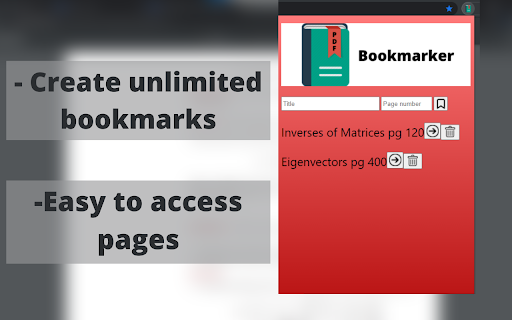
Bookmark PDF pages for easy access Read PDFs efficiently with PDF Bookmarker. Have you ever used a PDF version of a textbook and hated manually switching back and forth between pages? PDF Bookmarker solves this problem by allowing users to title and bookmark specific pages in the PDF. Using PDF Bookmarker: - simply enter in the page number and title of what you want to call the bookmark (title optional) and it will save onto the extension for easy access -click the bookmark button to bookmark your desired page - click the arrow button to access the page, and the delete button to delete the bookmark

Web to PDF
Use Web to PDF converter to save a web page as a pdf and download it instantly. Perfect for offline reading and sharing. 📃 Looking for a quick and reliable way to save a web page as pdf? This chrome extension is a web to pdf converter, perfect for anyone who needs to download content for offline access, sharing, or archiving. With just a single click, convert a web page to pdf without hassle: ✅ Preserve Styles and Links: Keeps original styles and clickable links. ✅ Flexible Layouts: Choose page breaks or a single-page format. ✅ High Quality: Uses Chrome’s PDF tool for fast, clear results. ✅ Secure: Saves directly to your device, protecting privacy. If you’re looking to save a web document to pdf, this tool makes it easy with smooth, intuitive functionality. All images, links, and formatting remain intact, giving you a faithful reproduction of the web content in one file. 💡 How to Use Web Page to PDF Converter 1️⃣ Open the web page you want to save. 2️⃣ Click on the Web to PDF extension icon. 3️⃣ Select Format to set the view size. 4️⃣ Choose Layout for page breaks or a single page. 5️⃣ Download your PDF — your file is ready in seconds! 📄 Tips for Best Conversions 1. Ensure the page loads fully before converting. 2. Adjust format and layout settings for optimal page fit. 3. Avoid pop-ups or overlays, as they may appear in the PDF. 4. Refresh the page if the first conversion doesn’t capture everything accurately. 💡 Why Save Internet Page to PDF? ◆ Access files offline anytime ◆ Share content without needing internet access ◆ Archive page for future reference ◆ Print web content easily in a structured format Web to pdf extension is the easiest way to convert web page to pdf quickly, ensuring you don’t lose valuable content or formatting. Almost anyone! This tool is ideal for: 1) Students who need to reference articles and papers 2) Professionals who want to save web data for reports 3) Researchers who need offline access to resources 4) Bloggers and writers who save content inspiration Imagine the convenience of accessing all your important web content as pdf files. You no longer need to bookmark endless links or worry about pages disappearing. Just convert the webpage to pdf and keep everything organized and secure. ❓ How to save a page as a PDF? 👉 Open the page, click the extension icon, choose settings, and save webpage as pdf. ❓ Will the file look like the original webpage? 👉 Yes, we ensure that your document retain the look and feel of the original. ❓ Does this extension work offline? 👉 Once a web document is saved, you can access it offline If you see a notice about the developer console, don’t worry — it’s simply due to Web to PDF using Chrome’s own PDF-printing system. Chrome provides an optimized, high-quality conversion method that outperforms other PDF tools in quality and speed. This message is a standard notification for Chrome extensions that use advanced browser functions. While screenshots capture images, PDFs provide a more functional and versatile way to save web pages. Here’s why this extension is the superior choice: ➤ Selectable Text: Easily select, copy, and highlight text. ➤ Clickable Links: Keep all links active for quick access. ➤ Accurate Layouts: Preserve the page’s original look and feel. ➤ Custom Page Options: Choose page breaks or single-page view. ➤ High Quality: PDFs retain clarity and detail better than screenshots. ✳️ News Articles: Save important news articles before they get archived or moved behind a paywall. ✳️ Legal Documents: Keep copies of terms and conditions, privacy policies, or legal agreements. ✳️ Receipts and Confirmations: Save confirmation pages after online transactions for your records. ✳️ Recipes: Save cooking recipes with all the links and notes intact for your culinary adventures. ✳️ Event Information: Capture details of events, schedules, or tickets for easy access. Whether you need a web page to pdf converter for work, school, or personal use, this extension is here to help. Get started today and discover the easiest way to download a web page as a PDF whenever you need it.

Flexi PDF Reader
Customizable PDF Viewing Made Effortless – Discover the Flexi PDF Reader Introducing Flexi PDF Reader: Your Ultimate Browser Extension for Effortless PDF Viewing. Experience the freedom of tailored PDF reading with Flexi PDF Reader. Whether you're a dedicated researcher, a diligent student, or a busy professional, our browser extension is designed to enhance your productivity and streamline your reading experience. Features That Empower You: 🔍 Highly Customizable PDF Viewer: Tired of the one-size-fits-all approach? Flexi PDF Reader lets you mold your viewing experience exactly as you prefer. Adjust layouts, fonts, and more to match your unique reading style. 📑 Default or Tab PDF Viewing: Seamlessly integrate Flexi PDF Reader into your browsing routine. Choose to view PDFs by default or within tabs, ensuring uninterrupted browsing. 🌙 Dark Mode for Eye Comfort: Whether it's late-night research or a preference for dark interfaces, our dark mode ensures strain-free reading in any lighting condition. 🔎 Zoom and Auto-Rotate: Dive into the details with customizable zoom options. And with auto-rotate, Flexi PDF Reader adapts to your screen orientation, keeping your reading smooth and hassle-free. 📂 Open Local PDF Files: Access your local PDFs directly within your browser. No more juggling between applications – Flexi PDF Reader makes it effortless. 🖋️ Annotations at Your Fingertips: Mark up your PDFs with ease using our annotation tools. Highlight, underline, and jot down notes directly within your browser, streamlining your research and collaboration. Flexi PDF Reader is more than a viewer; it's your reading companion tailored to your preferences. Whether you're a student, researcher, or professional, we invite you to explore the world of customizable PDF viewing. Elevate your productivity – get Flexi PDF Reader today.

Save Website as PDF
Easily save website as PDF. Convert pages to PDF. Get clean, readable, and editable documents — link-friendly and ready to print. With this Chrome extension you can convert any web page into a clean, high-quality document in seconds. Whether you want to download, edit, print, or archive web content, this tool makes it effortless. No more messy layouts or ads. Just the essential content you need in a structured format. 🔍 Top Benefits: ➤ Convert pages to PDF instantly with just a few clicks ➤ Automatically remove ads, pop-ups, and menus ➤ Preserve original layout and clickable links so your document looks exactly like the original ➤ Edit with ease – add notes, highlight, or remove text as needed ➤ Works offline once saved, so you can work on your document, share it easily, or print it anytime ➤ 100% secure – conversion happens on your device, ensuring privacy when you convert pages to pdf 💰 Free & Pro Plans Enjoy the extension for free with generous limits. 🔹 Free: up to 10 PDFs per month Upgrade anytime for unlimited access: 🔹 Pro Monthly — $4/month 🔹 Pro Lifetime — $24 (one-time payment) No account required. Cancel anytime. 🔥 Key Features: ✅ Simplicity – Just two clicks to save website as pdf chrome ✅ High-quality output – Perfect for print or archiving ✅ Privacy – No data sent to external servers ✅ Compatibility – Works seamlessly in Chrome ✅ Preserves links and images – Keep the original structure 💡 How to Save Website Page as PDF? 1️⃣ Install the extension from Chrome Web Store 2️⃣ Open the web page you want to save 3️⃣ Click the extension icon 4️⃣ Choose whether to convert the full page or article only for a clean, clutter-free document 5️⃣ Edit your document – add notes, highlight text, or remove unnecessary elements 6️⃣ Download website as PDF instantly 7️⃣ Share or print to pdf for easy access ❓ Why Save Website Page? 🔺 Works offline once saved. You can work, share or print your document 🔺 Archive important articles and research by using this tool 🔺 Easy sharing with colleagues or friends 🔺 Structured format for printing 🔺 No risk of losing content when links expire because you’ve already saved a website page as a pdf 🧑🎓 Who Benefits from This Tool? 🔹 Students who need to save website as pdf Chrome for research and assignments 🔹 Researchers looking to convert webpage to pdf for projects and citations 🔹 Professionals who want to save reports and documentation 🔹 Travelers who need to use documents for offline reading 🔹 Freelancers and creatives preserving content for inspiration and future work 🔹 Businesses archiving compliance documents 🧐 Frequently Asked Questions: ❓ How to save a webpage as a pdf? 💡 Open the page, click the extension icon, choose full page or article view, and save website as pdf instantly ❓ Will the document look like the original page? 💡 Yes! All formatting, images, and links are preserved ❓ Can I remove unwanted content? 💡 Absolutely. Ads, menus and other useless content are removed automatically or manually ❓ Can I edit my document? 💡 Yes! Highlight text, add notes, and remove any unwanted elements with ease ❓ Is my data secure? 💡 100%. Conversion happens locally on your device, so your files always stay private ❓ Does it keep links active? 💡 Yes! All hyperlinks remain clickable ❓ Does it work in Chrome? 💡 Yes, this is a Chrome-exclusive extension for maximum compatibility 📄 Additional Benefits ➤ No extra software required – works directly in Chrome ➤ Smartly identifies main content for clean conversion ➤ Accurate formatting for any content type ➤ Automatically name files based on page title ➤ Automatically adjust layout for perfect printing Add Convenience to Your Workflow! Stop bookmarking links that might disappear. With Save Website as PDF, you can keep essential information at hand. Perfect for work, study, or personal use. No more worrying about broken links or missing articles—your content stays safe. ✅ Install Save Website as PDF today and discover the easiest way to save your documents with Chrome!

PDF Signer
Use PDF Signer to sign pdf documents in Chrome's sidebar. Sign and fill documents with signatures and easily add stamp to pdf. Make your document workflow faster and more efficient with PDF Signer. This Chrome extension opens as a sidebar, enabling you to easily add signatures, initials, and company stamps to Portable Document Format. Whether you need to sign portable document files for personal or professional use, the extension provides all the signature tools to get the job done seamlessly. 🌟 Why use this extension? • Add initials, custom signatures, or stamps for pdf documents to make them look professional. • Sign portable document files directly in your browser without additional software. • Enjoy a smooth experience whether you work online or offline. • Easily sign pdf online from anywhere with just a few clicks. ✍️ Features of PDF Signer ✔️ Document Signatures: Type, draw, or upload your signature to make signing a pdf quick and seamless. ✔️ Custom Initials: Personalize your documents by adding initials, making it simple to sign documents without hassle. ✔️ Company Stamps: Upload professional stamps in PNG, JPG, or SVG formats to give your documents a polished finish. ✔️ Signature Options: Choose from multiple fonts for typed signatures or draw manually to create a unique signature. 🖌️ Customization options ∙ Choose colors for your signature on pdf files. ∙ Resize and reposition signatures, initials, or stamps to fit perfectly. ∙ Save commonly used signature styles for quick access and reuse. 👥 Who can benefit from PDF Signer? 📌 Students: Add initials and digital signatures to assignments or official documents. 📌 Professionals: Easily sign the pdf online or offline to finalize contracts, agreements, and forms. 📌 Business Owners: Utilize the signature creator for pdf to streamline document signing and approval processes. ⚙️ How to use PDF Signer ‣ Open the extension and upload the portable document file you want to edit. ‣ Choose your preferred method to add signature to pdf: ◦ Type your signature and select a font. ◦ Draw your signature directly in the extension. ◦ Upload an existing signature file (PNG, JPG, SVG). ‣ Insert initials or a company stamp where required. ‣ Save the edited portable document file and share it effortlessly. 🔐 Secure and reliable Your documents stay safe with PDF Signer. All processing is done locally on your device, ensuring privacy while you sign to pdf files or add initials. Whether you’re working on contracts, forms, or agreements, your data remains secure at all times. 🌐 Online and offline functionality With PDF Signer, you can sign pdfs without needing an internet connection after installation, or take advantage of its pdf sign online features when connected. This makes it a great tool for professionals on the go. Whether you’re at home or in the office, the extension is always ready to help. 📑 Key advantages - Sign and fill pdf with company stamps documents directly from your browser. - Quickly learn how to sign portable documents using an intuitive interface. - Add company logos, stamps, or initials to personalize your documents. - Save time by eliminating the need to print, scan, or mail documents. 📚 Frequently Asked Questions Q: How to sign a pdf using this extension? A: Open the extension, upload your document, and choose to type, draw, or upload a signature. Q: How to add a signature to a pdf file? A: Select the upload option and insert your signature in PNG, JPG, or SVG format. Q: Is it online pdf signature creation? A: Yes, you can create and use this signature tool online or offline. Q: Can I add stamps to portable documents files? A: Absolutely! Upload your company stamp in compatible formats and place it in your document. 🎨 Perfect for Every Workflow From small tasks to major projects, PDF Signer simplifies the process to digitally sign pdf files. It offers all the tools you need to make pdf signature additions, whether you’re an individual or a business professional. This extension supports effortless multitasking, allowing you to edit files while working on other tasks. 🌟 Advanced Tools for Professional Use 🔘 Provides the flexibility to electronically sign pdf efficiently. 🔘 This tool is simple and convenient to access from the side menu bar. 🔘 Allows users to learn and practice how to sign a pdf online with ease. 🔘 Try it now to streamline and simplify the process of signing portable documents. 🔘 Ideal for creating professional-quality signatures, initials, and stamps for official documents. 📈 Elevate Your Productivity Enhance your workflow by installing PDF Signer today. Add initials, upload stamps, and use the signature pdf maker to create polished documents that save you time and effort. Download it now and transform how you handle your digital documents. With our extension you can work smarter, faster, and more efficiently today!
