
lchfkoahaepmbengiebapcnoeahhkpll


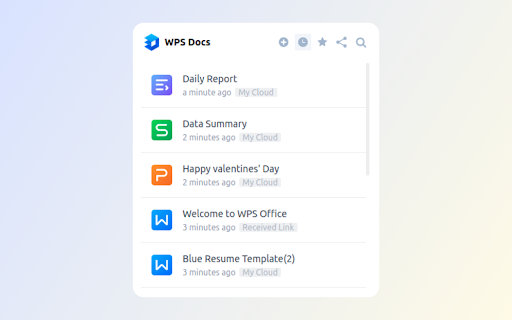
Create new docs, sheets, slides and view WPS Docs files from your browser bar. The official extension of WPS Docs. Introduction: The official extension of WPS Docs is a perfect tool that allows you to view, create and search for documents in your browser. It features a clean layout, a user-friendly interface and multiple useful functions that gives user an easy and instant access to WPS Cloud, Docs, Slides, Sheets and Livepage. If you want to quickly create, view and search for your files in your brower, then the extension is just the ideal tool for you. Features: ☆ WPS Cloud: Enjoy quick access to WPS Cloud interface. ☆ Create: Create online Docs, Slides, Sheets and Livepage files easily. ☆ View: Quickly view and open your recently opened and starred files, and also the files that others shared with you. ☆ Search: Search for the files you want in a quick way. How to use it: 1. Click the extension. 2. Choose what you want to do with different options • By clicking the “WPS Docs” logo, you can enter the WPS Cloud interface. • By clicking “Create” option, you can select what kind of file you would like to create, including WPS docs, Slides, Sheets and Livepage. • By clicking “Recent” option, you can view and open your recently opened files. • By clicking “Starred” option, you now have access to all your starred files. • By clicking “Shared with me” option, you can view all the files that others shared with you. • By clicking “Search” option, you can type in the keywords and quickly find all the related documents. We'd appreciate it very much for any possible interaction with our dearest users!

WPS PDF - Read, Edit, Fill, Convert, and AI Chat PDF with Ease
Easy-to-use PDF tools to view, edit, convert, fill, e-sign PDF files, and more in your browser. WPS PDF, part of the WPS Office suite with over 600 million monthly active users worldwide, offers an efficient approach to managing PDFs. Now integrated into Google Chrome, it enables effortless handling of PDF files across both desktop and web platforms, ensuring a consistent and powerful user experience. By adding the extension in Chrome, you can gain instant access to a wide range of tools, including various editing tools, parallel translate, fill & sign, chat PDF, drawing highlights, adding comments, making notes, and more. More features are waiting for your exploration here. How to Use the WPS PDF Chrome Extension: • Install and pin WPS PDF Chrome Extension • Open your PDFs in browser • Browse and process your PDFs View, Download, Print, and Store PDFs • Get the best PDF viewing experience online with WPS PDF extension. • Download or print your PDFs with a quick click. • Sign in to store your PDF files for fast access to them from anywhere. • Find your PDFs instantly. Edit PDFs • Add notes, text comments, and highlights to improve your work efficiency. • Use drawing tools to freely mark your ideas on your PDFs. • Unlock full PDF edit tools in WPS Office desktop, such as managing pages, extracting PDFs, protecting PDFs, combining PDF files, compressing PDFs, and more. Fill and Sign PDFs • Open a PDF file in WPS PDF extension and then fill or sign it in your WPS Office desktop. • Easily complete a form within WPS Office Fill & Sign feature. • E-sign your documents with your signatures or initials. Explore More Popular Premium Tools to Elevate Your Performance in Chrome PDF Parallel Translate • Supported by reliable LLMs with various languages. • Provide precise and layout-preserved translation. • Side-by-side comparison for intuitive reading and checking. Chat PDF • Extract essential information and provide concise summaries through insight. • Gain deeper insights and suggestions by asking the intelligent AI. • Provides credible and accurate AI responses backed by supporting citations. PDF Converter Offers over a dozen PDF solutions on the WPS online platform. Enjoy quick and high-quality PDF conversions to streamline your workflow. • Convert PDF to Word • Convert PDF to Excel • Convert PDF to PPT • Convert Word to PDF • Convert Excel to PDF • Convert PPT to PDF • Convert JPG to PDF Besides the PDF converter here, you can also find PDF tools such as compressor, splitter, merger, and more.

LibreOffice Editor
Create and edit documents with LibreOffice Online. LibreOffice Editor is a Chrome extension that allows to create, edit and view any Microsoft Word document, Excel spreadsheet and Powerpoint slide. It is an integration with LibreOffice Online and a file manager in order to handle all your documents when online. It is a document, spreadsheet and presentation editor integrated with our file manager to manage only "Office" file types with this online app. 1) It provides direct access to create a doc, xls or ppt document from scratch with this LibreOffice Editor. 2) It detects when you access to an "Office" document, and it opens it directly using this LibreOffice Editor. A) LibreOffice Editor Online, which contains the following features: - Create, edit and view XLS spreadsheets written using OpenOffice Calc, LibreOffice Calc or Microsoft Excel. - Create, edit and view DOC documents written using OpenOffice Doc, LibreOffice Doc or Microsoft Word. - Create, edit and view PPT slides written using OpenOffice Impress, LibreOffice Impress or Microsoft Powerpoint. - Styles management. - Font sizes. - Font colours. - Background colours. - Search for texts. - Insert columns / rows / tables / images.. - Delete rows / columns. - Advanced find & replace / regular expressions / special characters. - Spreadsheet functions. - Slides preview. - Export to PDF. - Auto save files. - Open source code. B) LibreOffice Desktop API, which supports the formats detailed here https://wiki.openoffice.org/wiki/Documentation/OOo3_User_Guides/Getting_Started/File_formats. 3) File manager module, which includes the following functionality over the files used by this extension: - Personal files and directories in the Cloud. - Operations with files and folders: copy, move, upload, create folder/file, etc - Search for files This LibreOffice Editor extension use the platform http://www.offidocs.com. It is available for free online users but it also allows the integration with premium users and on-premises OffiDocs deployments where the OffiDocs LibreOffice online global bundle is installed. IMPORTANT: This extension scans the URLs browsed in order to detect DOC, XLS, PPT files. The DOC, XLS, PPT files detected appear in a list located in the extension popup that are retrieved from our servers. The scanning is performed from our servers so your URL are reported to our system. No personal data is collected. This scan can be disabled with a checkbox that appears in the extension popup. If you disable this scanning, this functionality is not available so then the extension functionality is very limited.

WPS便签助手
🌠 遇见「WPS便签助手」,开启高效简洁的笔记体验! 🤔 你是否曾在「WPS便签」网站上因为页面上的辅助工具和小程序下载引导而分散了注意力? 🔍 你是否希望有一个更宽敞的编辑空间,让笔记更加集中和清晰? 🚀 现在,「WPS便签助手」来拯救你的笔记时间!… 🌠 遇见「WPS便签助手」,开启高效简洁的笔记体验! 🤔 你是否曾在「WPS便签」网站上因为页面上的辅助工具和小程序下载引导而分散了注意力? 🔍 你是否希望有一个更宽敞的编辑空间,让笔记更加集中和清晰? 🚀 现在,「WPS便签助手」来拯救你的笔记时间! - WPS便签助手将智能识别并优化页面布局,自动移除所有干扰,为你带来一个干净、专注的笔记环境。😌📝✨ - 在你需要专注工作时,WPS便签助手将扩展你的显示区域,让你的视野更加开阔,无需滚动即可掌握全局。🖥️🔍 🌈 马上尝试「WPS便签助手」,让你的笔记生活更加高效和愉悦! 💡 产品亮点: - 一键去干扰:自动清除页面上的小程序下载引导,聚焦于内容本身。 - 智能扩展:优化页面布局,最大化显示区域,为您提供更广阔的内容显示区域。 - 全面展示:所有操作按钮和工具栏均清晰可见,无需滚动即可访问所有功能,提升操作便捷性。

WPS浏览器助手:文档在线阅读编辑
PDF、Excel、Word、PPT等文档无需下载即可在线预览,还能对文档进行编辑、打印、转换等处理。 WPS浏览器助手,助你轻松办公! ⭐ 新版本来袭,解锁惊喜新功能 ✅网页高效阅读:网页AI总结,快速划词翻译,AI问答,只要你能想到! ✅AI写作:让AI帮你创作,才思如泉涌 ✅AI PPT:输入灵感,AI生成PPT,一键助你妙笔生花 ✅AI 搜索:纵览实时咨询,智能搜索尽在掌握 ✅AI阅读:为你解读论文、课件,轻松又专业 ⭐ 轻量化办公,浏览器内即可轻松处理文档 ✅在线文档一站式处理: 1. 在线预览PDF,多视图模式随心切换,阅读体验超舒适; 2. 可用画笔随心标记重点、批注笔记; 3. 一键转换格式,满足不同场景需求。 ✅办公文档云端协同:Word、Excel、PPT文档无需本地下载,在线即可流畅预览,云端编辑保存实时同步,团队协作无缝对接,无论身处何地,打开浏览器就能继续工作,高效便捷不卡顿。 如果您有任何建议或反馈,欢迎在评论区给我们留言
