
lcgmpehgdiaghhhhkaljhamggnbdgdig
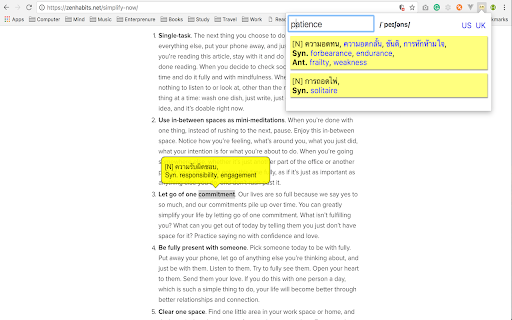
How - Just "DOUBLE-CLICK" on a word in any webpage you visting or; - Click the "ICON", to type any word with auto suggestion for you; - Not only list of meanings by the word you input but also having pronunciation in US and UK!

rikaikun
rikaikun shows the reading and English definition of Japanese words when you hover over Japanese text in the browser. As a Japanese dictionary, rikaikun helps you look up the only the words you don't know without losing your place. It's also useful for Japanese speakers wanting to know how to say Japanese phrases in English. Features: * Using shift or enter, switch between word, names, and Kanji dictionaries. * Enable text to speech in the options to hear Japanese words you look up spoken out load. * Press 'c' to copy the current word and definitions to the clipboard for making flash cards. * Customize how the pop up dictionary looks and what content it shows. Activate the extension by clicking the 理 icon in the top right. When the introductory pop up appears, rikaikun is ready for action. When it's activated, when you hover over Japanese words they'll be translated in a pop up. If you hit shift/enter, you'll see some information about the first Kanji. Press 'd' to hide the English definitions; press it again to bring them back. (Also changeable on the Options page.)

Dictionariez: Your Dictionary, Your Language
A customizable dictionary extension that supports double-click lookups in 20+ languages, 1000+ dictionaries, and Anki integration. 📚 Dictionariez: Your All-in-One Language Learning Toolkit 🚀 Learn any language faster and more effectively directly from your browser. Dictionariez combines instant lookups, your favorite dictionaries, text-to-speech, translation, and powerful Anki integration to turn reading into rapid vocabulary acquisition. ✨ Features: ⚡ Instant Lookup: Double-click any word on any webpage for a quick definition pop-up. Right-click or starting the app for a deep dive into detailed explanations. 📖 Choose Your Dictionaries: Fully customize your learning by selecting and prioritizing your favorite dictionaries. Supports multiple dictionaries for in-depth, multilingual study. 🧠 Seamless Anki Integration: Transform words from your lookup history into Anki flashcards with a single click. Effortlessly move vocabulary into your long-term memory. 🗣️ Master Pronunciation: Get instant realistic pronunciation using the built-in Text-to-Speech (TTS) feature, just select any text to hear it read aloud. 🌍 On-Demand Translation: Select any text on any website for an instant translation to your target language. 🎛️ Flexible Customization: Set customizable keyboard shortcuts that match your workflow for lightning-fast access, and benefit from auto-complete suggestions while typing your search. 🌐 Community, Support & Open Source Dictionariez is built for and by language learners. We welcome your contributions! * Contribute on GitHub: This project is Open-Source! Help us improve Dictionariez by reviewing, reporting, or contributing code. https://github.com/pnlpal/dictionariez/ * Explore Dictionary Collections: Find and import new dictionaries curated by the community. https://pnl.dev/category/4/dictionariez-trove * Suggest & Feedback: Request a new dictionary or suggest features directly. https://pnl.dev/category/3/feedback * Join Our Discord: Connect with other language learners and the Dictionariez team. https://discord.gg/sazRac4kSa

VocabEXP: Learn words across devices—Android, Windows, Chrome and Web
Expand your vocabulary with translations and spaced repetition. Learn English or build your own custom dictionaries. Learn English and other languages. This extension shows words from your chosen dictionary right on your screen as you use the internet. Your progress is saved automatically and syncs across all your devices - including the browser extension, Windows app, Android app, and website. Main Features: ★ Spaced Repetition System with Flashcards: Helps you remember words better by showing them again at optimal times - by default: after 2 days, 7 days, and 30 days. ★ Words On Your Screen: See new words at the bottom of your browser window as you visit websites. ★ Translation & Save: Open any selected word on a translation site (Google Translate™) and save it to your dictionary. ★ Create Your Own Dictionaries: Build personal word lists by uploading a simple file. ★ Sync Across All Devices: Your progress is saved everywhere. Start learning on one device and continue on another. ★ Listen to Words: Hear the correct pronunciation with audio for each word.

Japanese Translate & Dictionary Mazii じしょ日本語
For learn japanese, work in all website. Select text and double click to translate. With Mazii, you can look up Japanese words easily Mazii Japanese Dictionary is a crucial search tool for Japanese learners. With just 1 click you can quickly translate Japanese into your language. With Mazii, reading Japanese newspapers and emails becomes easier than ever. Besides your language, Mazii also provides users with other languages translation , allows users to compare meanings to get the meanings accurately. Outstanding features of Mazii Japanese dictionary : - Allow multilingual translation. - Quick vocabulary and Kanji look up. - Save the history of Japanese look up. - Look up directly in the toolbar How to use it: 1. Restart chrome to make sure the Mazii is working properly 2. Mazii is ready, now double click on any word on the browser. 3. To translate the whole sentence, choose the whole the sentence, hold the Alt key and click on the sentence. 4. To turn off quick translation, click the Mazii icon on the toolbar, a small window will appear, click Options and uncheck "Turn on quick translation". 5. To translate into another language, click on the Mazii icon on the browser toolbar, a small window will appear, click Options, in the translate section, select the language you want to translate. Thank you for using Mazii. We look forward to supporting and getting your comments.
