
lcckknlmojcknpkmnbodkfoonifcgngm

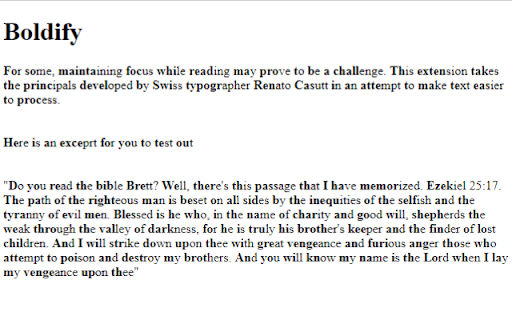
Automatically makes the first half of every word on a page bold. Some readers may find it difficult to focus while reading. This extension aims to address that by using the typography developed by Swiss designer Renato Casutt. When the extension is active, it will bold the initial part of the word in order to make it easier to process. This may be helpful for those who find concentrating while reading difficult, for those with dyslexia, or those who have ADHD.

Hyper Bold
An accessability extension for those with ADHD who struggle to read text on the web. HyperBold is an extensions which bolds the first half of mode words within readable text on a page. Similar techniques have been used to enhance the reading capabilities of those with ADHD. This extension works in real time on the page at the moment and is intended to be used with web-browsing. If you struggle with reading large paragraphs of text, or wish to simply read faster then this extension may help you.

Boldify
Make the beginning of each word bold. Boldify facilitates easier reading by boldening the first few letters of each word. Tools like this have been reported to help people with neurodiversity. Features: - Boldify any web page. - Toggle on and off without needing to refresh the page. - Choose different fonts. Limitations: - It may cause some links to stop working in which case you will need to refresh the page. - Some websites have protected elements that cannot be Boldified.

Boldify
A simple extension to provide bionic-reading like experience on the web. Bold icon by Icons8 https://icons8.com A simple extension to provide bionic-reading like experience on the web. Bold icon by Icons8 https://icons8.com/icon/7UcQA1J0pYss/bold https://icons8.com

Bionify | Read faster!
Open source text converter designed to help you read faster! Read any kind of public website faster with Bionify! Bionify converts any public website into Bionified format, which alters texts so that the most concise parts of words are highlighted. This guides the eye over the text and the brain remembers previously learned words more quickly. This extension is 100% free and open source, and you may find the source code here: https://github.com/Cveinnt/bionify. As Bionify is open source and free, it is NOT associated with the paid Bionic Reading® APIs. We use our own highlighting algorithms and do not violate their copyrights. If this extension helped you, feel free to leave a star! Please note that the extension currently don't support any kind of locally uploaded contents, such as PDFs. INSTRUCTIONS * Pin the Bionify extension to your Chrome extension bar * Go the the public website you want to read * Click on the extension icon * Click on the toggle button to start reading with Bionic Reader! If you have any questions or comments, feel free to submit an issue on the GitHub repo. This is in early development and improvements, features, and fixes will be soon to come!
