
lbjojakdjggbdpnnockgkbnbkgenfknj

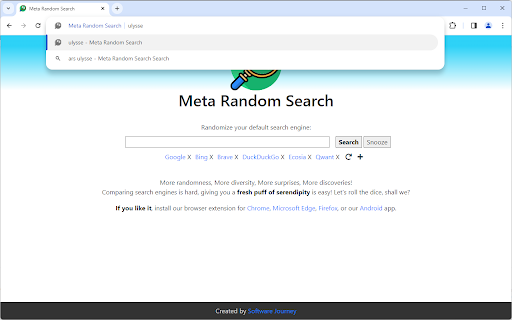
Randomize your default search engine Your search query will be processed by a different search engine each time. More randomness, More diversity, More surprises, More discoveries! Finding the best search engine is hard, giving you a fresh puff of serendipity is easy!

Random Bookmark V3
A Chrome Extension that loads a random bookmark at each new tab Random Bookmark is a Chrome extension designed to help you rediscover your bookmarked websites. It opens a random bookmark every time you open a new tab, turning your browser into a more productive tool. No setup or configuration required—just install it and start exploring your bookmarks. - Random Bookmark Opening: Every time you open a new tab, Random Bookmark opens a random website from your bookmarks. - No Setup Required: Simply install the extension, and it will start working. No configuration needed. - Smart Bookmark System: The extension ensures that all your bookmarks are visited before any are repeated, so you always get a fresh experience. - Bookmark Management: If there are specific bookmarks you don’t want to open, you can simply unselect them in the options page. This allows you to keep your bookmark but prevent it from being randomly selected. The blocklist feature is gone from the newer version as you can find better extensions that do the job.

Random Tab
Opens a random tab when the icon is pressed and displays a tab counter. Now with the added option to chose between opening a random tab from all windows or just the current window.

HideMail: keep your email private
Gives you unique, random email addresses that are forwarded to you when you want to keep private your personal email HideMail gives you unique, random email addresses (or "aliases") that are forwarded to your primary e-mail account when you want your personal email address to remain private. Additionally, these email addresses can be easily deactivated at any given time, effectively blocking unwanted emails from reaching your inbox. Whether you're signing up for a new service or just want to keep your personal email private, Hide My Email has you covered. A random email address can now be generated for each new account, just like a password. Because email is often caught in database dumps and leaks, and while a password can be easily changed, an email address is difficult to change across all sites where it has been used. This is no longer a problem!

FDev Security
You are protected absolutely with our awesome features: Realtime protection, block seen and typing indicator, blur messenger! # INTRODUCTION You are often afraid about "malicious" websites on the internet. It seems that you cannot know when your sensitive data was stolen by attackers. And when your information, data is hacked by someone (such as banks account, Facebook, ...), you just realized that your data is very importance and you begin to care about the security when you browsing in the Internet. Let's CoderDocs Security protect you with real-time protection feature. And we also has another awesome features like: Facebook (+Zalo) privacy, Privacy Web Experience, Blur Messenger, Malware URL scanning, .... # FEATURE 1: REAL-TIME PROTECTION When you install CoderDocs Security extension successfully, this feature will enable real-time immediately. This feature is the most important, so you cannot disable it. When you visit a malware site, the warning popup will be displayed to warning you about this malicious site. # FEATURE 2: FACEBOOK (+ZALO) PRIVACY You can easily enable / disable this feature by check or uncheck the checkbox of every small functions. This feature includes: - Block "Seen" indicator: When you receive a Facebook message, you click to view this message, the sender will see the status "seen" in their message space. But if you enable this function, the sender can not see the status "seen" any more. They never know whether you saw the message or not. - Block "Typing" indicator: Similar with block "seen", the sender can not see the "typing" indicator when you compose the message in Facebook message space (the three dots indicator "..."). - Block "Seen" status in Story: When you click to view the Story of someone, they will know that you have seen their Story. But with this function, nobody can know that you saw their Story. You can click and see your ex-girlfriend any time. - Block "Typing" indicator in Comments space: When you are typing the comment in any post. People can see the indicator "Someone are typing ...". But if you enable this function, this indicator will be disappear forever. - NOW, it support block seen and typing indicators in Zalo web version. Note: Block "Seen" status in Story and block "Typing" indicator in Comments are disable now because some technical problems. # FEATURE 3: PRIVACY WEB EXPERIENCE You can also easily enable / disable this feature by check or uncheck the checkbox of every small functions. This feature includes: - Block important sites when you absent: When you go out, you forgot to lock your computer, someone can open you browser, they can open some important site such as Facebook, Gmail and see your sensitive information. If you don't want that thing happen. Let enable this function. It allow you to block some importance sites that you don't want anyone access to if you have to lend your computer or you go out. - Block tracking Ads Scripts: This function allow you to block the tracking scripts like Facebook, Google. For example, you go to an e-commerce website, when you comeback to Facebook, the previous items in e-commerce website will be display. You can enable this function to block them. - Browser for kids: This function allow you to block almost porn sites in the world. If your kids uses your computer, let enable this function. # FEATURE 4: URL MALWARE SCANNING This is a feature that allow you to operate directly on the user interface. Let go to menu path: TOOLS / SECURITY / MALWARE SCAN and explore this feature. This feature allow you to analyze any URL and inform for you if the URL will be redirected to the website that contains any malware/virus. # FEATURE 5: BLUR MESSENGER This feature allow you to hidden all information when you chat with someone in the Messenger (messenger.com). Just don't care anyone who often peek at your messages. It only work with Messenger - Open Messenger (messenger.com) - Click Settings Icon in the left side bar. - Enjoy the new Messenger feature. More information about CoderDocs Extension: https://lenhatthanh.com/en/coderdocs-security/
