
lbhpijbhnnpcobofdieiocbphkdjjbef

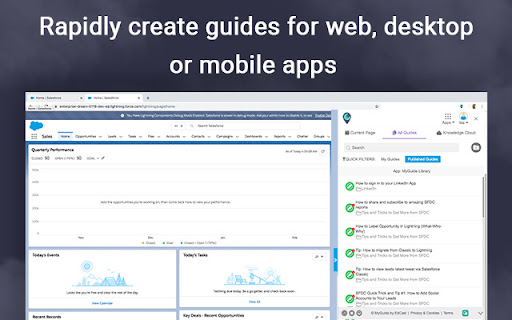
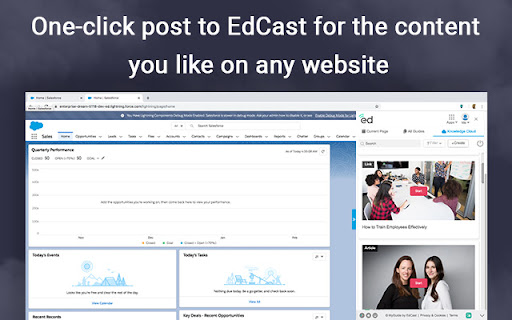


Drive Digital Productivity with MyGuide Rapidly create guides for web in minutes. Get intelligence on apps (who needs what help?) Automate any guide Offering in-app guides, intelligence and automation. 1) Turbo-charge your Google/Bing Search with 10X better results from EdCast. 2) One-Click post to EdCast for the content you like on any website.

CSOD LXP
Cornerstone's Galaxy LXP enables learning in the flow of work for CSOD employees. For public app, 'Learning Experience - Browser'. The browser extension for Cornerstone’s (CSOD) Galaxy Learning Experience Platform (LXP) enables Cornerstone employees to create and access content in the flow of work. Only for CSOD employees. See "EdCast by Cornerstone" for public app: https://chromewebstore.google.com/detail/edcast-by-cornerstone/nmnepfeljponffechclpkpejadcakiba Content Discovery: Find and use content from within the organization and premium content providers that your organization subscribes in the Google Chrome experience powered by EdCast AI for personalization and relevance. Content Curation and publishing: Learn, build skills, and share useful or impactful content within your organization, group, or channel with easy access to curation functions for articles and rich-media across the internet. Knowledge Base Search: Search all the information used, tagged, subscribed and paid by your organization in one easy to use and familiar interface securely keeping knowledge within your organization. Community Building: Build community and drive conversations around topics and content right in the flow of work Assign Workflows: Equip managers and subject matter experts to assign content and tasks easily.

Saba Org Planning Admin Chrome Connector 2.0
Enables the user to launch Saba Org Planning Administration app Enables the user to launch Saba Org Planning Administration Application. This Chrome Connector App provides you a platform to connect Saba Org Planning Administration Application. This connector will only work with Saba Org Planning Administration Application which provides creation of Domains, Views, Profiles etc.

Oracle Guided Learning Editor
Oracle Guided Learning (OGL) is an enterprise cloud digital adoption platform that supports the creation of personalized and contextualized in-application guidance to simplify and accelerate user adoption of web-based applications. The Oracle Guided Learning Editor extension is required for OGL content developers and administrators to create, edit, and configure content from within the OGL console. Oracle Guided Learning helps organizations and product owners lower the cost of training and supporting users. It enables the creation of individualized and guided onboarding visualizations for end-users, serving as a learning and information interface embedded in a host application. The main purpose of Oracle Guided Learning is to accelerate the adoption of any web-based application, facilitating the process for both organizations and employees. By installing the Oracle Guided Learning extension software, you are agreeing to the following terms: 1. You may use the software subject to the following: (a) the software may be used solely for your internal business operation; (b) the software may not be modified or altered in any way; and (c) the software may not be redistributed. 2. The software is the intellectual property and copyrighted works of Oracle America, Inc. or a third party provider. All rights, title and interest not expressly granted with respect to the software are reserved. 3. You may not access, download, use or export the software in violation of U.S. export laws or regulations, or in violation of any other applicable laws or regulations. You agree to comply with all export laws, restrictions and regulations of any United States or applicable agency or authority, and to not directly or indirectly provide or otherwise make available any services and products of Oracle in violation of any such restrictions, laws or regulations, including, without limitation, laws, restrictions or regulations pertaining to the development, design, manufacture or production of nuclear, chemical or biological weapons or missile technology. 4. Disclaimer of Warranties. THE SOFTWARE IS PROVIDED ON AN "AS IS" BASIS. ORACLE EXPRESSLY DISCLAIMS ALL WARRANTIES OF ANY KIND, WHETHER EXPRESS OR IMPLIED, INCLUDING, BUT NOT LIMITED TO, THE IMPLIED WARRANTIES OF MERCHANTABILITY, FITNESS FOR A PARTICULAR PURPOSE AND NON-INFRINGEMENT. THE SOFTWARE IS USED AT YOUR OWN DISCRETION AND RISK. ORACLE SHALL HAVE NO RESPONSIBILITY FOR ANY DAMAGE TO YOUR COMPUTER SYSTEM OR LOSS OF DATA THAT RESULTS FROM THE DOWNLOAD OR USE OF THE SOFTWARE. 5. Limitation of Liability. IN NO EVENT SHALL ORACLE BE LIABLE FOR ANY DIRECT, INDIRECT, INCIDENTAL, SPECIAL OR CONSEQUENTIAL DAMAGES, OR DAMAGES FOR LOSS OF PROFITS, REVENUE, DATA OR DATA USE, INCURRED BY YOU OR ANY THIRD PARTY, WHETHER IN AN ACTION IN CONTRACT OR TORT, ARISING FROM YOUR ACCESS TO, OR USE OF, THE SOFTWARE. 6. Exclusions and Limitations. SOME JURISDICTIONS DO NOT ALLOW THE DISCLAIMER OR EXCLUSION OF CERTAIN WARRANTIES OR THE DISCLAIMER, EXCLUSION OR LIMITATION OF CERTAIN LIABILITIES. TO THE EXTENT THAT THEY ARE HELD TO BE LEGALLY INVALID, DISCLAIMERS, EXCLUSIONS AND LIMITATIONS SET FORTH ABOVE DO NOT APPLY AND ALL OTHER TERMS SHALL REMAIN IN FULL FORCE AND EFFECT. 7. All matters relating to your access to, and use of, the software shall be governed by U.S. federal law or the laws of the State of California. Any legal action or proceeding relating to your access to, or use of, the software shall be instituted in a state or federal court in San Francisco or Santa Clara County, California. You and Oracle agree to submit to the jurisdiction of, and agree that venue is proper in, these courts in any such legal action or proceeding.

Degreed Extension
Track all your learning. Bring learning into your everyday workflow with the Degreed button. You can track your learning from any website, share content with others, save for later, add to a Pathway, or search for content in Degreed without ever leaving the site you’re on. Track your learning: Track all your learning directly from your browser without leaving the page you’re on — and save comments about what you learned. Share with others: If you love what you learned, you can recommend it to a friend or a group. Save for later: If you find an article you want to read later, you can save it. If you forget, Degreed will recommend it in your feed. Add to Pathway or Plan: When building a Pathway or plan in Degreed, you can add to it directly from the Degreed Button. Add to catalog: If you have the “Manage Content” permission, you can add directly to the catalog. The Degreed Button will scrape the title, description, and image for the content if available, removing the need to manually add the information. You can also review and modify the title and description before the item is added to the catalog. Find more learning resources: Find new learning resources and people to follow. If you want to learn more, search to see other learning items or find people to follow and see what they’re reading. Stay in touch with notifications: Your Degreed notifications are available directly. If someone recommends an item, you get notified without leaving the page you are on.
