
lbfjgknkjfjmnjdgdhbbmmbkoddgpdoc
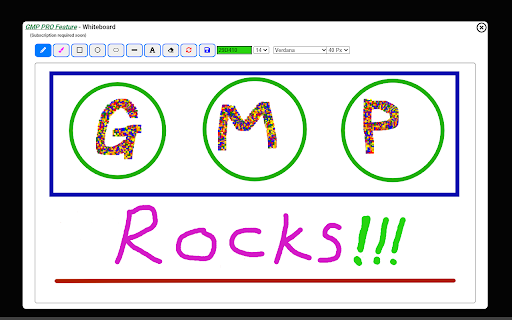

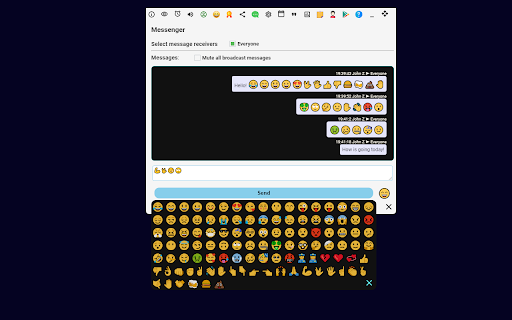


Breakout rooms,attendance,dark mode,chat,emojis,reward points,quiz,poll,file sharing,stickies,many more features for Google Meet 🔰Meet Plus (also known as Google Meet Plus or GMP) is a must-have extension for Google Meet users. It provides users a way to collaborate, interact, and having fun with each other in real-time.🔰 Note that it does require participants to install the extension in order to see and interact with Meet Plus features. The extension offers two versions, the basic version which is free, and Meet Plus PRO (also known as GMP PRO) which requires a monthly subscription. You can sign up the PRO version from link below: The PRO version focuses on the needs of educators and enterprise conference. Features like Task, Help Request, Breakout rooms, Attendance, Control Panel, Stats and many other features are tailored for modern educators to run their online classrooms stress-free and more efficiently. Many educators, schools and school districts across the globe have subscribed to the PRO version and reported great success in their virtual teaching. ✅Settings: Following settings can be configured as part of the Settings: 🢂 Configurable default microphone and camera state. 🢂 Press/Tap to mute or talk. 🢂 Buzz another user and mute incoming buzz. 🢂 Change default meeting background. 🢂 Change language display from 7 available languages. 🢂 DO NOT DISTURB (DND) mode 🢂 Mute notification 🢂 One click reset 🢂 Meeting auto joining 🢂 Turn off video display to save CPU & GPU ✅Drag/Resize/Restore Video Tiles: Users can arrange video tiles by dragging the video tile anywhere on the screen, resize the tile to suitable sizes and restore to its original position and size when needed. ✅Show/Hide Bottom Bar: Ability to show and hide Google Meet's bottom bar ✅Reward/Redeem/Ranking/Points System: Users can earn points from the hosts and redeem their points with the prizes the hosts offer. Points and badges are ranked in the meeting. ✅Messenger: You will be able to broadcast a message to the room, or send a private message to another meeting participant or a group of users directly. You can add emojis in your messages! Message history are capture in the messenger panel. ✅User Status: You can now set their status via top status bar. Also, users can view everyone's status by mouse over the eye icon on the status bar on the top. It also allows custom status. A notification will appear when someone changes status. ✅Help Request: You can now submit a help requests/questions to the meeting host, the priority of the request is tracked and announced as it changes its position in the queue. Help request can also be shared to the Messenger ✅Task Management: Receiving tasks from the meeting host, and update the status of the task as the user making progress. Need help option integrates with Help Request system. ✅Trivia Quiz: Enabling: Start a trivia competition in two mode(Vanilla Trivia and Bamboozling Trivia). We have around 50K trivia for players to choose from. ✅Link Sharing: You can share images, website and links with other users within the meeting session. ✅Mute/Umute Meeting: Enabling users to mute/unmute the audio of current meeting session. Also enabling users to request unmute of a muted user. ✅Minimize/Draggable: Meet Plus control bar can be drag and park anywhere on your screen, also user can minimize it anytime to the meeting control bar. ✅Focus on Google Meet: By clicking on the extension icon of Meet Plus, Google Meet tab will be maximized and focused. ✅You will be able to see all actions done by other participant in the same meeting room ✅It's free!: All above mentioned features are free, and we will be adding more features as new ideas pops up. This version offers a set of advanced features in addition to basic features. It requires a monthly subscription. The main goal is to cover our growing infrastructure cost, and deliver more features and quality services for all users. We are offering 3 days free trial when you subscribe to PRO, so that you can try out the features before the subscription starts. For schools, school districts, institutions and organizations, we offer bulk purchase pricing and annual subscription. We also provide the access to our online License Management System for bulk purchases. Please contact support@meet-plus.com for details. All actions initiated by PRO users are visible to all users who has Meet Plus installed. 🅾Free Access to ClassAgile.com as long as you are an active subscriber 🅾Tile Shortcuts: Showing feature shortcuts on every tile of attendees, user can conveniently buzz, ring, chat, mute and turn off camera of other users in the meeting. 🅾Reward/Redeem/Ranking/Points System: Users can award attendees with points, also is able to offer prizes for attendees to redeem. Points and badges awarded to attendees are ranked as part of their achievements. 🅾Standard Breakout Rooms: Create multiple breakout rooms instantly in an active meeting. This powerful feature allows users to assign meeting participants to different breakout rooms, send them to the rooms, bring them back to the main rooms, moving users between rooms and broadcast messages to the breakout rooms, monitor rooms, quickly focus on a specific room etc. 🅾AIO Breakout Rooms: AIO stands for All In One. This unique feature allows the meeting host to create breakout rooms within the meeting without sending participants to another room. This will reduce the efforts to manage tabbed breakout rooms drastically as all breakout rooms are in the one room. The host can easily configure breakout rooms and drag and drop participants to different rooms, participants can start their breakout sessions without leaving the current room. Although everyone is having breakout rooms sessions in the same room, but they can only chat with and hear from their own group members. 🅾File Sharing: You an share files with selected participants in the meeting directly, and monitoring the progress of the file transfer. The recipient can choose to accept or reject the file transfer. 🅾Private Screen Sharing: You can share tab or screen with selected participants in the meeting directly instead of presenting to all meeting participants. The shared screen will be shown in a draggable, resizable, collapsible and maximizable window. 🅾Private Voice Chat: Allowing users to launch a private voice chat with a participant or a group of participants without leaving the room. It's integrated with Breakout rooms and Parking lot for help request. 🅾Highlight Users: Select one or more users to be highlighted in the meeting. Option to turn off other attendees video when this feature is enabled. 🅾Host's Control Panel: You will be treated as the host of the meeting, and have the power to enable/disable many features, banning users, deny entry, authorize certain features to Non-PRO users, mute all users and auto admitting new guests etc. 🅾Attendance: You can take attendance in the meeting, recording attendance, and stayed duration and save the data as a CSV file. attendance taking can also be scheduled. History can be saved to users Google Drive. 🅾Parking lot for help requests: As the host of the meeting, users can now manage requests for help from attendees in a queue. The priority of a request can be adjusted by dragging the request up and down. It also integrated with Breakout rooms and the Messenger 🅾Task: Giving the host ability to create task for the attendees, the status of task is being tracked as users update their task status. Task feature also integrates with Breakout rooms and Help request feature. 🅾Talking Stick: This feature gives the host the ability to start a round of speaking as configured. The selected participants will have the microphone access in the arranged order while others listen with microphone muted. the application will manage the speaking duration and microphone access of the participants automatically based on the configuration 🅾Stats: Providing some useful stats of the meeting and feature usage. 🅾Real-time Whiteboard Sharing: Enabling participants to share and collaborate on a whiteboard in the meeting. All users in the session can see the drawing in real-time. Only PRO user can draw on the board. Drawing can be downloaded as an image file. 🅾Instant Poll: Configure & launch an install poll in your meeting session, results can be downloaded, saved, viewed and imported. 🅾Customized Quiz: You can now create a real-time quiz within an active session, and save the results/scores. 🅾Sticky Notes: Create and configure sticky notes, notes are saved automatically to your computer. User can show, hide, minimize, delete and share the note with other users in a session 🅾Messenger: You will have a shorter wait period between chats. Also, users have option to receive messages from others when the Messenger is disabled. 🅾Bravo Badges & Fireworks & Animated Messages: You can launch varies type of fireworks, even with a message. Also you can award badges to other users in the room and send an animated message to the room or another user in the room. 🅾Inspirational Quotes: Auto delivered when joining the meeting base on your language setting, and user can share the quote. Users can also enter a quote to share with the room, and have the option to print the quote on the bottom bar. We have a selection of more than hundred thousands quotes in all major languages. 🅾Multimedia Reaction: Your can now share Youtube video with the Autoplay option, the shared video can be minimized, maximized and dragged on the screen. Users can also react with many predefined sounds and animated images. You will definitely impress other users with your reactions. 🅾Personalized Avatar: Changing your avatar on the fly, just find a cool avatar link online and update your avatar, it accepts animated images too 🅾Chat Emojis: Embedded emojis on built in Google Meet chat, easy to click and select while chatting. 🅾Stopwatch/Meeting Timer: You can share their stopwatch or meeting timer with other users during a meeting session 🅾3 Days Free trial: By subscribing, you will automatically get 5 days free trial, so that you can try it out before the subscription becomes active. 🅾All actions done by you are visible by all Meet Plus users in the same room Meet Plus works best when everyone in the meeting room install it, ask your friends and colleagues to install it today! ❓How we use your data? The extension only collects your Google Meet's user's name and email in order to identify you and support functionalities of the extension. These information are necessary as we store your reward points and badges in our database. Our Privacy Policy and Terms & Conditions can be viewed at https://meet-plus.com/legal.html ❓Permission to accessing to your browser history? The extension stores its configuration/settings in your browser cache which requires the access to your browser history storage, therefore this permission is required. The extension does not read your browser history other than the extension related configuration/settings.

Virtual Backgrounds for Google Meet™
Virtual Backgrounds for Google Meet™ Virtual Backgrounds for Google Meet Want to use a different background when you're in an online video call using Google Meet or hangouts meet? Amaze the other participants in this video call when you show up with the most trendy backgrounds during your Google Meet call or google hangouts meet call. Please Note if you are having issues with changing your background, its due to the following issues. 1) SWITCH OFF the Web Camera inside the Google Meet Call and Switch it back on for the Virtual background to work. This solves over 90% of the issues of the extension virtual backgrounds not working for users/individuals. - Host permissions are needed because our extension needs to insert in the background image when you're on the Google Meet website. Please note we do NOT capture any personal data and the only reason we need host permissions is to insert the background image during your Google Meet/Hangout call. To begin using this software for google meet app, here is what you need to do. Install the software Go to Google Meet and enter your video call. If you have any feedback/suggestions for our virtual backgrounds extension for google video conference, please contact us. Please note you can also use the push to talk functionality inside Google Meet after installing this extension. Simply configure the settings and you can "automatically mute" yourself inside Google Meet, press the "space bar" to talk to ensure no hot microphone issues. Disclaimer: Please note this extension is NOT made by Google and is made by an independent development team. All copyrights belong to their respective owners. Google doesn’t endorse or sponsor this Chrome extension. Virtual Backgrounds for Google Meet is not owned by,it is not licensed by and is not a subsidiary of Google Inc.

Visual Effects Google Meet
Visual Effects for Google Meet Want to make your Google Meet & hangouts meet meetings more lively? You can make yourself look different on these video calls on Google Meet today once you install our extension "Visual Effects Google Meet". Our extension has various different visual effects you can put on your face while you are inside Google Meet meetings or google hangouts meet. The visual effects work for google meet app include - Adding Fireworks - Adding Dog Ears to your own face - Making a black and white contrast of your face New visual effects are added in weekly. To begin using our software extension, here is what needs to be done. 1) Install our software extension 2) Go inside a Google Meet meeting 3) CLICK on OUR extension icon to activate our code. Choose a visual effect once you click on our extension icon. If the visual effect does NOT work for google video conference, switch your web camera off and turn it back on again. Disclaimer: Please note this extension is NOT made by Google and is made by an independent development team. All copyrights belong to their respective owners. Google doesn’t endorse or sponsor this Chrome extension. This is not owned by, it is not licensed by and is not a subsidiary of Google Inc.

Google Meet Auto Disable Mic/Cam
Provides options for defaulting microphone and camera to disabled when joining a Google Meet meeting This simple extension provides options to default your microphone and camera to disabled. It also displays emojis in the tab title indicating if your microphone is muted or your camera is on.

Beyond Meet for Google Meet
Features: 👍 Flying Chat Messages Enables you to see chat messages without opening the chat window 🔘Adjustable speed 🔘Can be turned on and off 🔘Mouse over pausing 👍 Multitasking Mode Enables you to multitask without losing the focus. It's exceptional useful when presenting 🔘Launch Google Meet session to a split window 🔘Multiple split window positions to choose from 🔘See participant's videos while presenting 👍 Realtime AI Emotion Tracking Helps you understand the perceived emotion of your current facial expression and be able to gauge the meeting atmosphere in realtime 🔘 Tracking your emotion change in realtime 🔘 Tracking other users emotion 🔘 Participants multiple emotion ranking 👍 Meeting Notes Enables you to take formatted notes and save to Google Drive 🔘 Integration with Google Drive or download to your machine 🔘 Load & edit saved notes from Google Drive 🔘 Google Doc style editing 🔘 Notes panel transparency adjustment 👍 Meeting Recording Gives you the ability to record the meeting anytime you want. 🔘 Recorded downloaded to your computer automatically 🔘 Choices of recording resolution and audio only option 🔘 Pause and resume during recording 👍 Meeting Transcription Captures conversations in the format of text in realtime with timestamp & speaker name 🔘 One click to start capturing conversations 🔘 Integration with Google Drive or download to your computer 🔘 Pause and resume during recording 👍 Camera Loop Stream a recorded video clip to participants in loop 🔘 Multiple recording length options 🔘 Seemly integration with Google Meet 🔘 Reusable recorded video clips 👍 Speech Duration Tracking Shows you who talks the most during the meeting 🔘Tracking participants speech duration 🔘Realtime ranking chart display 🔘Draggable & transparent chart panel 👍 Streamer Stream an image to replace your camera video 🔘 Stream whiteboard drawing to Google Meet participants 🔘 Support multiple image file format 🔘 Drag & drop to upload the image file 🔘 Able to set background color for transparent images 👍 Meeting Utilities Provides a list of useful settings that give you a better experience 🔘Join automatically without clicking 🔘Mute microphone and turn off camera when joining 🔘Picture in Picture mode 🔘Default profile setting 🔘Shared screen zooming All features of this extension are free to use with a certain amount of usage limit which resets every month. Please sign up for BM PRO at https://beyondmeet.app for unlimited access to all features. ❓How we use your data? The extension only collects your user's name and email in order to identify you and support functionalities of the extension. Our Privacy Policy and Terms & Conditions can be viewed at https://beyondmeet.app/pages/legal ❓Permission to accessing to your browser history? The extension stores its configuration/settings in your browser cache which requires the access to your browser history storage, therefore this permission is required. The extension DOES NOT read your browser history other than the extension related configuration/settings.
