
ibkpaabpalfgeiklbphhmgenfjfcijil

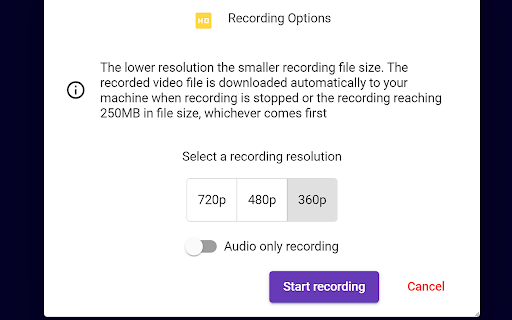


Features: 👍 Flying Chat Messages Enables you to see chat messages without opening the chat window 🔘Adjustable speed 🔘Can be turned on and off 🔘Mouse over pausing 👍 Multitasking Mode Enables you to multitask without losing the focus. It's exceptional useful when presenting 🔘Launch Google Meet session to a split window 🔘Multiple split window positions to choose from 🔘See participant's videos while presenting 👍 Realtime AI Emotion Tracking Helps you understand the perceived emotion of your current facial expression and be able to gauge the meeting atmosphere in realtime 🔘 Tracking your emotion change in realtime 🔘 Tracking other users emotion 🔘 Participants multiple emotion ranking 👍 Meeting Notes Enables you to take formatted notes and save to Google Drive 🔘 Integration with Google Drive or download to your machine 🔘 Load & edit saved notes from Google Drive 🔘 Google Doc style editing 🔘 Notes panel transparency adjustment 👍 Meeting Recording Gives you the ability to record the meeting anytime you want. 🔘 Recorded downloaded to your computer automatically 🔘 Choices of recording resolution and audio only option 🔘 Pause and resume during recording 👍 Meeting Transcription Captures conversations in the format of text in realtime with timestamp & speaker name 🔘 One click to start capturing conversations 🔘 Integration with Google Drive or download to your computer 🔘 Pause and resume during recording 👍 Camera Loop Stream a recorded video clip to participants in loop 🔘 Multiple recording length options 🔘 Seemly integration with Google Meet 🔘 Reusable recorded video clips 👍 Speech Duration Tracking Shows you who talks the most during the meeting 🔘Tracking participants speech duration 🔘Realtime ranking chart display 🔘Draggable & transparent chart panel 👍 Streamer Stream an image to replace your camera video 🔘 Stream whiteboard drawing to Google Meet participants 🔘 Support multiple image file format 🔘 Drag & drop to upload the image file 🔘 Able to set background color for transparent images 👍 Meeting Utilities Provides a list of useful settings that give you a better experience 🔘Join automatically without clicking 🔘Mute microphone and turn off camera when joining 🔘Picture in Picture mode 🔘Default profile setting 🔘Shared screen zooming All features of this extension are free to use with a certain amount of usage limit which resets every month. Please sign up for BM PRO at https://beyondmeet.app for unlimited access to all features. ❓How we use your data? The extension only collects your user's name and email in order to identify you and support functionalities of the extension. Our Privacy Policy and Terms & Conditions can be viewed at https://beyondmeet.app/pages/legal ❓Permission to accessing to your browser history? The extension stores its configuration/settings in your browser cache which requires the access to your browser history storage, therefore this permission is required. The extension DOES NOT read your browser history other than the extension related configuration/settings.

Tactiq: AI note taker for Google Meet, Zoom and MS Teams
Meeting note taker and AI transcription for Google Meet, Zoom, and MS Teams. No more taking notes or missing details—Tactiq transcribes and summarizes meetings for you! From team standups to sales calls, masterclasses to product research sessions - never miss a beat. Capture every valuable insight with Tactiq's powerful note taking AI. Powered by the groundbreaking GPT-4, Tactiq provides ultra-accurate AI meeting summaries, preserving every detail. Seamlessly integrate ChatGPT meeting summaries and let Generative AI auto-detect action items, key takeaways, and more. Connect Tactiq with Google Meet, Zoom, or Microsoft Teams. In just one click, go beyond transcription: highlight key insights, tag crucial tasks, save chat conversations, and snap screenshots. Then, watch as Tactiq consolidates everything into one sleek, shareable AI meeting summary. 700,000+ PEOPLE ACROSS 20,000+ COMPANIES * Trust Tactiq as their go-to AI note taking app to transcribe their meeting notes. * Join the league of efficient teams, leaders at Fortune 500s, engineers, freelancers, salespeople, and marketers who rely on Tactiq. * Dive into the future of meetings with Tactiq’s ai meeting note taker. Whether it's Google Meet, MS Teams, or Zoom, let Tactiq transform how you capture meeting transcripts, insights, and action items. How It Works: * Install the Tactiq AI transcript Chrome extension. (Absolutely FREE). * Join your Google Meet, Zoom, and MS Teams meetings. * Tactiq gets to work - transcribing, summarizing, and generating AI-powered meeting notes in real time! * Use advanced ChatGPT capabilities for one-click AI meeting summaries and insights. Main Features: * Transcribe meetings in real-time and never miss a word with our accurate AI note taker. * Generate insightful summaries powered by GPT-4 and an advanced AI meeting summarizer. * Search, review, and categorize transcripts with ease using a powerful transcript extension. * Draft emails and action items with an intelligent AI for meeting minutes tool. * AI Meeting Assistant - Answer questions, extract key takeaways, and generate reports in seconds. * Record and save chat history directly within your meeting transcription * Take screenshots in Google Meet, Zoom, and Microsoft Teams for easy reference. * Save transcripts directly to Google Docs, Notion, Dropbox, or export as PDF. * Search spoken text across all transcripts, making your meeting notes AI more organized and accessible. * Summarize YouTube videos - Upload transcripts and get seamless AI-generated notes. * Extract key insights effortlessly using Generative AI for structured, actionable AI meeting summaries. Get These 10 Features in Just One AI Chrome Extension for AI note taking and meeting summaries: * FREE AI GPT-4 Meeting Summary for Google Meet, Zoom, and MS Teams - Transcribe meetings and access ChatGPT powered summaries for free. * AI Meeting Assistant powered by GPT-4 answers queries, saves meeting prompts, and writes follow-up emails. * No-bot meeting transcripts to make sure no unsolicited bots interrupt your meetings. * Save prompts and queries as AI meeting templates - reuse them at any time. * Export transcripts to PDF or TXT for easy sharing. Automatically save the transcript to your Google Drive, Notion, Pipedrive, Linear or HubSpot. * Share AI meeting summaries with your team via Slack and Microsoft Teams * Extract and share meeting insights effortlessly using Tactiq’s AI workflow automations. * Save in-call messages, links, and comments automatically within transcripts. * Automatically update your leads and contacts in your CRM and meeting notes using AI workflows. * Youtube AI Summary - Upload the YouTube transcript and get the summary with one click Tactiq’s Main Advantages & Capabilities: * Real-time, AI meeting transcription with instant meeting summaries for Google Meet, Zoom, and MS Teams. * Access the most advanced GPT-4o, GPT-4 Turbo, ChatGPT Enterprise and Claude models. * Built-in AI meeting templates to help generate summaries, action items, and accelerate your workflow. * Translate, paraphrase, and explain meeting details with ChatGPT. * Search for spoken text across all transcripts and never lose an important discussion. * Chat with your meeting transcript AI assistant anytime for quick insights * Personalized prompts to make ChatGPT meetings summary your way. Secure Transcripts: * Dive deep into AI-driven insights without data privacy concerns. We use OpenAI’s API to ensure your data remains secure and private at all times. * SOC 2 Type II and GDPR compliant. * OpenAI does not use data submitted via API to train models. * All transcriptions are securely stored and private by default. * Read our privacy policy here: https://tactiq.io/privacy-center * ChatGPT Enterprise Settings Available Need Help? * Visit https://tactiq.io for more info. * Explore our help center at https://help.tactiq.io * Contact us at https://tactiq.io/contact-us Join Tactiq and experience the power of AI-driven note taking! Your meetings, redefined.

AI Note taker for Google Meet, by Noty.ai
AI note taker for Google Meet. Meeting transcription, automatic summaries, and task tracking, powered by Gemini. Noty.ai transcribes and summarizes your meetings in real time — no bot joins your call, ever. Works with Google Meet, Zoom, YouTube, online lectures, webinars, and any audio playing in your browser. 98.6% accurate transcription in 88 languages. Powered by Google Gemini. Backed by Google for Startups. Used by 100,000+ professionals, students, and educators worldwide. 1. Install the extension 2. Join any Google Meet or Zoom call (or open any tab with audio) 3. Noty.ai automatically generates real-time transcription, AI summaries, and action items 4. Review, search, and share from your workspace No setup. No bot in your meeting. No awkward "Who is Noty Notetaker?" - Live transcription as people speak - Speaker identification - Keyword search within any transcript - Time-stamped insights - No bots joining your meeting Perfect for sales calls, team standups, onboarding, HR interviews, research interviews, lectures, seminars, and study groups. One-click AI summaries powered by Gemini: - Key decisions and next steps - Risks and blockers - Client needs and commitments - Lecture summaries and research insights - Custom summary formats Noty.ai detects and extracts tasks, follow-ups, deadlines, client requests, and assignments. Sync to Google Tasks, Gmail, Google Keep, and Docs. Find anything across your entire meeting history — decisions, requirements, quotes, study materials. A searchable knowledge base built from every conversation. Chat with your meeting data: - Ask questions grounded in your actual meetings - Draft follow-up emails - Generate reports and study summaries - Create documentation from transcripts It's ChatGPT — but connected to your meetings. Not just meetings. Transcribe and summarize: - YouTube videos - Online lectures and courses - Podcast episodes - Webinars and live streams - Recorded presentations For Work: Sales call notes, product research transcripts, marketing feedback, customer success tracking, HR interviews, legal meeting records. For Education: Lecture transcription, study notes, research interviews, group projects. Students and educators get 90% off — email natalia@noty.ai. No bot joins your meeting — ever. Encrypted transcripts. Never used for AI training. GDPR compliant. Private by default. Free: 10 meetings/month + 7-day Pro trial Pro: $10/month — unlimited meetings and AI features Pay-as-you-go: $1/hour — no subscription needed EDU / Non-Profit: $25/year (email natalia@noty.ai) Your meetings — captured, summarized, and organized automatically.

Free Google Meet Note: Live Transcription & Translate & Summary, Bookmark
Live Transcription & Translate & Summary, Transcript, Tailored Meeting Notes, Content Bookmark and Capture, Meeting Timer. etc ELI - Free & Smart Meeting NotePad for Better Focus & Understanding Stay focused and understand every meeting better! ELI is your free AI meeting notepad that transforms how you experience online meetings. Key Features: 🎯 • Unlimited FREE meeting transcription (other services charge $15-20/month!) • Real-time translation for global communication • Smart Live meeting summarization • One click bookmark meeting content you want to remember • Floating NotePad for easy note-taking Perfect for: 🎯 • International teams needing translation • Anyone who wants to focus better in meetings • Teams looking to improve meeting productivity • Non-native speakers who need extra support Why ELI? ✨ • Zero cost for core features - use as much as you want! • No app switching - works directly in Google Meet • Perfect for international teams and non-native speakers • Helps you stay focused and engaged in meetings • Instantly review previous discussions Start improving your meeting experience today - completely free, no credit card required! 10/31 : All Of bug fixed, you can use it again, thank you for using it!

Call Copilot: Live Transcription & AI Meeting Notes
Real-time transcription, AI summaries, and chat for Google Meet, Zoom, Teams. No bot joins your call. Privacy-first. Never miss important details in your meetings. Call Copilot offers real-time transcription, AI-powered summaries, and intelligent chat for online meetings - all inside Chrome, with no bot joining your call. Compatible with Google Meet, Zoom, Microsoft Teams, and any browser-based video conferencing platform. No-bot recording in Google Meet and Teams means no extra participant shows up. Perfect for freelancers, developers, and small teams who need to stay focused during negotiations, technical discussions, and client calls. • Live transcription as they speak – Real-time transcription so you never miss a word. Mark key moments with callouts, action items, and highlights. Scroll back instead of asking "Could you repeat that?" • AI-powered meeting summaries – Get action items, key decisions, and important numbers automatically. Use preset prompts for daily standups, project updates, or custom summaries. • AI chat during the call – Ask "What was the deadline?" or "Summarize the pricing discussion" and get instant answers. Clarify points without interrupting the conversation. • 100% private & NDA-safe – All data stays on your device. Use local LLMs - zero data leaves your computer. Safe for sensitive client discussions, contract negotiations, and confidential meetings. GDPR-compliant. • One-click translations – Translate summaries and transcripts instantly for international clients. • Works everywhere – Google Meet, Zoom, Microsoft Teams, webinars, online classes, and any browser-based video call. HOW TO INSTALL AND USE: After installing: • Click the extension icon in your browser toolbar to access Call Copilot • No registration required for your first call (completely free and unlimited) • Pin the extension to your toolbar for quick access HOW TO USE WITH GOOGLE MEET/ZOOM/MICROSOFT TEAMS: • Join your meeting in Chrome browser (browser version, not desktop app) • Click the Call Copilot extension icon • Click "Start Recording" - the extension records directly on your device with no bot in the meeting • Live transcript appears in the side panel • Work with live transcription or get AI help during the call HOW TO USE WITH ANY WEB AUDIO: • Works with webinars, online lectures, podcasts, and any website with audio • Open the website you want to transcribe • Click the Call Copilot extension and start recording • Live transcript appears automatically Call Copilot is built privacy-first from the ground up: • All recordings stored only on your device • No cloud storage or syncing • No data sharing with third parties • GDPR-compliant transcription service • Your clients, contracts, and conversations stay completely private PERFECT FOR: • Professionals who can't focus 100% on the conversation while taking notes - now you can do both • Freelancers and consultants handling client calls where missing one detail about pricing or deadlines costs money • Developers in technical meetings who want to focus on problem-solving, not documentation • Small startup teams handling negotiations and needing precise records of terms discussed • Anyone working with NDAs and sensitive contracts who can't risk client data on third-party servers • Anyone who struggles with language barriers, accents or fast speakers in calls • Chrome 138+ or Chromium-based browser (Edge, Brave, etc.) • Microphone permission (to capture your voice) • Tab audio capture permission (to record the meeting)
