
lbcpkafjpgemhnnfecglcacniceiimik
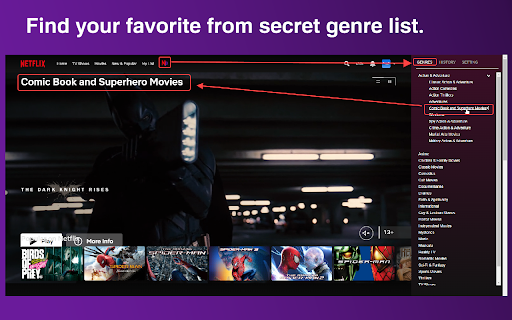
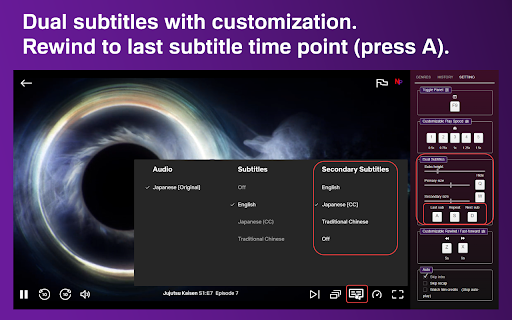

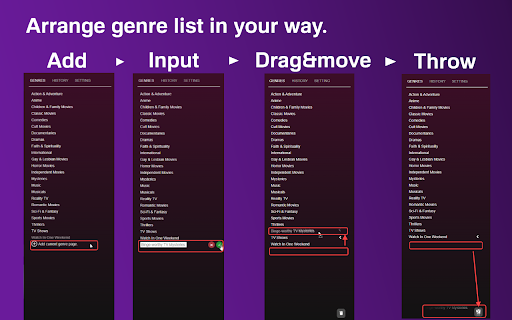
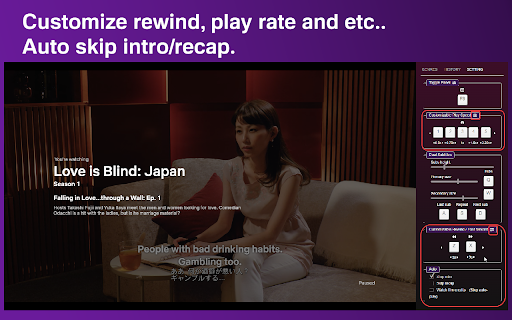
Netflix dual subtitles, favorite genres list, history, auto skip and etc... in best UI/UX Welcome to Netflix Pixie! Log: 2024-06-26 Fix dual subtitle. 2022-10-23 Fixing history function. 2022-08-29 Fixing Movie player page, icon no show bug. 2022-07-10 Fixing secondary subtitle adjustment & removed primary subtitle adjustment. 2022-06-19 Partially fixed secondary subtitle not showing bug. 2022-04-01 「Dual subtitles」 and「Jump to the last line」functions added. 🥳 Here are the basics: 🎥Customizable genre list - Go to a genre page and add it to the list. - Genre items are all draggable, arrange the list in your own way. - Drag items to the trash can if you want to delete them. 🧭 History List - Review the history to find the similar tag or genre you would like. - A quick look at the current progress. - An adjustable number of history items. 🎮Setting - Dual subtitles - Get a second subtitle (Just choose in the Netflix subtitle menu) - Jump back to the last line (in case you missed it 😉) - Adjustable font size. - Adjustable subtitles height. - Hotkeys - To toggle the Netflix Pixie panel. - To rewind/fast-forward in desirable secs. - To set play rate at a desirable speed. - Automation - Auto skip intro. - Auto skip recap. - Stop auto-playing(watch film credits). Feel free to Email us if you need more functions or you find an issue/bug: netflix.pixie.home@gmail.com Disclaimer: NETFLIX is a trademark of Netflix, Inc.. This extension and its developer are in no way affiliated with Netflix, Inc..

Subfilter for Netflix
Watch your favourite series on Netflix with filtered subtitles and improve foreign language at the same time. With Subfilter you can improve your listening skills. Support for more than 20 languages available on Netflix. If you watch series/movies with Subfilter every day you can feel results in 1-2 weeks. Changes in version 0.5.2 Fixed - Fix for recent changes in Netflix UI. - Migrated to Manifest v3 Changes in version 0.5.1 Fixed - Fix for recent changes in Netflix UI. Changes in version 0.5.0 Added: - Pressing Ctrl key or mouseover subtitles, will reveal hidden words - Introducing different modes of watching - Normal - default, typical comfortable watching - Pause (before) - Before every subtitle is video paused. Press 'Space' to continue watching. - Pause and reveal (after) - After every subtitle is video paused and hidden text is revealed. Press 'B' to repeat last subtitle. Press 'Space' to continue watching. - Pause, reveal, continue - After every subtitle is video paused, hidden text is revealed and video continue automatically. - Dialogs only - Watch only dialogs, skip else. Removed: - Download SRT button Changes in version 0.4.0 - Added filter for Chinese and Japanese - Added HARDCORE filter (for HARDCORE learners, or just for fun) - Added general reverse filter (still not sure about this one, but can be useful) - Added some useful commands accessible from JS console, e.g. subfilter.cmds.dump(), subfilter.cmds.words(), subfilter.cmds.grep(/word/i) - there might be UI in some later version) - Added tooltip when you hover subtitle contains unfiltered text - Improved recognition of punctuation (eg. handle correctly question mark in Arabic) - UI hiding delayed This extension is based on Subadub extension project of Russel Simmons. Wiki with instructions: https://github.com/met/subfilter/wiki Source code: https://github.com/met/subfilter License: MIT

Dual Subtitles for Netflix
Helps you learn languages using Netflix. Uses your browser's Auto-Translator to ensure direct translations. Recommended Method: 1. Turn on the subtitles for your Target Language 2. Right Click the page --> "Translate to [Native Language]" Alternate Method (If target language subtitles aren't available): 1.Turn on the subtitles in your Native Language 2. Right Click --> Translate to your Target Language (Note: Some shows in the following languages may use hardcoded subtitles which means the extension won't work: Arabic, Hebrew, Hindi, Japanese, Korean, Persian, Thai, Chinese, Vietnamese. However, Netflix seems to have updated them all so it should be fine, I just can't make any guarantees. If it is the case though, the alternate method will still work) You can click the extension icon at the top right to customize text color, size, and opacity. There's also an on/off button up there too. Don't forget to turn off Browser Translation as well when turning off the extension (or just refresh the page). Honestly, the Alternate Method is not ideal for me since the audio likely won't match the target language text. Other people have told me they still find it very useful though so you can decide for yourself. *The accuracy is determined by Google Translate, not me! * If you care, this is open source (the website link is the GitHub repo). I prefer to keep this a simple and unobtrusive extension but feel free to email me if you really think there's a feature I should add. Or you can just message me on Reddit at /u/DuhMeTreeUs

Netflix SubStyler : customize subtitles
Extension to customize captions and subtitles on Netflix. Change text size, font, color and add background. Wake up your inner artist and express your creativity by customizing Netflix subtitle style. Even though you usually don’t use movie captions, you may consider starting after checking out all the settings this extension has to offer. Now you’re able to: - Choose custom text color, - Adjust text size, - Add text outline and choose its color, - Add text background, choose its color and adjust the opacity - Choose font family Feeling artistic? Here’s another bonus: all the colors can be chosen either from a built-in color picker or by entering RGB value, creating almost endless style possibilities. Take the subtitle customization to the next level with Netflix SubStyler and let your imagination run wild!! Too many options? Worry not! Check out some basic settings, such as text size and background. All you need to do is add Netflix SubStyler extension to your browser, manage available options in the control panel and adjust subtitles to your own preferences. It’s as simple as that! Disclaimer : Netflix is a trademark of Netflix, Inc. This website & extension hold no association or affiliation with Netflix or any third-party companies.

NflxMultiSubs 2021 (Netflix Multi. Subtitles)
Bilingual Subtitles for Netflix (fixed) Best ever Chrome/Firefox extension to unleash bilingual subtitles on Netflix! This is a fixed and updated re-release of the original NflxMultiSubs. This version contains a fix for the 2021 Netflix redesign that broke the original, and has various other bugfixes and improvements. Click on the extension button to access the extension settings. Note: this extension will only show the subtitle languages that are available in your country. Features: - Enable secondary subtitles in the available languages (incl. image-based subtitles like Japanese, Chinese, Russian, …) - Smart selection on secondary subtitles. Choose between 3 subtitle activation modes: disabled; automatically match subtitle language to audio language; or remember the last selected language. - Seamless integration with native Netflix player UI -- switch languages in place - Adjust playback speed with a hotkey ( [ and ] ) - Free and open source! Report bugs by creating an issue on Github (https://github.com/gmertes/NflxMultiSubs) or send me an email (click "contact the publisher" on the right of this page). --------------------- Changelog: --------------------- v3.0.3: - Fix for new Netflix player v3.0.0: - Fix Chrome version with experimental manifest v3 support v2.3.5: - NEW: improved font size settings. This should make font size better adaptable to various monitor sizes and resolutions. - Fix a crash in the candidate subtitle server selection. v2.3.4: - NEW: Extra out of region languages can now be used as secondary subtitles. To do so, activate the wanted language as a primary subtitle first. The language will then show up in the secondary subtitle list ready to be used. After selecting the wanted language as secondary sub, the primary language can be switched back. For now you have to do this for every new playback. - Fix the subtitle color picker on Firefox - Fix key binds for the playback rate controller (now [ and ] for all keyboard layouts) v2.3.0: - Fix critical bug in subtitle builder - NEW: You can now change the color of text-based subs from the settings page. v2.2.10: - Fix primary sub scaling - Improve secondary sub scaling for 4K displays - Show vertical scrollbar when subtitle list overflows v2.2.3: - NEW: Add secondary language options (disabled, audio, last used) - Fix subtitles overlapping in certain cases - Fix image-based subtitle scaling - Fix image-based subs sometimes falling outside of top screen edge v2.2.2: - Improve subtitles activating on the first try without requiring a refresh v2.2.0 (first release): - Fix for the September 2021 Netflix redesign that broke the original extension
