
lapeaphgjllbegagnpgghnjdclidlanh


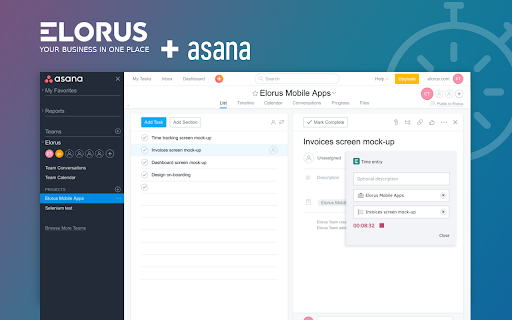
Use your browser to track time effortlessly and boost your productivity. Elorus will keep all of your timers synchronized; start tracking from the browser, the web or mobile apps and make real time updates via any platform. Our tracking reminder will make sure you never lose a minute's worth of work! Get your team on board and gain access to useful insights via the web application. All you need to get started is a forever free Elorus account. Start the Elorus timer directly from the tools you already use. Currently available integrations: - Asana - Jira - Trello ABOUT ELORUS Elorus is a super-easy online invoicing & time tracking software for freelancers and small business owners. ** Save hundreds of hours Automate daily processes like invoicing, tracking time & expenses. Get paid online and let Elorus follow up with your clients. ** Simplify the way you do business Send professional invoices within a few seconds. Let your clients access their own private portal; they will love it! ** Boost your productivity Keep track of your team's time in one place. Monitor your time data by projects, tasks, persons and get the most out of it!

YoCoBoard: An Online Time Tracker
Add YoCo to Chrome and track real time work hours and productivity right away. Take your clock everywhere you go! With YoCoBoard’s chrome extension, clock in and clock out of your project without leaving your favorite web page. Just sign in to your YoCoBoard profile once and you’re set. Whether you’re checking an important email or preparing a draft for your presentation, you’ll always be able to access your YoCoBoard no matter where you are. Pretty handy, right? It's just 3 steps away 1. Click on "Add to Chrome" 2. Login to YoCoBoard from the extension menu. 3. Start tracking YoCoBoard facilitates time tracking with just a click. Discover an online virtual time tracker that requires minimal effort from your end to start tracking time. YoCoBoard is the no-fuss app for your time tracking needs.The YoCoBoard web app promises you an incredible solution for your time tracking needs. The web app comes loaded with powerful features embedded in a user-friendly environment. *Track time with a click *Sleek reports *Confirm hours *Create adjustments If you have any problems or feedback regarding YoCoBoard chrome extension, write to us at support@yocoboard.com

Web Activity Time Tracker - Block Websites, Pomodoro & Web Analytics
Track time of your web activity, limit and block distracting websites. Monitor your web usage. Web Activity Time Tracker keeps track of how you spend time on the web and presents the stats in a useful and intuitive way. Take control of your online time! Tracking and limiting your use of any website helps you stay productive and focused. Stay focused and maximize your productivity. Whether you're managing work projects, studying for exams, or simply want to understand your browsing habits better, this tool is your go-to companion. Web Activity Time Tracker is a powerful Chrome extension designed to help you monitor and optimize your online productivity. Effortlessly track the time you spend on each website, set goals, and get detailed reports to boost efficiency and focus. With a sleek, user-friendly interface and real-time insights, this tool empowers you to make the most of your web browsing. You can set a daily visit limit for sites and block them after the expiration of the limit. Alternate work and rest times with Pomodoro Mode. ✅ Real-Time Tracking: Get instant insights into the time spent on each website you visit. ✅ Daily and Hourly Reports: Receive summary reports that highlight your browsing habits and patterns. Comparison of time by day. ✅ Limit and Block Distracting Websites: Set daily time limits for specific websites to help you stay focused. ✅ Usage Statistics: Effortlessly monitor the time you spend on different websites. ✅ Notifications for Websites and daily summary notification. Set goals and receive notifications to stay on track. ✅ Pomodoro Mode ✅ Track files in the browser, including .pdf, .png, .json and so on ✅ Export Data to CSV Web Activity Time Tracker helps you: 🍀 Stay focused 🧠 Understand how you use the internet 👀 Reduce distraction 🍅 Overcome web addiction ⏲️ Self-control 💯 Boost productivity 🚀 Increase your digital wellbeing 💪 Reduce wasted time This version introduces an OPTIONAL banner widget powered by Media IntelliView. When enabled by the publisher of a participating website, the extension may display a small contextual banner on that website's page. What is sent over the network when the widget is enabled: - The page origin (e.g. "https://example.com") — never the full URL or page content - A randomly generated per-install identifier (no personal data, no account, no login) - Banner display/click/dismiss event timestamps The widget is fully described in our prominent disclosure shown on install AND update (Welcome page), and you can disable it at any time in the Options page. Local time tracking and blocking features continue to work exactly as before — they do NOT depend on the widget. Take control of your online habits and make every minute count with Web Activity Time Tracker.

Clockify Time Tracker
Track time from anywhere on the web and improve productivity. Track time from anywhere on the web with one click. Later, analyze and export time at https://clockify.me/reports/summary • Integrates with 50+ web apps • Idle detection • Reminders • Pomodoro timer • Automatically start/stop timer • Start a timer from selected text • Start/stop timer shortcut (Ctrl+Shift+U) • Default project for new time entries Q: Why does the extension need access to "read and change all your data on the websites you visit"? A: We use the "Read and change all your data on the websites you visit" permission only for putting a timer button on other websites and taking the task's names as a description for the timer. If you don't wish to see the button on other websites, you can disable it in extension's Settings>Integrations. The code for this extension is open source. Feel free to examine it and contribute on Github: https://github.com/clockify/browser-extension For more information on how Clockify works, check out our help article https://clockify.me/help/apps/chrome-extension If you have any issues or feedback, send us an email at support@clockify.com Clockify is a time tracker that allows you to track the time you spend on projects and analyze your productivity. You can use Clockify on the web, desktop, and mobile – all your tracked data is synced in real time so you can seamlessly switch between devices. - Free and simple online timer - Analyze time in reports and export data - Invite team and track time together - Manage projects and monitor progress

Linkwise for Chrome
Discover new affiliate programs and generate deeplinks on the fly! A new, useful and user-friendly tool for all Linkwise affiliates. Linkwise for Chrome enables you to discover new affiliate programs by displaying a green badge whenever you visit a Linkwise advertiser website. By clicking on the Linkwise icon, you can view the program’s details and copy the affiliate deeplink for the page you are on. Get easy, one click access to every program’s essential information like name, short description and commissions and easily get and customize deeplinks with SubIDs.
