
lanknfgmjkocejapddeibabjpdenkpnn

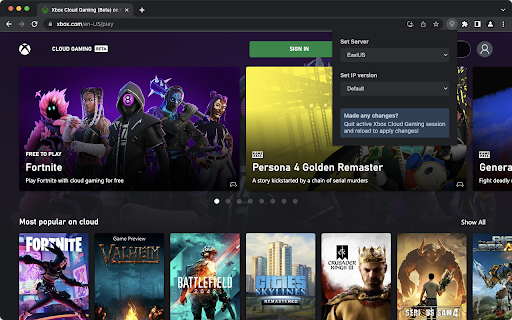
A browser extension to select the server region and IP version for Xbox Cloud Gaming Usage: Select the region and IP version as desired, then quit any active Xbox Cloud Gaming session and reload Xbox Cloud Gaming to apply the changes. Source Code: https://github.com/n-thumann/xbox-cloud-server-selector Disclaimer: This project is not affiliated with Xbox in any way. Microsoft and Xbox (name and logo) are trademarks of the Microsoft group of companies.

Geforce Now OS Switcher
This extension uses the declarativeNetRequest API to set the Nv-Device-Os to WINDOWS to bypass the Geforce Now OS checks.

Controller Visualizer
An extension that adds a visualization of controller input to the page. Adds an overlay to a website that visualizes controller input; helpful for screen sharing or recording when navigating with a controller. Tested with Xbox and PlayStation controllers, but should work with any standard gamepad.

Cloudpad
Cloudpad allows you to connect an iPhone (running the Cloudpad app) as a game controller on Stadia, GeforceNow and XCloud Use your phone as a tilt-to-steer controller for a more immersive gaming experience! Cloudpad leverages the motion sensors in your phone to give you an unprecedented level of control in racing video games on cloud gaming platforms. Forget the expensive racing wheels – with Cloudpad, you can feel like a real racer as you swipe, tilt and rotate your phone to control your driving style. Requires the Cloudpad iOS/iPad app installed on phone or iPad. Supports GeforceNow, XCloud and Amazon Luna.

EmuX - Virtual Xbox Controller For Cloud Gaming
EmuX emulates an Xbox controller for Xbox Cloud Gaming, letting you map keyboard and mouse inputs. 🕹️ EmuX – Virtual Xbox Controller for Xbox Cloud Gaming Play Xbox Cloud Games with your keyboard and mouse like never before. EmuX emulates a full Xbox controller directly in your browser, letting you map your keyboard and mouse inputs to virtual gamepad controls. - Full Virtual Xbox Controller: Seamlessly emulates a connected Xbox gamepad for any title on xbox.com/play - Customizable Key & Mouse Bindings: Easily map any key or mouse button to controller inputs (A, B, X, Y, triggers, sticks, and D-Pad). - Mouse Aim Mode: Turn your mouse into a right or left stick for smooth aiming or driving controls. - Profiles & Presets: Create, duplicate, and manage unlimited profiles — or choose from built-in presets for FPS, Racing, Platformer, and more. - Live Theme Customization: Personalize your UI with Xbox, dark, light, or custom themes, adjustable glass blur, and corner radius. - Cloud Storage Integration: Saves your mappings, themes, and preferences automatically across sessions. - Instant Toggle: Turn emulation on or off with one click. Update Log: v1.8 - Can now use scroll wheel to bind to controller buttons - Added support for 14 languages - Revamped the UI and added more animations v1.7: - Mouse aim fixed - Can now enable mouse aim with mouse buttons set to binds v1.4: View button now works
