
ffmekhedacncololhegkdhnbjoegceng


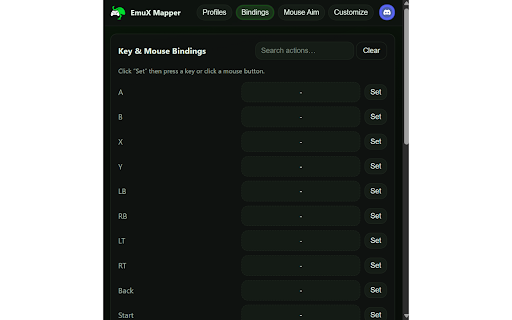

EmuX emulates an Xbox controller for Xbox Cloud Gaming, letting you map keyboard and mouse inputs. 🕹️ EmuX – Virtual Xbox Controller for Xbox Cloud Gaming Play Xbox Cloud Games with your keyboard and mouse like never before. EmuX emulates a full Xbox controller directly in your browser, letting you map your keyboard and mouse inputs to virtual gamepad controls. - Full Virtual Xbox Controller: Seamlessly emulates a connected Xbox gamepad for any title on xbox.com/play - Customizable Key & Mouse Bindings: Easily map any key or mouse button to controller inputs (A, B, X, Y, triggers, sticks, and D-Pad). - Mouse Aim Mode: Turn your mouse into a right or left stick for smooth aiming or driving controls. - Profiles & Presets: Create, duplicate, and manage unlimited profiles — or choose from built-in presets for FPS, Racing, Platformer, and more. - Live Theme Customization: Personalize your UI with Xbox, dark, light, or custom themes, adjustable glass blur, and corner radius. - Cloud Storage Integration: Saves your mappings, themes, and preferences automatically across sessions. - Instant Toggle: Turn emulation on or off with one click. Update Log: v1.8 - Can now use scroll wheel to bind to controller buttons - Added support for 14 languages - Revamped the UI and added more animations v1.7: - Mouse aim fixed - Can now enable mouse aim with mouse buttons set to binds v1.4: View button now works

GamePie - Gamepad to Keyboard Mapper from ProtoPie
Control ProtoPie prototypes in your browser by mapping gamepad inputs to keyboard keys. A New Way to Control Your ProtoPie Prototypes. GamePie is a powerful Chrome extension that allows you to use a gamepad controller to test your interactive prototypes in a web browser. It is built to help ProtoPie designers and developers create more engaging experiences by offering a new and efficient way to control your designs on the web. - A New Way to Test: Test your Pie files with a controller, offering a more dynamic interaction. - Streamline Your Workflow: Quickly map your controller's inputs to keyboard commands, saving you time and effort in the prototyping process. - Intuitive and Flexible: Use a pre-configured profile or create your own custom mapping in seconds. - Broad Compatibility: While engineered for ProtoPie, GamePie is a versatile tool that also works seamlessly with any browser-based game or web application that accepts keyboard input. - Cross-Device Support: Connect effortlessly with popular controllers like Xbox, PlayStation, and Nintendo Switch. - Beta Version: GamePie is currently released in a beta version to gather user feedback and improve future versions. Gamepad extension is only compatible with ProtoPie Cloud. It cannot be used in Studio or Player yet. - Optimized for ProtoPie: This extension is optimized for use with ProtoPie. While it may work in other browser-based environments, it is not designed as a general-purpose gamepad-to-keyboard mapper. - More Power with ProtoPie Connect: Advanced interactions, such as analog stick ranges and haptics, can be implemented with greater precision and control using ProtoPie Connect. Install GamePie today to add a new level of control and efficiency to your ProtoPie creations. ProtoPie is the most intuitive high-fidelity prototyping tool for designers to build realistic, interactive prototypes for any digital product.

Gamepad Tool
View Gamepad sticks, buttons, and history in real-time. Gamepad Tool is a real-time gamepad inspector designed for gamers, developers, and hardware testers. Instantly view your controller’s stick movement, button presses, pressure values, and input history — all inside a clean and responsive interface. Visual indicators for sticks and buttons Input history logging with clear-history option Perfect for debugging controller issues, verifying input behavior, or developing browser-based games that use the Gamepad API.

MapperJoy – Gamepad to keyboard mapper
Map your game controller buttons to keyboard/mouse. Just like Joy2Key but for your web browser. Transform your game controller into a keyboard and mouse for browser-based games and web applications! MapperJoy is a powerful Chrome extension that lets you map your gamepad inputs to keyboard and mouse actions, making browser gaming more accessible and enjoyable. Key Features: • Map any gamepad button to keyboard keys or mouse actions • Create and save custom mapping profiles • Real-time controller input visualization • Quick toggle to enable/disable mappings • Works with any browser game or web application • No background software required - runs directly in your browser • Secure and privacy-focused - all processing happens locally Perfect for: • Browser-based games that don't support controllers • Chromebook users who can't install traditional mapping software • Accessibility needs - customize controls to your preferences • Web applications that require keyboard/mouse input Pro Features: • Create unlimited mapping profiles • Sync profiles across devices • Copy and share profiles with others • Advanced mapping options Whether you're gaming on a Chromebook, need accessibility options, or just prefer using a controller, MapperJoy makes it easy to use your gamepad with any browser-based game or web application. Try it today and transform your gaming experience!

xCloudWheel — Racing Wheel for Xbox Cloud Gaming
Play Forza, F1 and every xCloud racing game with your Thrustmaster, Logitech or Fanatec wheel. One payment, forever. Use your racing wheel as an Xbox controller on xCloud.
