
langlhlcknngldkeliapahbhbcmlcbcj

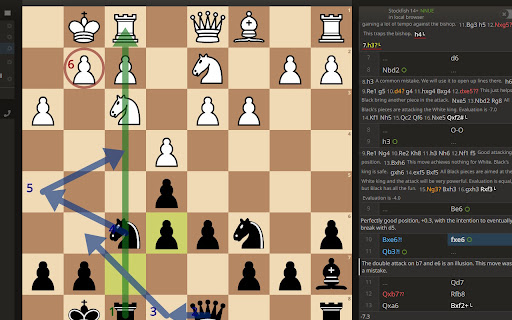
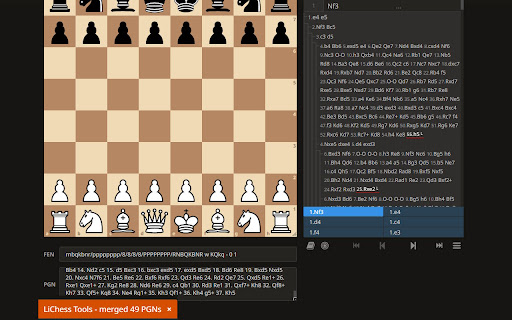
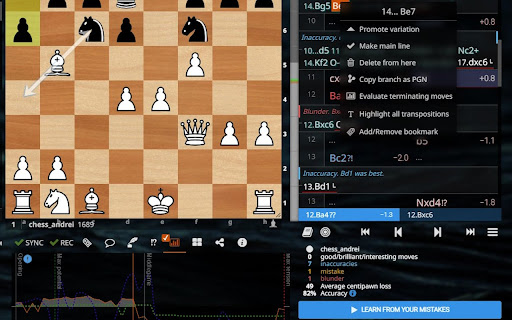

Turbocharge lichess.org with a ton of features This extension adds a lot of extra functionality to the https://lichess.org web site. - Extended Interactive Lessons allow you to play ALL variations - Explorer Practice allows you to play against the moves in Opening Explorer, essentially helping you train against any rating bracket on the Internet or a specific opponent - local computer analysis chart when no server one exists, even when not logged in - Enhanced PGN Import in Analysis board allows you to merge multiple PGNs into a single one (lichess limitations strip down the comments, but I am working on a solution). This helps you quickly collect a player's repertoire and maybe save it as a study Interactive Lesson, simulating their play. Then you can export the current analysis moves into separate lines as well, or just copy a single branch as a PGN. - See evaluation of possible moves of the selected piece in analysis - Automatic detection of interesting/brilliant/good/best moves - a PGN editor supporting a lot of operations and accepting tens of megabytes of text - Mobile device features (for browsers that support extensions on mobile, like Kiwi), including drawing arrows and circles on mobile, scroll/zoom lock while playing, etc. - Change the friends box into a menu or a button, live update Friends page, - Sound and voice notifications where players you follow start playing (with mutable option per player) - TV enhancements: Current games section for players you follow and streamers, menu to go to previously opened games, previous two games in player TV just like in category TV - Ctrl-right/left to play a random move from the available ones in the list. This also works for moves coming from transposing positions - Extra context menus for Analysis/Study move list. One allows you to copy the current branch as a PGN. Another will use add comments with the computer evaluation to the terminating moves in all branches - Show player country flags and game opening names - Custom piece sets, sound themes and board images There are many more. Here is a comprehensive list, in the order of implementation: - randomly play one of the next moves with Ctrl-RightArrow - configurable probability to play a move by putting prc: in the move comment, where number is a percentage between 1 and 100 - highlights for the last move of variations in the analysis/study board - also showing which of the last moves that have not ended in mate have no comment - highlights the transpositions to the current move in the analysis/study board - also an option to show all transpositions in the PGN - play multiple variations in Interactive lesson mode in the same chapter! (using the prc: notations if present) - automatically open/hide/convert to menu the Friends box at page load - sound alert when one of your friends starts playing a game (for various time controls) - changing the shortcut for playing the next best computer move from Space to Ctrl-Space - a minimum chess engine level (if it is idle in a lower state, it runs until it gets to that level) - sticky Interactive lesson Preview mode (remains in Preview when switching between chapters) - use keyboard shortcuts (i, m, b, Alt-i, Alt-m, Alt-b) for inaccuracies, mistakes and blunders in analysis - show player country flags next to their names (if they have their country specified in the profile) - import multiple PGNs in analysis mode and merge them into one - show the order of arrows and circles in analysis/study - add an item in the Watch menu to go to last watched game (and from there to the previously watched game and so on) - show opening name in TV game and mini games - opening explorer button to quickly switch between you and the selected user - show history section (last two games) for user TV - copy branches from analysis/study to clipboard - TV games have a link to the game in the title and can be bookmarked during the game - languages supported: English, Romanian - extension options in the Preferences menu in LiChess - next moves from transpositions are now available in the analysis move list - study move list context menu item to automatically go to the last move of every variation and add a comment with the computer evaluation - option to save preferences in incognito mode, too (you have to set it from Preferences first!) - buttons to change chapter names from the Event or Black/White PGN tags in the chapter edit form - custom styles for study comments - study chapter navigation controls (including random chapter) - auto save and button to reload PGNs in Analysis mode (recover from accidental reloads) - enhanced Friends list now shows live online status and TV links, plus allows the option to "mute" playing alerts for each player - hide score tally crosstable during play - select move from variations, computer list or explorer by pressing . (dot), Ctrl-. and Shift-. respectively, then a digit key - global enable/disable extension switch - for the currently selected chapter, the ability to selectively remove just the comments, glyphs or drawn shapes - mobile device settings (use Kiwi browser on mobiles, it allows extensions) - custom user CSS themes (you can create PRs for them or ask me to include them, but you are maintaining them!) - delete all PGN tags in bulk or pick individual ones from the current chapter - practice with Explorer (computer makes moves based on what masters, lichess or a specific player played in that position) - additional glyphs on board - drawing of arrows and circles on mobile (for analysis, study, games, puzzles, TV) - collapsable preference categories - extra computer analysis metrics on charts and eval gauge - the many preferences now can be filtered by advanced or basic and the categories can be collapsed - a friends tab in the Current Games section, to see just the games of the people you follow - a menu entry to go directly to the last visited study - notification on unread timeline posts and comments from the blogs, forums or people you follow - showing evaluation on Explorer moves from local computer analysis/lichess/chessdb/winning stats - scroll lock on mobiles while playing - finding interesting moves and allowing cycling through interesting/good/brilliant moves just like with blunders - quiet mode on all tabs and manual button for setting quiet mode - explorer gambits shows which move to make to play a gambit - persist last study settings when creating new studies - button to create chapter after the selected one - PGN textarea in studies, similar to Analysis - Move list options: indented variations shows all variations as tree branches, not inline - Move list options: bookmarks allows tagging variations with a label, collapse/expand them, link to them, split chapter by them, open another window with just the analysis tools (move list, explorer, computer eval) - Option to not see cloud values in computer evaluation - Context menu on bookmarked positions to get the URL of the position - Move list options: Expanded move list and Hide left side in Analysis - a streamers tab in the Current Games section, to see just the games of streamers - search Wiki in analysis by position, not move order - practice with whatever computer engine you selected, ignoring cloud and with your specific custom engine level - TV options: - show history section (last two games) for user TV - TV games have a link to the game in the title and can be bookmarked during the game - a friends tab in the Current Games section, to see just the games of the people you follow - a streamers tab in the Current Games section, to see just the games of streamers - show pawn structures in analysis, TV games and mini-games - save different Explorer settings and toggle between them - click on Explorer sum row to get a random move, weighted on move probabilities - custom mini-game size - play again from where you entered Preview mode in Interactive Lessons and collapsible Interactive Lesson chapter controls - use Stockfish on Brave browser - learn from your mistakes in Study chapters - pin studies and broadcasts to home page - community forum - PGN editor (merge, split, normalize, count, search) - play lag chart - freeze board in analysis - download all studies of a player - larger coordinates, outside coordinates in Analysis - Profile date interval label and detailed Puzzle statistics tab - #readgame URL to read games in analysis/study - restore position in the move list in study chapters on page refresh - move assistant shows evaluation on selected piece destinations - warning when playing against a suspicious opponent (disconnect rate) - better board image export - board editor mirror position button - more decimals in computer eval - unselect piece after a few seconds - study flairs - hide/show lobby page elements - Explorer resize - Custom sound options (just disable move sounds, keep the rest) - Back to current position in correspondence - Hide chat during play - Broadcast OBS support - Hide header shortcut - Next move behavior for variations (like Chessbase) - Save blog while editing it - Option to switch to Analysis when your game ends - Screen not locking when watching TV - Active tab icon - Fast interactive lesson moves - Paste images in chat/forum - URL/image detection and unlimited text size in the team/study chat - one click moves (in Analysis/Study) - show common teams of you and your opponent - expand variations that are collapsed by default - popup video support in studies - team chat message notifications - daily chess quote - copy puzzle PGN - game list options: filters, selection, open directly in analysis - link to current Analysis board - show player rating deviation - game custom time alerts - persist last blog view - puzzle timer - show puzzle total points per session - extra piece sets - a followers page - quick actions: flip board, request server analysis, chat emojis, toggle comment reading - started puzzle history - bot list filters - color computer engine evaluations - read move comments aloud - reorder variations - study subchapters - quick report and block option - position info context menu - local evaluation persistent cache - bulk delete of imported games - K-MAPS analysis of the position - show latest games in challenge menu - custom chat buttons when playing - estimate rating based on game accuracy - bulk removal of imported games - show latest 5 challenges when no active ones - random challenge button - improved best move arrow - evaluate all branch moves - highlight next moves in Explorer - Ctrl-C to copy current position - extra lobby counters - sortable and expandable study topics - Bulk edit study chapter PGN tags - Quick LiChess Tools toggle in the user menu - Auto whisper and prepend move buttons in game chat - Find position in puzzles (and puzzles from your games) - Download local engine analysis - commands! type /help to get a list URLs: - extension page: https://siderite.dev/LiChessTools/ - GitHub page: https://github.com/Siderite/lichessTools I am taking suggestions for other features, bug reports, styling help or any other kind. Please rate, review and spread the word!

Archetyped: Know You & Your Lichess Opponents
Actionable info and tendencies about you and your Lichess Opponents at game time (e.g., performance, game results, speed, and more) Archetyped takes your chess game to the next level by showing key info about you and your opponent—right next to usernames, in the form of emojis—while you play. Why does that matter? Knowing if someone’s crushing it or on a losing streak can change how you approach the game. Think of it like bringing the advantages of game prep to online chess. 🔑 Why you need Archetyped 🔑 1. Get the scoop on yourself and your opponents at a glance —Win/loss streaks, recent rating swings, usual game speed, and how often they play. Knowing your opponent’s tendencies means you're not going in blind. 2. See Archetypes when they matter — These are more than just emojis. They’re a quick read on who you're facing, giving you insight in real-time so you can adapt your strategy. 3. Visualize all your data and insights in a clean dashboard at www.archetyped.lol — Easily track your performance trends, uncover hidden patterns in your gameplay, and see where you (and your opponents) excel or struggle. These insights give you a clear roadmap to improve your strategy and outsmart your competition. 🌟 The Archetypes 🌟 "Trending" = They’re either on fire or in a slump—playing 100+ points better or worse than their usual level over the last 10 games. "In Flow" = Winning a lot or losing a lot—this one shows if they’re on a streak (good or bad). "Wild Card" = They’re unpredictable—taking down players they shouldn’t, or dropping games they should’ve won. Expect surprises. "Devoted" = They play way more chess than most people. The grind never stops for them. "Speed" = They’ve got a favorite mode—Bullet, Blitz, or Rapid. You’ll know if they live in the fast lane. We’ve just launched a full website where you can log in with your Lichess account and get all the detailed insights across all games and archetypes. This isn’t just what you see in-game; you can dive deep into your chess profile across games. 1) See the full breakdown—all your archetypes, stats, and patterns. Track how your style evolves over time, and figure out where you can improve. 2) Get a better read on opponents—not just in one game but across all games. Know who you’re up against and how you're likely to play before you even play 1. e4. 3) If you’re serious about understanding your game (or your opponent’s), creating an account is a no-brainer. There’s free and paid tiers for those who want advanced filter options / more stats — but that’s up to you.

Lichess2Chess
Adds Chess.com rating estimates to Lichess.org. While playing a game, or when visiting any profile, you will be able to see an estimate of what their Chess.com rating would be. This allows you to have a more accurate picture of someone's FIDE rating, and what their strength would be on Chess.com.

Lichess Opponent Form
This extension shows live performance, legend and last 8 games of your lichess.org game opponents. This extension shows live performance, legend and last 8 games of your lichess.org game opponent. The information is presented in the current Chrome tab without any time and effort-consuming redirections. Small popup window will present average performance and a list of recent games of your opponent, including their opponents' names and ratings, pieces colors, game results and the rating changes. The information is clickable and navigates to the recent games and players' profiles. * May be useful to make a preliminary opinion about your opponent's strength and current form in fast blitz games. * Helps to recognize and avoid users with inadequate chess rating. * Is handy to look into the current situation and events in Arena tournaments, look for winning series. * Entertains with useful statistics while waiting for the opponent's move.

Lichess enhancement
New styles of pieces and boards for Lichess NEW AMOGUS PIECES ! With this extension you will be able to play chess on Lichess with more than 35 styles for chess pieces and more than 20 styles for boards. The extension works on the whole site whether you watch a game or play a game. The extension also works for variants.
