
kpjfeffjdlhdafohanbfpjjbmgjpaohp
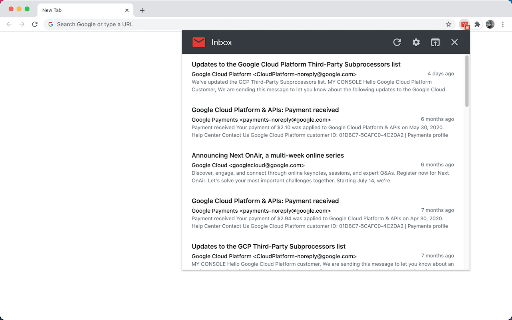

Get notifications and quick look your new Gmail messages. This is a high-performance and easy-to-use Gmail checking tool. It can check the latest emails, send out notifications, view email content and perform some common operations. It also has rich settings to meet the subtle differences in needs between different users. In short, it is not a fully functional Gmail client, but it can help you quickly complete some routine email processing tasks. This extension is implemented using the official Gmail API and only needs to be authorized through OAuth, no any website permission requirements. Some Features: • This extension only checks unread messages in the Gmail inbox, and you can set to check only or notify only specific categories of messages. • The main list can display up to 1000 messages, and the loading speed is very fast. • Supported operations include: mark as read, archive, delete, open Gmail, mark as spam, etc. • Support system notification and voice notification. • Support do not disturb function (no notification will be sent under certain conditions). • The function page can be set to be displayed in the popup page or in a new tab page. • Support archive and mark as read one-click completion. • Support setting whether to display labels, snippets, etc. • Support complete keyboard shortcuts (can be used without a mouse). Notes: 1. Currently only Chrome browser is supported, and other Chromium-based browsers are not supported. 2. Multi-account simultaneous use is not supported at this time. Privacy This extension does not collect ANY information from you, and no tracking code. Your data is transferred only between your browser and the Google (Gmail) server, some data is cached in your browser locally, no data sent to any third party.

Email Notifier
A lite notifier that works with Gmail™, Yahoo, Live, iCloud, and more. Email Notifier is an extension that gives you easy access to a few famous email providers (such as Gmail, iCloud, Live Mail, etc.), plus you get badge notifications. Before using the extension, please log in to each email service once to enable the badge notifications. To add or remove an email service, please open the options page and choose desired services (at the top). Moreover, you can re-arrange email tiles within the toolbar popup. Badge color is also adjustable via the settings page. To report bugs, please visit the addon's homepage and fill out the bug report form (https://mybrowseraddon.com/email-notifier.html).

Simple Gmail Screen
Simplify Gmail screen, make the sidebar and top bar auto-hide. This extension simply hides the top menu bar and left sidebar of Gmail. The hidden menus could then be re-activated via moving your mouse cursor to the edge of screen. Website: https://www.bart.com.hk/simple-gmail-screen/ Open sourced under GPL v3: https://github.com/bartsolutions/simple-gmail-screen == Update 2022-07-08 (v0.10.1) == - Added option for bar hidden delay == update 2020-11-23 (v0.5.1) == - fix problem for side bar menu collapse

Entrar for Gmail™
Entrar for Gmail™, a gmail entrar extension, is a shortcut to open gmail and login gmail. Entrar for Gmail™, a gmail entrar extension, is a shortcut to open gmail and login gmail. Entrar for Gmail™, a gmail entrar extension provides a shortcut to login www.gmail.com directly and change mailto href link behavior. How to Use the extension: ● First,when the user wants "login gmail", click the extension icon; ● Second,Entrar for Gmail™ will open a new tab and login gmail without manual operation; ● Third,You can quickly reply to emails with gmail; It should be noted that If you signed in gmail, the extension will open gmail inbox directly. The features of the extension are as follows: ● This gmail entrar extension can help users log in gmail more quickly and more easily; ● If users click a normal email href link, the browser will open an email application to handle it. But this gmail entrar extension can help users to open Gmail in a new browser tab to handle it; Vision for current extension development: ● Help users make better use of emails, such as gmail or other emails; ● Integrate more shortcut operations to help users improve work efficiency and leave more time for other things; ● Users can get in touch with us to provide feedback, and we will greatly respect the opinions of users; RECENT UPDATES: [Stay tuned for more interesting features] Disclaimer : gmail is a trademark of Google Inc, registered in the U.S. and other countries. This extension is made by an independent development team, and it is not related in any way to the Google Inc.

Gmail app badge notification
Show badge notifications in the taskbar when using Gmail as an app 1. Install the extension 2. Add Gmail as an app. You can do so by following this guide: https://support.google.com/chrome_webstore/answer/3060053?hl=en - make sure to select the option "open as a window". 3. Open the newly installed app.
