
kphobmidlmfbdljcjhljfbjodkjfnldd
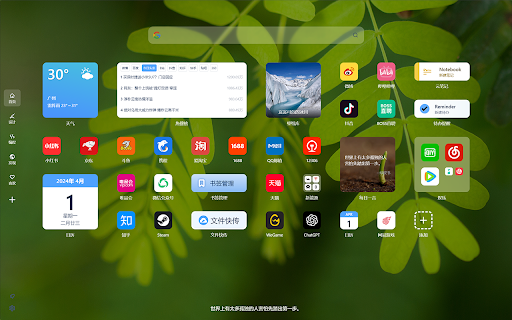
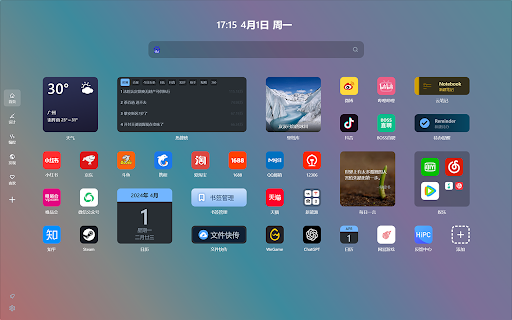
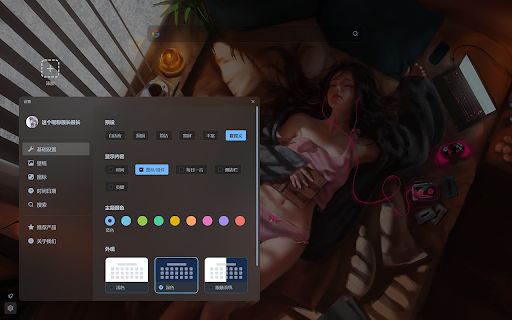
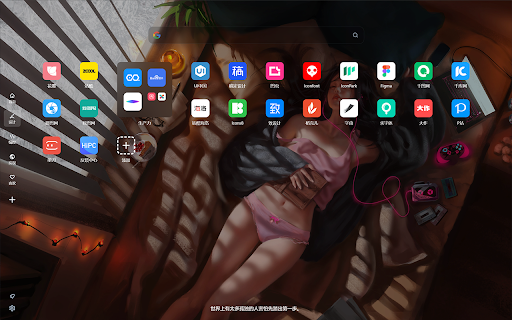
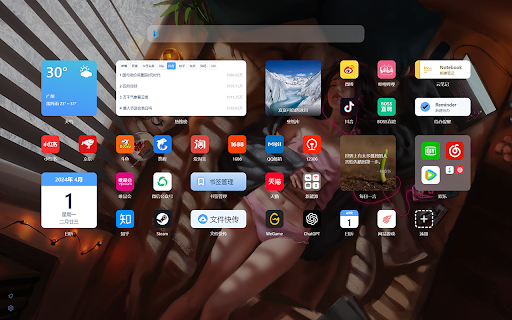
一款集才华与颜值于一身的浏览器新标签页,让你每一次访问互联网都从美好开始。 一款真真正正集才华与颜值于一身的浏览器新标签页扩展,让你每一次访问互联网都从美好开始。 由HiPC团队出品的轻快好看的浏览器新标签页扩展,前瞻性的Win12式UI交互设计,支持每日高清壁纸、搜索整合、网址图标管理、趣味小组件、文件快传、时钟日历天气展示等。 功能简介: * 设计——前瞻性Win12式UI交互 * 简单——页面支持自适应,支持深色与浅色自动切换 * 易用——免注册免密码,扫码即可开启使用 * 页面——图标与小组件可自由拖动,自由排列 * 搜索整合——随意切换各大主流搜索引擎,让简单的事事半功倍 * 网址整理——分页分文件夹,高效整理大量书签 * 高清图标——在PC也可以获得如平板上的视觉体验 * 小组件——丰富的娱乐与效率小组件 * 云书签——简单高效地查看与管理浏览器书签 * 个性化——纯色壁纸、动态壁纸、4K高清图库,每日为你呈现,且能同步HiPC上收藏的壁纸 * 时间与日期——年月日、时分秒、星期农历和节气均可高度自定义 * 日历——新历农历节气假日放假安排等均支持查询 * 生日——每个人的存在都无比特别,值得被记住与庆祝 * 纪念日——重要的日子,当然要记住啦,而且还支持提醒 * 倒数日——特别的日子倒数工具,让你更好的规则工作 * 侧边栏——自由创建分页,支持简洁显示与自动隐藏 * 热搜榜——聚合微博抖音百度知悉等热门平台热点 * 股票——让你关注的市场更被关注 * 电子木鱼——带计数功能的数字木鱼,声音疗愈,静心养性 * 云笔记——PC或手机均可记,让记录成为一种习惯 * 待办提醒——PC上创建待办手机上提醒,确保每项任务按时完成 * 今年余额 —— 自动倒数每年剩余天数,支持新历与农历 * 文件快传——拖拽文件即可上传,多端查看且不限速 * 远程开机 —— 支持控制HiPC远程开机卡 * 云同步——一个账号,微信扫码即开启多端多设备同步 * 小程序——移动端由微信小程序提供服务,体验十分出色 * 预设模式——多种模式、大屏小屏,都好好看 隐私政策: https://www.haipc.cn/privacy.html 帮助与反馈: 微信:hipcNO1 邮箱:hipccn@126.com 官网:www.haipc.cn

iHomepage: Minimalist Browser New Tab Page & Free
Redefine your browser's "New Tab" as a powerful, minimalist, highly customizable personal homepage iHomepage is a powerful browser new tab and homepage customization tool that helps you build a "beautiful + practical + efficient" all-in-one workspace. One page covers all your browsing and productivity needs, with sync across desktop, mobile, and tablet — your personalized homepage stays consistent on every device. Highly personalized customization Freely adjust layout and content to build a homepage that fits your habits perfectly. Rich and practical widgets Built-in tools including weather, calendar, clock, calculator, site bookmarks, reading list, RSS, and translation — all in one page. One-step site navigation Aggregates popular sites across AI, tools, entertainment, community and more, saving you time hunting for the right link. Multiple search engine support Comes with a selection of mainstream search engines for one-click switching, plus support for adding any custom search engine. Efficient keyboard shortcuts Press number keys 1–9 to switch pages instantly. Press letter keys A–Z to launch frequently used sites or apps in a single keystroke — productivity to the max. Beautiful wallpaper library A massive collection of high-quality wallpapers, continuously updated, to make your homepage as good-looking as it is useful. Seamless cross-platform experience Sync across desktop, mobile, and tablet for a consistent experience anytime, anywhere. iPhone / iPad: Search for "iHomepage Browser" in the App Store Web version: https://web.ihomepage.me Official website: https://ihomepage.me

Awesome New Tab Page
Enhance your New Tab Page with ultimate customizability and power. Awesome, like you. [ANTP] Awesome New Tab Page transforms your Chrome new tab into a personalized dashboard with apps, shortcuts, and widgets you'll actually use. Features: - Interactive widgets that display real-time information - Fully customizable layout - add, remove, and resize tiles - Create personalized shortcuts to your favorite sites - Direct search from shortcuts - Flexible resizing for apps and widgets Awesome New Tab Page is a privacy-oriented extension. It does not track your browsing activity or sell it or in any way share it with third parties. Awesome New Tab Page is 100% ad free and completely customizable. Current Widgets: - Weather - xkcd Comic - Cryptocurrency Price Trackers (BTC, XRP, ETH) - More crypto widgets coming soon with enhanced features! Have suggestions? Contact us at hi@antp.co How to Use: 1. Unlock the grid with the padlock icon 2. Open the widgets drawer and drag a widget out onto the grid 3. Customize to your heart's content 4. Lock the grid when finished FAQ Q: How can I add my own links and images? A: Unlock the grid, then click on an empty tile. This will create a custom shortcut and open the tile editor, allowing you to start customizing. Q: Can I remove tiles from my dashboard? A: Yes! Unlock the grid, click the "X" on any tile, then lock again to use your dashboard. Q: Can I change the background image or color? A: Yes! Click the settings icon and use the color picker to select any background color. Q: How do I go back to the default Chrome new tab page? A: Uninstall the extension through Chrome's extension management. Thanks for trying it, and please share any feedback you have! It would mean a lot if you would like and share on Bluesky: https://bsky.app/profile/antp.co Use License: Permission granted for personal, non-commercial use only. This license prohibits: - Modifying or copying materials - Commercial use or public display - Reverse engineering - Removing copyright notices - Redistributing materials Disclaimer: Awesome New Tab Page is provided "as is." Awesome HQ, LLC makes no warranties regarding merchantability, fitness for purpose, or non-infringement of rights. We do not guarantee accuracy, results, or reliability of materials within Awesome New Tab Page. Widgets may display content from third-party sources including weather services, cryptocurrency data providers, and other external sources. Awesome HQ, LLC is not responsible for the accuracy, content, or availability of these third-party services. User-created shortcuts, bookmarks, and custom content are the sole responsibility of the user who created them.

Search Selection with Bookmarks
New tab page of web search and bookmarks. Can customize search site by user. Changes to new tab page of web search and bookmarks. Can customize search site by user. ■ Features - Search ・Many search sites Google, Yahoo!, Wikipedia, YouTube and Amazon, can be added by the user further. ・Add and modify search site ・Individual settings of the search site ・Search words of memory and history ・Display of the Home page ・Display of the search results page ■ Features - Bookmarks ・List of bookmark ・Open all in the folder ・Open link action can choose current , new tab form background. ・Internal display with cursor ・Display of history ・Display of Most visited (Different Chrome original) ・Change the number of columns ・Change font size ・Open the bookmark manager (menu of right-click on folder link) ・Suggest box (Test pilot version) ■ For use in each country. Software is English only. However, by changing the search site at options,it is available in each country. Changes will vary from country to country and site. Other examples are listed on the support site.

TabX - Minimalist New Tab
Improve your web browsing experience with TabX, a beautiful, customizable and lightweight new tab. Enhance your browsing with TabX, a fast, elegant, and privacy-focused new tab page inspired by Apple’s design. 🚀 Features: ✅ 🏞 Dynamic 4K Backgrounds – Fresh Unsplash images daily ✅ 🔎 Search Bar – Works with any search engine ✅ 🕰 Analog Clock – Multiple customizable styles ✅ 🌤 Weather & 🌐 Random Quotes – Stay updated & inspired ✅ 🔗 Quick Links & 📝 Custom Fonts – Personalize your homepage ✅ 🌘 Dark Mode & 🧑💻 Custom CSS – Tailor it to your style ✅ 🔒 Privacy First – No accounts, no tracking, open-source Minimal, beautiful, and built for productivity. Try TabX today! 🚀
