
kphdbcjcdhecefloameedhhldchhbela


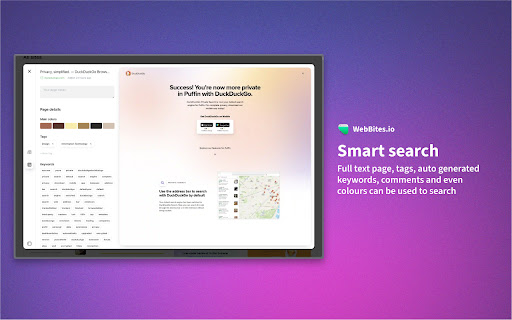
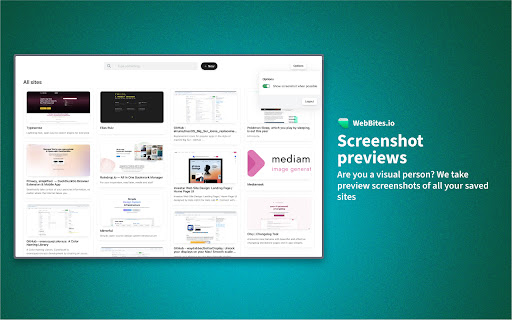
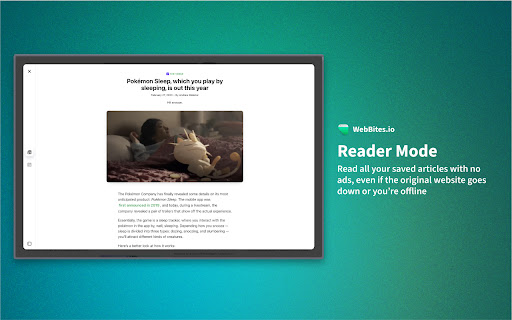
All your bookmarks, organized with AI. Save, organise and find all your bookmarks with the help of AI. 💻 Page previews Get a preview screenshot of all websites you save. 📺 Adapts to your content The web is diverse, so why should all sites be treated the same? WebBites knows what type of content you're saving and adapts to it. 📰 Reader Mode Remove all the clutter and ads with reader mode, saving your saved sites as text. 📸 Full-page screenshots Take a full-page screenshot of all websites you save, forever accessible, even if the page is taken down. 📝 Page annotations Annotate anything you want directly on the website’s screenshot. 📟 Auto-generated metadata Each page you save is automatically categorised into tags, keywords and colours to help you organise your digital life. 🔎 Smart search Full-text page search, tags, auto-generated keywords, comments, and even colours can be used to search.

tabOS - Tab management, ChatGPT 4o, Docs/Images, RSS/YouTube/Reddit feeds
Enhance your New tab/Sidebar - Manage tabs, ChatGPT prompted chats, RSS/YouTube/Reddit feeds, write documents and save images. Meet tabOS - An operating system (sort of! 😇) for your browser. Add it with one click to gain a powerful new tab where you can manage your tabs and tab groups. Try it for free. Stop jumping from tab to tab, from tool to tool, losing your focus and time in the process. Declutter your browser by saving tabs not used at the moment, effortlessly create relevant tab groups, take notes anywhere, save images, and get answers from your library of AI helpers. Lay out everything on the same page to save time and discover new insights from your data. Stay on top of the news by creating and subscribing to RSS feeds, all inside your new tab. 🧑🏭 Assemble your custom-prompted AI helpers in a new tab, and then use them side-by-side with your web apps via the side panel view. Add powerful documents and note-taking capabilities anywhere. Integrate next-level, intuitive, and familiar tab and tab group management. Combined, these elements forge the comprehensive ecosystem of tabOS. 👌 Drag and drop to save and close your tabs and tab groups. Create and rearrange groups and organize them all in easy-to-use and familiar grid, column, list, and tree views. Additional features include discarding tabs, searching your library, and picking up where you left off, all within the new tab. ⭢ Tab Management: Easily handle your tabs with options to open, close, and manage them effortlessly. ⭢ Tab Groups: Organize your tabs into visually distinct groups for improved focus and organization. ⭢ Tab Folders: Further categorize your tab groups into folders for streamlined navigation. ⭢ Discard Tabs: Free up resources by discarding tabs without losing track of them. ⭢ Pin Tabs: Keep important tabs always accessible by pinning them to the browser window. ⭢ Move Tabs: Reorder and move tabs between windows and groups with a simple drag-and-drop. ⭢ Windows Management: Manage multiple cloud desktops to enhance multitasking and reduce context-switching. Bookmarks Integration: Seamless integration with your bookmarks for quick access and management. ⭢ Documents: Create and edit documents directly in your browser. ⭢ Notes: Take quick notes, save ideas, and manage to-do lists dynamically. ⭢ Markdown Support: Write and format using Markdown for clear, structured documents. ⭢ To-Do Lists: Organize tasks effectively with customizable to-do lists. ⭢ Bullet Point Lists: Make concise lists for easy readability and organization. ⭢ Code Snippets: Store and manage code blocks with syntax highlighting. ⭢ Highlight Colors: Visually prioritize information with color-coded highlights. ⭢ Images: Insert and manage images within your documents and notes. ⭢ Cloud Drive: Integrate seamlessly with your cloud storage for anywhere access to files. ⭢ AI Chats: Engage with AI-driven chat for help and queries. Custom Prompted Assistants: Tailor AI prompts to your specific workflow needs. ⭢ Vision AI: Utilize AI for image recognition and contextual actions. ⭢ ChatGPT 3.5 & 4.0 & Turbo: Choose from a range of AI versions, including the most advanced, for a personalized experience. ⭢ Global search: Powerful search across your entire workspace, including tabs, bookmarks, and cloud files. ⭢ Search open tabs: Quickly find and jump to the content within your currently open tabs. ⭢ Fuzzy search: Smart search technology that finds what you need, even with partial or misspelled queries. ⭢ Share data: Share tabs, documents, and notes easily with others. ⭢ Shared folders: Collaborate with team members using shared cloud folders. ⭢ Shared documents: Work on documents simultaneously for real-time collaboration. ⭢ Live collaboration: Interact and collaborate in live sessions with colleagues and friends. ⭢ New Tab view: A fresh perspective every time you open a new tab, with the option to pick up where you left off. ⭢ Sidepanel view: Multi-task with ease by using tabOS next to your web apps. ⭢ Web app: Access all your data from anywhere via our fully featured web app ⇨ Free Plan: Get started with the core functionalities without any cost.. Try out with an anonymous account. ⇨ Pro Plan & AI Plus Plan: Scale up as needed with extra cloud storage and AI sorting capabilities. ⇨ Automatic Daily Backups: Ensure all your data is secure and up-to-date with daily automatic backups.

PlutoAI - AI Bookmarks and Tabs Manager
AI bookmarking assistant that enables you to instantly save, highlight, annotate, retrieve web content Simplify your tabs and bookmarks with PlutoAI, your personalized AI bookmark manager. Organize, manage, and access your saved content from the web effortlessly. Say goodbye to endless scrolling and hello to streamlined bookmarking with PlutoAI. Manage browser tabs and sessions - Save and resume browser sessions with one-click picking up precisely where you left off. Smart Tags and Categories - Automatically categorize and tag your saved bookmarks by topic, theme, or key elements to never lose an article again. Full-text and Filter search - Find anything and everything using text, tags, and filters. Learn in under 30 seconds - Get AI-powered content summaries and TLDRs for quick learning. Content tailor-made for you - Enjoy personalized content recommendations that 100% match your interests and preferences. Smart alerts | Zero distractions - Receive reminders to finish reading or watching incomplete articles/videos to help you stay on track. Whether you’ve never saved an article before, you’ve saved stuff but forgotten about it, or have a hard time sorting your bookmarks — Pluto AI helps you get organized and keeps you going. Pluto AI fuels your curiosity - by helping you save, manage, and retrieve content, all in one place - no matter what you’re interested in, we’ve got you covered! From AI summaries to personalized recommendations of content that matters the most to you, Pluto AI is here to help you become your most organized and productive self!

SaveDay - AI Bookmark Manager
AI knowledge assistant helps you instantly save, highlight web content, annotate and retrieve them SaveDay is an AI knowledge manager extension. With SaveDay, you can bookmark much more than web links and articles, organize them to make it easy to read them later and find them whenever you need. Features: ★ Content saving: Save content in any format (web links, images, videos, photos, podcasts, audio...) easily while keeping your content confidential ★ Reminder for saved content: Set reminders for your saved content, ensuring you stay on top of your reading list and never miss out on valuable information ★ Web highlighter and Quoteshots: Easily highlight any web page, social post, and share it with beautiful templates ★ Annotation: Add sticky notes on any place in a webpage, add highlight notes to your highlighted contents and timestamp notes for moments in video ★ Intuitive search: Search by keyword or by the way you think, in any language, for contextual information retrieval ★ Sidebar: Access all your notes, including highlights, AI notes, sticky notes, and highlight notes, in the sidebar. ★ Free to use Tips: Use the SaveDay side menu to automatically store the content you've selected, get sticky notes, get key points, and access collections. Here's how to turn it on: In the menu bar: Step 1: Click on the SaveDay icon in the top right corner of your browser (ensure it's pinned first) Step 2: In the ""Settings"" section, switch on the ""SaveDay side menu"" Step 3: The SaveDay side menu will be turned on and visible In the Settings page: Step 1: In the Preferences section, navigate to the ""Side menu"" category Step 2: Click on the ""Deleted"" icon to remove the website you previously turned off. Now, you can use the SaveDay side menu as usual Alternatively, click to switch on the button for the ""Side menu,"" turning it on for all websites until you decide to turn it off Use the Highlight button to easily and quickly highlight, annotate and create quoteshots: In the SaveDay Menu: Step 1: Click the SaveDay icon in the top right of your browser (ensure it's pinned) Step 2: In the ""Settings"" section, switch on the ""Highlight button"". The highlight feature will be turned on, ready for use In the Settings Page: Step 1: In the Preferences section, choose the ""Highlight button"" category Step 2: Type the website URL for which you want to turn on the highlight button. Click the ""Delete"" icon next to the website if it was previously turned off Alternatively, switch on the button for the ""Highlight button"" to turn it on permanently for all websites Use the SaveDay sidebar to access all your contents: Step 1: Click on the SaveDay icon in the top right corner of your browser (ensure it's pinned first) or click on the SaveDay side menu Step 2: Choose ""This content's note""

FavBox
FavBox is a local-first experimental browser extension that enhances and simplifies bookmark management without cloud storage or third-party services. It extends your browser's native bookmarking features. 🔄 Syncs with your browser profile 🔒 No third‑party data sharing, no ads, no tracking 🎨 Minimalist, clean interface 🏷️ Supports tags 🔍 Advanced search, sorting, and filtering by tags, domains, folders, and keywords 🌁 Multiple display modes 🌗 Light and dark themes 🗑️ Automatically detects broken and duplicate bookmarks ⌨️ Hotkeys for instant search access 🗒️ Supports local notes ❤️ Free and open source
