
gmfaoihlkhopieoibopcponemocgbloj

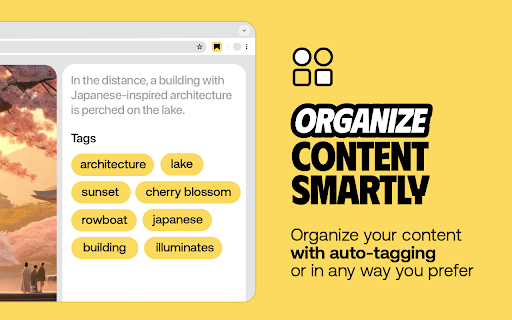
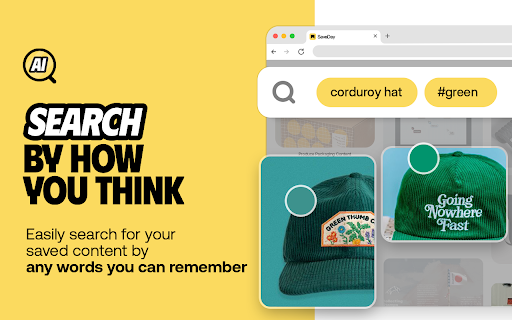
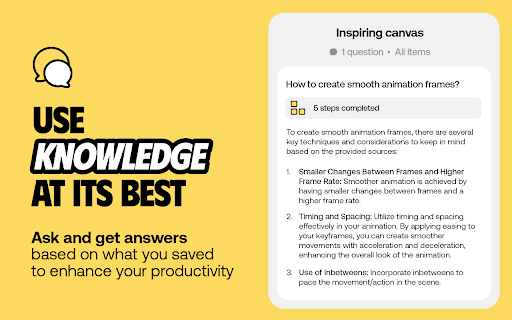
AI knowledge assistant helps you instantly save, highlight web content, annotate and retrieve them SaveDay is an AI knowledge manager extension. With SaveDay, you can bookmark much more than web links and articles, organize them to make it easy to read them later and find them whenever you need. Features: ★ Content saving: Save content in any format (web links, images, videos, photos, podcasts, audio...) easily while keeping your content confidential ★ Reminder for saved content: Set reminders for your saved content, ensuring you stay on top of your reading list and never miss out on valuable information ★ Web highlighter and Quoteshots: Easily highlight any web page, social post, and share it with beautiful templates ★ Annotation: Add sticky notes on any place in a webpage, add highlight notes to your highlighted contents and timestamp notes for moments in video ★ Intuitive search: Search by keyword or by the way you think, in any language, for contextual information retrieval ★ Sidebar: Access all your notes, including highlights, AI notes, sticky notes, and highlight notes, in the sidebar. ★ Free to use Tips: Use the SaveDay side menu to automatically store the content you've selected, get sticky notes, get key points, and access collections. Here's how to turn it on: In the menu bar: Step 1: Click on the SaveDay icon in the top right corner of your browser (ensure it's pinned first) Step 2: In the ""Settings"" section, switch on the ""SaveDay side menu"" Step 3: The SaveDay side menu will be turned on and visible In the Settings page: Step 1: In the Preferences section, navigate to the ""Side menu"" category Step 2: Click on the ""Deleted"" icon to remove the website you previously turned off. Now, you can use the SaveDay side menu as usual Alternatively, click to switch on the button for the ""Side menu,"" turning it on for all websites until you decide to turn it off Use the Highlight button to easily and quickly highlight, annotate and create quoteshots: In the SaveDay Menu: Step 1: Click the SaveDay icon in the top right of your browser (ensure it's pinned) Step 2: In the ""Settings"" section, switch on the ""Highlight button"". The highlight feature will be turned on, ready for use In the Settings Page: Step 1: In the Preferences section, choose the ""Highlight button"" category Step 2: Type the website URL for which you want to turn on the highlight button. Click the ""Delete"" icon next to the website if it was previously turned off Alternatively, switch on the button for the ""Highlight button"" to turn it on permanently for all websites Use the SaveDay sidebar to access all your contents: Step 1: Click on the SaveDay icon in the top right corner of your browser (ensure it's pinned first) or click on the SaveDay side menu Step 2: Choose ""This content's note""

PlutoAI - AI Bookmarks and Tabs Manager
AI bookmarking assistant that enables you to instantly save, highlight, annotate, retrieve web content Simplify your tabs and bookmarks with PlutoAI, your personalized AI bookmark manager. Organize, manage, and access your saved content from the web effortlessly. Say goodbye to endless scrolling and hello to streamlined bookmarking with PlutoAI. Manage browser tabs and sessions - Save and resume browser sessions with one-click picking up precisely where you left off. Smart Tags and Categories - Automatically categorize and tag your saved bookmarks by topic, theme, or key elements to never lose an article again. Full-text and Filter search - Find anything and everything using text, tags, and filters. Learn in under 30 seconds - Get AI-powered content summaries and TLDRs for quick learning. Content tailor-made for you - Enjoy personalized content recommendations that 100% match your interests and preferences. Smart alerts | Zero distractions - Receive reminders to finish reading or watching incomplete articles/videos to help you stay on track. Whether you’ve never saved an article before, you’ve saved stuff but forgotten about it, or have a hard time sorting your bookmarks — Pluto AI helps you get organized and keeps you going. Pluto AI fuels your curiosity - by helping you save, manage, and retrieve content, all in one place - no matter what you’re interested in, we’ve got you covered! From AI summaries to personalized recommendations of content that matters the most to you, Pluto AI is here to help you become your most organized and productive self!

Marqly – The Ultimate Bookmark & Tab Manager
Marqly – The Ultimate Bookmark & Tab Manager Supercharge your browser with Marqly – a powerful, privacy-first bookmark manager and highlighter that now helps you reduce tab clutter and save up to 95% memory. Effortlessly save links, highlight text, organize bookmarks, and now collapse all your open tabs into a clean, restorable list — all in one sleek extension. 🔹 Why Marqly? Tired of messy bookmarks and tab chaos? Marqly makes it incredibly easy to: 📌 Save and organize bookmarks with tags and boards 📝 Highlight and save text snippets from any webpage 🗂 Create nested collections and custom boards 🔍 Use advanced search & filters to find anything fast 🧠 Restore memory and reduce CPU usage with OneTab-style tab saving 🚀 What You Can Do with Marqly - Save and edit websites effortlessly - Add bookmarks to customizable boards - Tag your links for powerful filtering - Search by URL, content, date, or type - Collapse all open tabs into a single list, saving up to 95% of memory - Restore tabs individually or all at once - Sync across devices securely 🆕 Latest Features 🔥 All-new Tab Saver to eliminate clutter and save memory ✨ Fresh new UI and responsive mobile layout ⭐️ Highlighted texts now auto-organized into quick-access boards 🧮 Enhanced filters and viewing controls 💡 Full-screen website preview 🖱 Drag-and-drop board reordering 💾 Nested collections 🔒 Privacy First Your data stays with you. Marqly never transmits your bookmarks, tabs, or highlights to anyone. Your tab lists are private — shared only if you choose to. Marqly is the only tool you need to take control of your web browsing — save smarter, organize better, and browse faster. ➡️ Try Marqly now and simplify your digital life.

Markwise - Save, Organize & Find Anything Online
Save anything from the web—links and videos with timestamps—and find it instantly with AI. Your searchable knowledge base. Stop losing your bookmarks and ideas in a sea of open tabs. Markwise is your AI-powered second brain that helps you save, organize, and find anything on the web instantly. Markwise transforms your browser into a powerful knowledge base. Whether you're researching a project, saving tutorials, or curating resources, Markwise keeps everything organized and instantly accessible. 🧠 AI-POWERED ORGANIZATION Forget about manual tagging. Markwise uses advanced AI to automatically categorize and summarize every link you save. Your knowledge base stays organized effortlessly, so you can focus on reading and learning, not managing files. 🎥 YOUTUBE MOMENTS & TIMESTAMPS Never lose a key insight from a video again. With Markwise, you can snap timestamps on any YouTube video while you watch. Create a personal library of video highlights and jump back to the exact moment you need with a single click. Perfect for tutorials, lectures, and podcasts. ⚡ BRAINBAR COMMAND PALETTE (Cmd/Ctrl + Shift + K) Speed up your workflow with the BrainBar. Access your entire knowledge base from any tab. Search for saved pages, create new notes, or organize your spaces without ever touching your mouse. It’s the fastest way to navigate your digital memory. 🔍 SEMANTIC SEARCH & RECALL Find what you need, even if you forget the title. Markwise’s semantic search understands concepts and ideas. Searching for "coding tips for beginners" will find that article about "React Best Practices" you saved months ago. It feels like magic. 📂 SMART SPACES FOR PROJECTS Group your bookmarks, videos, and notes into dedicated Spaces. Keep all your research for a specific project, client, or hobby in one focused view. Switch contexts instantly without losing your flow. 📝 HIGHLIGHTS & SMART NOTES Don’t just save links—save insights. Highlight important text on any webpage and it automatically syncs to your Markwise dashboard. Add quick notes to give context to your bookmarks, linking your thoughts directly to the source. 🚀 PRIVACY & SECURITY FIRST Your knowledge is personal. Markwise is built with privacy at its core. Your data is encrypted, secure, and never sold to third parties. Only you have access to your second brain. Toggle Brain Bar: Cmd/Ctrl + Shift + K Save Focus Session: Alt + Shift + S Join thousands of users who are reclaiming their browsing history and building a smarter digital life with Markwise. Install Markwise today and turn your browser into a superpower.

Bookmark, AI Tagging, Cache & Screenshot | PageOrg
Organize, ai tagging bookmarks. Cache page offline. Take, edit screenshots. Team collaboration. 1. Bookmark Management: Import bookmarks and search by text, tags, domain, or URL. 2. Browsing History Search: Import browsing history and search by text, date range, domain, or URL. 3. Easy Bookmark Organization: Edit titles inline, bulk-apply and drag & drop tags, and leverage AI-driven auto-tagging for efficient organization. 4. Offline Page Caching: Cache pages locally for offline access with an option to auto-cache bookmarked pages. All data is stored locally to ensure privacy. 5. Screenshot Capture & Editing: Capture, annotate, and download screenshots easily, or upload to share via a unique link. 6. Cross-Device Sync & Collaboration: Sync data across devices and collaborate on bookmarks with friends and colleagues for seamless teamwork. Introduction: Page Org – the ultimate Chrome extension for seamlessly managing bookmarks, browsing history, and more across devices, with powerful collaboration tools for teams. Cache pages for offline access, capture and annotate screenshots. Organize, search, cache and share content—all with productivity-focused features designed to streamline your workflow. With Page Org, elevate your browsing experience through tools that let you: ✔️ Efficiently Manage Bookmarks & Browsing History : Import bookmarks and history, then find what you need quickly by searching through keywords, tags, domains, URLs, or date ranges. Advanced Tagging & Editing: Edit titles inline, bulk-apply and drag & drop tags, and let AI-powered auto-tagging organize your collection faster than ever. ✔️ Offline Page Caching: Cache any page for offline access, with options to auto-cache bookmarked pages—all stored locally for your privacy. ✔️ Enhanced Screenshot Capture & Editing: Capture, annotate, and edit screenshots on any page. Save locally or upload to share through a unique link. ✔️ Cross-Device Sync & Collaboration: Download our app for mobile, sync data across devices, and create channels to collaboratively manage bookmarks and tags with friends or colleagues for efficient teamwork. Our Help Center offers step-by-step guidance and tips for maximizing productivity. Say goodbye to cluttered bookmarks and disorganized browsing history. Experience streamlined browsing with Page Org, your partner in efficient online organization.
