
kpbdaaemjmcpnacfkdjiohoifagldhml

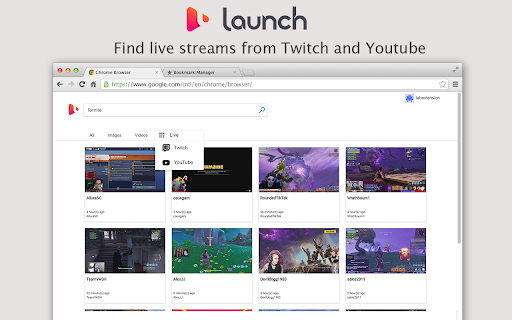

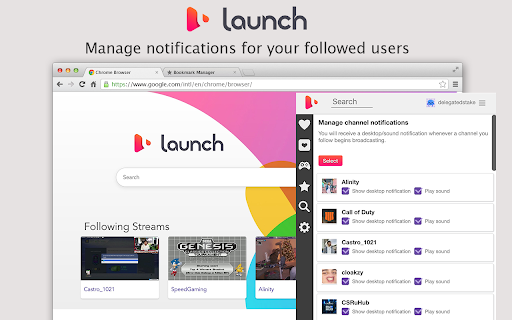
Find new games and live streams on Twitch. Get automatic notifications when your favorite stream goes online. Find your favorite game streams with Launch! Launch is the new live stream search engine that automatically keeps track of your favorite streams. Our Chrome extension lets you view all your followed streams right in the browser and keeps you notified automatically when your favorite stream goes online. Never miss your favorite stream again! Required permissions: 'Display Notifications' - this permission allows us to send you a notification when your followed stream goes online 'Set your new tab to Launch.am' - this permission is needed for the “New Tab”page so you can find your followed streams and search for new ones. Privacy: Your privacy matters. Here's how we protect it: https://launch.am/privacy ** Current version of the extension supports Twitch. YouTube support coming soon and available on the search engine.

Twitch Lurker
Always support your favorite streamer by automatically pulling up their stream when they go live. Support your favorite Twitch streamers by automatically lurking in their stream when they go live. Twitch Lurker allows you to build a list of favorites based on who you follow and open up muted tabs of their stream as soon as they go live. IMPORTANT: You must have tabs already open with the Twitch player running in order for you to count as a viewer in their viewer count. If the extension loads a new tab with a stream, it won't count you as a viewer until you open the tab and load the player yourself. How to use the extension: 1) Download/Install from the store or sideload it in your browser 2) Login with OAuth so we can pull your follow list (don't worry, we don't collect any of your info) 3) Click the stars next to channels in your following list to mark them as Favorites 4) Order your Favorites list to your liking (the higher in the list, the higher their priority over other Favorites) 5) Open two tabs with live streams 6) You are now supporting your favorite content creators and gaining free channel points! If you would like to support this extension feel free to hit the "buy me a coffee" button in the extension or drop me Twitch Prime sub @ twitch.tv/ErianasVow . It'd help me a lot and all proceeds go to further development of the extension! If you'd like to view or contribute to the source code: https://github.com/mikeyaworski/Twitch-Lurker

Twitch Live Chime
Get notified when your favorite Twitch streamers go live with auto-launch capability. Real-time notifications and auto-launch to never miss a stream.

Twitch Live Extension
A browser extension that lists your live followed streamers and sends notifications when they start a new stream To start using it, open it, log in with your Twitch account so that the extension has access only to your public information and your follows, and, every time you click on the extension icon, you will see the streamers that you follow that are live. This extension supports *Just Went Live* notifications. If you want to enable them, open the extension, go to *Settings* and enable the Just Went Live notifications. There's also a button to log out from your Twitch account. Special thanks to everyone that helped test this extension: https://github.com/PedroS11/twitch-live-extension#contribution

Twitch Notification(Now Streaming Notifier)
Get instant notifications when your favorite twitch streamers come online! Get instant notifications when your favorite twitch streamers come online! Twitch Notification is a Chrome extension that will greatly improve the way to manage your favorite now streamers. In addition to having all live streamers in one place, you will enter your favorite Twitch streams with one click! Features: - Get notification whenever a streamer you follow starts live - access to your favorite streamers quickly - Enable or disable notifications How to use: 1. Click “Add to Chrome” and install Twitch Notification 2.log in with your account(extension has access only "your follow") 3. Click the extension icon, you can watch the live streamers that you follow 4. In addition, you can get instant notifications when your favorite streamers come online 5. Have fun! Q&A Why do I need Twitch account authorization? We need to capture the information of the streamers you follow at all times, so we need your account authorization. Please rest assured that we will not obtain any other information from the account. Where do I get the streamer's go-live notification? You can receive his online notification in your chrome browser, just click the notification window, and you can jump directly to the live page If you like it, recommend it to others and give a nice review. It really helps.
